
Kia Seltos: Features of your vehicle
Contents:
- Keys
- Remote keyless entry
- Smart key
- Immobilizer system
- Digital Key 2 Touch
- Theft-alarm system
- Door locks
- Rear Occupant Alert (ROA) system
- Integrated Memory System
- Liftgate
- Power liftgate
- Smart liftgate
- Windows
- Hood
- Fuel filler door
- Sunroof
- Steering wheel
- Mirrors
- Instrument cluster
- LCD display
- Warning and indicator lights
- Infotainment system vehicle settings
- Head-Up Display (HUD)
- Lighting
- Wipers and washers
- Interior lights
- Defroster
- Climate control system
- Manual climate control system
- Automatic climate control system
- Windshield defrosting and defogging
- Scheduled Ventilation Control
- Storage compartments
- Luggage board
- Increase cargo space
- Interior features
- Exterior features
- Infotainment system
- Declaration of Conformity
Keys
Record your key number

The key code number is stamped on the key code tag attached to the key set. If you lose your keys, this number helps an authorized Kia dealer duplicate the keys more easily. Remove the key code tag from the key ring and store it in a safe place.
Record the key code number and keep it in a safe and convenient location, but do not store it inside the Kia Seltos. Keeping the code separate from the vehicle helps protect against unauthorized key duplication if the vehicle or key set is lost.

WARNING
Aftermarket keys
Use only genuine Kia parts for the ignition key in your Kia Seltos. If an aftermarket key is used, the ignition switch may not return properly to the ON position after START. This can cause the starter to continue operating, which may lead to overheating, excessive current in the wiring, or a possible fire.
Key operations
Folding key
To unfold the folding key for the Kia Seltos, press the release button. The key blade will open automatically.
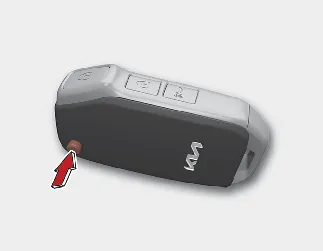
To fold the key, press and hold the release button, then fold the key blade manually back into the key body.

CAUTION
Key button operation
Do not fold the key without pressing the release button. Forcing the key blade closed may damage the folding key mechanism.
Smart key
To remove the mechanical key from the Kia Seltos smart key, press and hold the release button (1), then pull out the mechanical key (2).
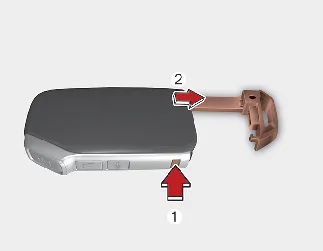
To reinstall the mechanical key, insert it into the opening and push it in until a click is heard. This confirms that the mechanical key is locked securely in place.

WARNING
Ignition key
Never leave the keys inside your Kia Seltos with unsupervised children. Leaving children unattended in a vehicle with a manual ignition key or smart key is extremely dangerous.
Children may imitate adults and place the key in the ignition switch or press the start button. They could operate power windows, adjust controls, unlock doors, or even cause the vehicle to move, which may result in serious injury or death.
Remote keyless entry ➤
Smart key ➤
Immobilizer system ➤
Digital Key 2 Touch ➤
Theft-alarm system ➤
Door locks ➤
Rear Occupant Alert (ROA) system
The Kia Seltos Rear Occupant Alert system is provided to help remind the driver to check the rear seat before leaving the vehicle.
The ROA system is especially useful after a rear door has been opened and closed before driving, as it can remind the driver that a passenger or belongings may still be in the rear seat area.
-
When you open the front door after opening and closing a rear door and turning off the engine, the "Check rear seat for passengers and belongings" warning message appears on the cluster.
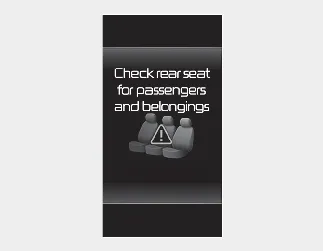
You can activate or deactivate the ROA system from the User Settings mode in the cluster LCD display.
The option can be found under the following menu:
-
Press the MODE button (
 ) several times on the steering wheel until the 'User Settings' menu appears on the LCD.
 -
Select 'Convenience → Rear Occupant Alert' with the MOVE switch (
 /
/  ) and the OK button on the steering wheel.
If your Kia Seltos is equipped with the infotainment system, the option can be found under the following menu:
-
Press the SETUP button on the infotainment system.
-
Select 'Vehicle → Convenience → Rear Occupant Alert' on the infotainment system screen.

NOTICE
The infotainment system may change after software updates. For the latest menu names, screen layout, and detailed instructions, refer to the user’s manual provided in the Kia Seltos infotainment system and the quick reference guide.

WARNING
The ROA system does not detect objects or people in the rear seat. Instead, it uses rear door open and close history to remind the driver that something or someone may be in the rear seat. Always check the rear seat directly before leaving the Kia Seltos.

CAUTION
-
The ROA system uses a rear door open and close history.
-
The history is reset after the driver turns off the ignition normally, exits the vehicle, and locks the door remotely using the remote keyless entry system. Because of this, the ROA warning may appear even if the rear door is not opened again.
-
For example, after the ROA system warning appears, if the driver does not lock the door and then drives again, the alert may appear again.

WARNING
The door lock system may not operate if the electrical system is compromised. For safety, teach child passengers how to open the Kia Seltos doors manually before an emergency occurs. This can help them respond properly if an emergency situation arises.
Integrated Memory System ➤
Liftgate ➤
Power liftgate ➤
Smart liftgate ➤
Windows ➤
Hood ➤
Fuel filler door ➤
Sunroof ➤
Steering wheel ➤
Mirrors ➤
Instrument cluster ➤
LCD display ➤
Warning and indicator lights ➤
Infotainment system vehicle settings ➤
Head-Up Display (HUD) ➤
Lighting ➤
Wipers and washers ➤
Interior lights ➤
Defroster ➤
Climate control system ➤
Manual climate control system
The Kia Seltos manual climate control system uses heating, cooling, air distribution, and fan speed adjustment to help maintain a comfortable environment inside the vehicle. With the manual controls, the driver can directly set airflow direction, cabin temperature, and air intake mode.
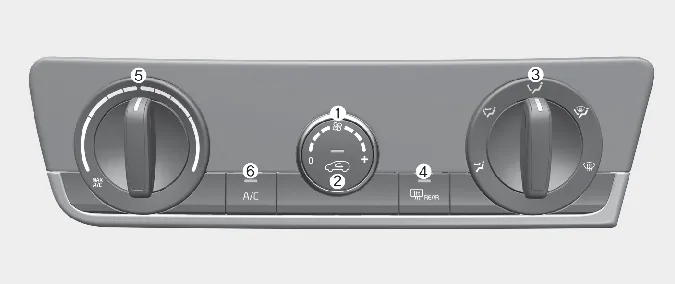
-
Fan speed control knob
-
Air intake control button
-
Mode selection knob
-
Rear window defroster
-
Temperature control knob
-
Air conditioning (A/C) button

CAUTION
Operating the blower when the ignition switch is in the OFF position may discharge the battery. Use the blower while the engine is running whenever possible.
Mode selection
The mode selection controls determine the direction of airflow through the Kia Seltos ventilation system.
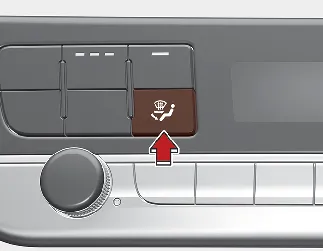
Air can be directed toward the floor, dashboard outlets, windshield, or a combination of these areas. Five symbols are used to represent Face, Bi-Level, Floor, Floor-Defrost, and Defrost air positions.
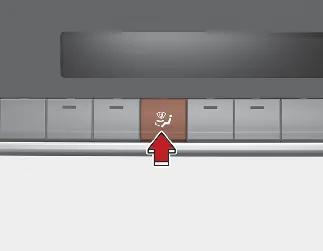
Face-Level (B, D, F)
Airflow is directed toward the upper body and face. Each outlet can also be adjusted to direct the discharged air more precisely.

Bi-Level (B, C, D, E, F)
Airflow is directed toward both the face and the floor, helping provide balanced comfort inside the Kia Seltos cabin.
 Floor-Level (A, C, D, E, F)
Most of the airflow is directed to the floor, with a small amount of air directed to the windshield, side window defrosters, and side air vents.
 Floor/Defrost-Level (A, C, D, E, F)
Most of the airflow is directed to the floor and windshield, with a small amount directed to the side window defrosters and side air vents.
 Defrost-Level (A, D)
Most of the airflow is directed to the windshield, with a small amount of air directed to the side window defrosters and side air vents.
Instrument panel vents

You can adjust the direction of air delivered from these vents using the vent control lever, as shown in the illustration. Adjusting the vents properly helps improve comfort for the driver and passengers.
Automatic climate control system ➤
Windshield defrosting and defogging ➤
Scheduled Ventilation Control ➤
Storage compartments ➤
Luggage board
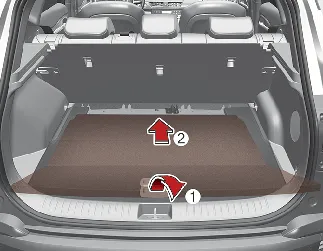
You can store a reflector triangle, small emergency items, or other suitable accessories under the Kia Seltos luggage board. This hidden storage area helps keep the cargo space neat while keeping useful items available when needed.
-
Grasp the handle on the top of the cover and lift it upward.
-
Fold the rear part of the luggage board forward.
-
Lift the luggage board forward until it stands by itself.
Increase cargo space
If you want to increase the cargo space in the Kia Seltos, adjust the luggage board to a lower position as follows:
-
Grasp the handle on the top of the cover and lift it.
-
Fold the rear part of the luggage board forward.
-
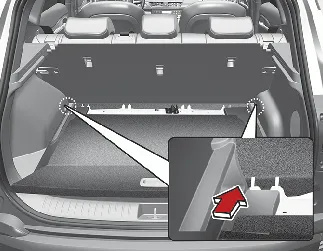
Pull the luggage board hinge to the end of the sliding slot. The luggage board will move lower to help increase cargo space.
-
Slide the luggage board forward as shown in the illustration.
Interior features ➤
Exterior features ➤
Infotainment system ➤
Declaration of Conformity ➤
 Why didn't my air bag go off in a collision? (Inflation and non-inflation conditions of the air bag)

Other information:
Kia Seltos SP2 (2021-2026) Owner's Manual: Air bag - advanced Supplemental Restraint System
* The actual air bags and their locations in your Kia Seltos may differ from the illustration depending on model, trim, and equipment. Driver's front air bag Passenger's front air bag Side air bag Curtain air bag Even in vehicles equipped with air bags, the driver and all passengers must always wear the safety belts provided.Kia Seltos SP2 (2021-2026) Owner's Manual: Vehicle Stability Management (VSM) system
The Vehicle Stability Management (VSM) system in the Kia Seltos provides additional support for vehicle stability and steering response under certain driving conditions. VSM may assist in the following situations: When driving on a slippery road surface. When the system detects a difference in traction between the left and right wheels.