
Kia Seltos: Features of your vehicle / Interior features
Contents:
- Air ventilation seat
- Sun visor
- USB charger
- Power outlet
- Wireless smart phone charging system
- This device complies with part 15 of the FCC Rules
- Coat hook
- Floor mat anchor(s)
- Cargo area cover
The Kia Seltos includes various interior features designed to improve comfort and convenience for the driver and passengers during everyday use.
Air ventilation seat
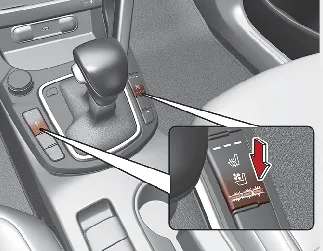
Front seat
The seat ventilation setting changes according to the switch position. This feature helps move air through the seat cushion for added comfort in warm weather.
-
To ventilate the seat cushion, press the switch.
Each time the switch is pressed, the airflow level changes as follows:
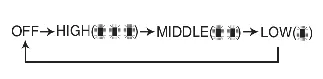
The seat warmer with air ventilation returns to the OFF position whenever the ENGINE START/STOP button is turned on.

NOTICE
This function is designed to automatically change the seat temperature setting from High to Low to help maintain comfort inside the Kia Seltos when the engine is stopped by the ISG (Idle Stop and Go) system.

CAUTION
Seat damage
-
When cleaning the seats, do not use organic solvents such as paint thinner, benzene, alcohol, or gasoline. These substances may damage the air ventilation seat.
-
Do not place heavy or sharp objects on the seat, as they may damage the ventilation components inside the seat cushion.
-
Be careful not to spill liquids such as water or beverages on the seat. If liquid is spilled, wipe the seat with a dry towel and allow it to dry completely before using the air ventilation seat again.
Sun visor
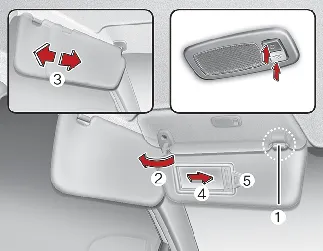
Use the Kia Seltos sun visor to block direct sunlight coming through the front windshield or side windows.
-
To use the sun visor, pull it downward.
-
To block sunlight from the side window, pull the sun visor downward, unsnap it from the bracket (1), and swing it to the side (2). Slide the sun visor if additional coverage is needed (3).
-
To use the vanity mirror, pull down the visor and slide the mirror cover (4).
The ticket holder (5) is provided for holding a tollgate ticket or a similar small card.

WARNING
For your safety, do not block your view of the road, mirrors, or traffic signals when using the sun visor.

NOTICE
Do not place several tickets or cards in the ticket holder at the same time. Overloading the holder may damage it.
USB charger
The Kia Seltos USB charger allows you to charge digital devices such as smartphones, tablets, and other compatible portable electronics. Connect the charging cable to the USB port, and charging will begin when the operating conditions are met.
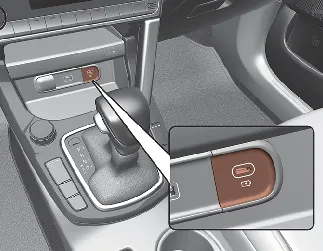
Front
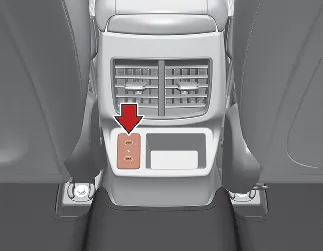
Rear
The USB charger in the Kia Seltos is available when ACC is on or when the ignition is on. For stable charging and to help prevent battery discharge, connect digital devices while the engine is running. Check the device screen to confirm charging status and completion.
A smartphone or tablet may become warm while charging. This is usually normal and does not affect the service life or basic function of the device. Charging may stop automatically if the device battery becomes too hot. Some digital devices may not charge properly, or may require a dedicated adapter, if their charging method is not compatible with the vehicle USB charger.

CAUTION
-
Use the USB charger with the ignition on. If used for a long time while the vehicle is off, the Kia Seltos battery may discharge.
-
Use the official USB cable supplied or recommended by the manufacturer of the digital device being charged.
-
Make sure foreign objects, drinks, or water do not contact the USB charger. Moisture or debris can damage the USB port.
-
Do not connect an electrical device that generates excessive electromagnetic noise to the USB port. Doing so may cause noise or interruptions in audio, AV, or other electronic systems.
-
If the charger is connected incorrectly, it may seriously damage the connected device. Damage caused by incorrect use is not covered by the vehicle warranty.
Power outlet
The Kia Seltos power outlet is designed to supply power to mobile phones and other electrical accessories made for use with vehicle electrical systems.
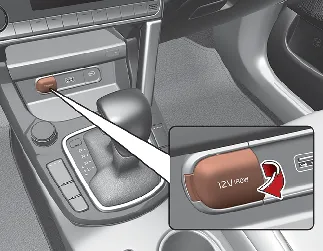
Type A
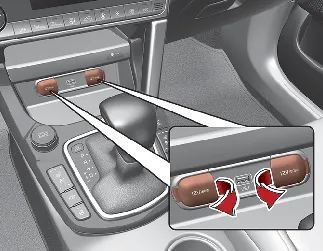
Type B
The connected devices should draw less than 15 amps while the vehicle is on.
-
Use the power outlet only when the Kia Seltos is on, and remove the accessory plug after use. Using an accessory plug for a long time while the vehicle is off may discharge the battery.
-
Use only 12 V electrical accessories with a capacity of less than 15 A.
-
Set the air conditioner or heater to the lowest level when using the power outlet to reduce electrical load.
-
Close the outlet cover when the power outlet is not in use.
-
Some electronic devices may cause interference when plugged into the vehicle power outlet. This can create excessive audio static or affect other electronic systems in the Kia Seltos.
-
Push the plug fully into the outlet. If the plug is not inserted properly, it may overheat and the fuse may open.
-
For electronic devices equipped with batteries, connect only devices that have reverse current protection. Current from the device battery may flow into the vehicle electrical system and cause a malfunction.

WARNING
Electric shock
Do not put a finger or a foreign object, such as a pen, into the power outlet, and do not touch the outlet with wet hands. Doing so may cause electric shock.

CAUTION
Do not connect another vehicle's Tire Mobility Kit (TMK) to the Kia Seltos power outlet or battery terminal. A mismatch between the vehicle power outlet and the TMK power requirements may cause fire, circuit damage, or damage to the Tire Mobility Kit.
Wireless smart phone charging system
The Kia Seltos wireless smart phone charging system is located in front of the center console. If equipped, this feature allows a compatible smart phone to charge without connecting a cable.
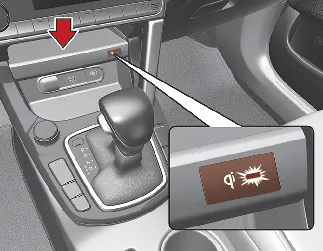
Firmly close all doors and make sure the ignition switch is ON. To begin wireless charging, place a smart phone equipped with wireless charging capability on the wireless charging pad.
For the best charging performance, place the smart phone in the center of the charging pad. Incorrect placement may slow charging or prevent the Kia Seltos wireless charger from detecting the device.
The wireless charging system is designed for one Qi-compatible smart phone only. Check the smart phone accessory cover or the manufacturer's information to confirm whether your smart phone supports Qi wireless charging.

NOTICE
During wireless charging, an internal fan may operate to help prevent overheating. Fan noise may be heard, and this is normal.

WARNING
If a metallic object such as a coin, key, or card is located between the wireless charging system and the smart phone, charging may be interrupted. The metallic object may also become hot and could cause burns or damage.
This device complies with part 15 of the FCC Rules
Operation is subject to the following two conditions:
-
This device may not cause harmful interference.
-
This device must accept any interference received, including interference that may cause undesired operation.
Coat hook
A coat hook is located next to the rear grab handle in the Kia Seltos. It is intended for light clothing items only.
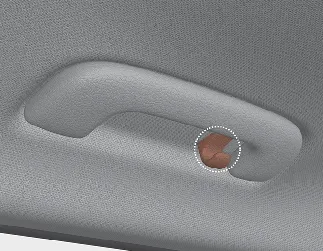
* The actual feature may differ from the illustration depending on vehicle specification.

CAUTION
Hanging clothing
Do not hang heavy clothing on the coat hook, as excessive weight may damage the hook.

WARNING
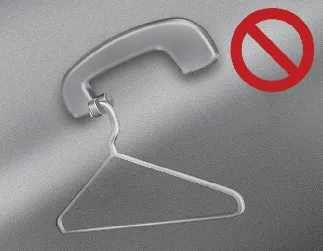
Do not hang hangers, hard objects, or items other than clothes on the coat hook. Do not place heavy, sharp, or breakable objects in clothing pockets. In an accident or when the curtain air bag inflates, these objects may cause vehicle damage or personal injury.
Floor mat anchor(s)
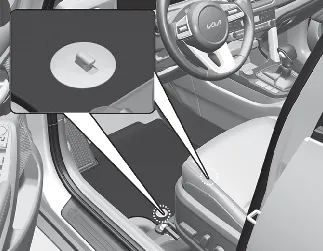
When using a floor mat on the front floor carpet, make sure it is securely attached to the floor mat anchor(s) in the Kia Seltos. This helps prevent the floor mat from sliding forward and interfering with pedal operation.

WARNING
Aftermarket floor mat
-
Do not install aftermarket floor mats that cannot be securely attached to the vehicle's floor mat anchors. Unsecured floor mats can interfere with accelerator, brake, or clutch pedal operation.
-
Use floor mats that are not too thick and are designed to be properly secured to the floor. Installing mats without removing plastic films from the carpet may damage or break the floor mat fixing rings, leaving the mats unsecured. Especially for the driver's seat, unsecured mats may cause unintended acceleration or braking. Always remove all plastic films from the carpet before installing floor mats.
The following precautions must be observed when installing any floor mat in the Kia Seltos:
-
Make sure the floor mats are securely attached to the vehicle's floor mat anchor(s) before driving.
-
Do not use any floor mat that cannot be firmly attached to the vehicle's floor mat anchors.
-
Do not stack floor mats on top of one another, such as placing an all-weather rubber mat over a carpeted floor mat. Only one floor mat should be installed in each position.
Cargo area cover
Use the Kia Seltos cargo area cover to hide items stored in the luggage compartment. It can help keep cargo out of direct view and make the rear area look more organized.


Other information:
Kia Seltos SP2 (2021-2026) Owner's Manual: LCD display modes
You can switch between LCD display modes by pressing the Mode button. The available screens may differ depending on the Kia Seltos trim level, equipment, and active vehicle systems. Mode Driving Assist Trip Computer TuIf a professional towing service is not available during an emergency, your Kia Seltos may be temporarily towed using a suitable cable, chain, or towing strap attached only to the emergency towing hook located under the front or rear of the vehicle. Front Rear If towing is necessary, it is always best to have the Kia Seltos handled by an authorized Kia dealer or a professional commercial tow-truck service.