
Kia Seltos: Features of your vehicle / Storage compartments
Contents:
The Kia Seltos storage compartments are designed for small items needed by the driver or passengers. They help keep the cabin organized and reduce loose objects while driving.
-
To reduce the risk of theft, do not leave valuables in the storage compartments.
-
Always keep storage compartment covers closed while driving. Do not place too many items inside a compartment, so the cover can close securely.

WARNING
Flammable materials
Do not store propane cylinders or other flammable or explosive materials inside the Kia Seltos. These items may catch fire or explode if the vehicle is exposed to high temperatures for an extended period.
Luggage net holder
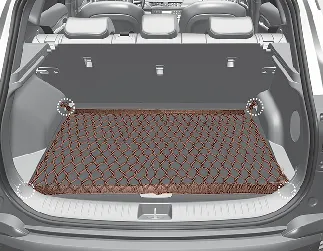
To help keep items from shifting in the cargo area, you can use the 4 holders located in the luggage compartment to attach the luggage net.
If a suitable luggage net or replacement holder is needed, contact an authorized Kia dealer.

CAUTION
To prevent damage to cargo or to the Kia Seltos interior, use care when carrying fragile, heavy, or bulky objects in the luggage compartment.

WARNING
DO NOT over-stretch the luggage net, and ALWAYS keep your face and body away from the luggage net's recoil path. Failure to follow these instructions may result in severe facial injuries. DO NOT use the luggage net if the strap shows visible signs of wear, fraying, or damage.


Other information:
Kia Seltos SP2 (2021-2026) Owner's Manual: LCD display modes
You can switch between LCD display modes by pressing the Mode button. The available screens may differ depending on the Kia Seltos trim level, equipment, and active vehicle systems. Mode Driving Assist Trip Computer Tu