
Kia Seltos: Features of your vehicle / Integrated Memory System
Contents:
The Integrated Memory System in the Kia Seltos is designed to store and recall selected driver comfort settings with a simple button operation. This feature helps the driver quickly return the vehicle to a preferred driving position after another driver has used the vehicle.
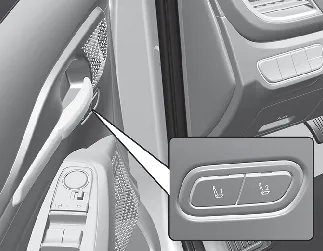
The Kia Seltos Integrated Memory System can store and recall the following settings, depending on vehicle equipment:
-
Driver's seat position
-
Head-Up Display (HUD): position

WARNING
Never attempt to operate the integrated memory system while the Kia Seltos is moving.
Operating the system while driving could cause loss of control and may result in an accident, serious injury, death, or property damage.

NOTICE
-
If the battery is disconnected, the stored memory settings may be erased.
-
If the integrated memory system does not operate normally, visit an authorized Kia dealer for inspection.
Storing memory positions
-
Shift to P (Park) while the ignition switch or ENGINE START/STOP button is in the ON position.
-
Adjust the driver's seat position and the head-up display height to your desired position.
-
Press and hold the memory button (1 or 2). The system will beep once, and the message 'Driver 1 (or 2) settings saved' will appear on the infotainment screen.
Recalling memory positions
-
Shift to P (Park) while the ignition switch or ENGINE START/STOP button is in the ON position.
-
Press the desired memory button (1 or 2). The system will beep once, and the driver's seat position and head-up display height will automatically move to the stored positions.
-
The message 'Driver 1 (or 2) settings applied' will appear on the infotainment screen.

