
Kia Seltos: Features of your vehicle / Remote keyless entry
Contents:
The remote keyless entry system allows you to lock and unlock the Kia Seltos doors from a distance for convenience and security.
Remote keyless entry system operations
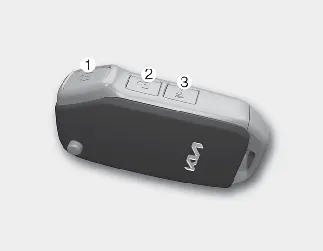
Folding key
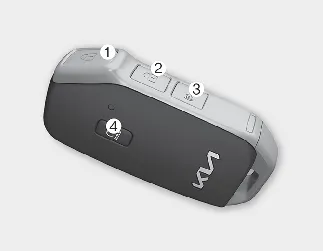
Smart key - Type A
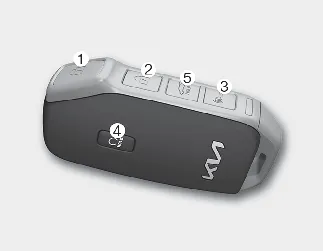
Smart key - Type B
Lock (1)
All doors are locked when the lock button is pressed. If all doors are closed, the hazard warning lights will blink, and the chime will sound once for the smart key to confirm that all doors are locked.
If the lock button is pressed again within 4 seconds, the hazard warning lights will blink and the chime will sound once more to confirm the locked status.
If any door remains open, the hazard warning lights and/or chime may not operate. After all doors are closed, pressing the lock button will cause the hazard warning lights to blink once.
Unlock (2)
The driver's door unlocks when the unlock button is pressed once. The hazard warning lights will blink twice, and the chime will sound twice for the smart key to indicate that the driver's door is unlocked.
All doors unlock if the unlock button is pressed again within 4 seconds. The hazard warning lights will blink twice again, and for the smart key, the chime will also sound twice.
To activate or deactivate 2 Press Unlock, select 'User Settings → Door → 2 Press Unlock' on the instrument cluster, or 'Setup → Vehicle → Door → 2 Press Unlock' on the infotainment system.
After the unlock button is pressed, the doors will lock automatically unless a door is opened within 30 seconds.
If you attempt to lock or unlock the doors by pressing the door lock/unlock button in any of the following conditions, the doors may not lock or unlock:
-
When attempting to lock or unlock the doors while the vehicle is in ACC or ON state.
-
When attempting to lock the Kia Seltos while one or more doors are open.

NOTICE
The infotainment system may change after software updates. For the most accurate menu information, refer to the user's manual available in the infotainment system and the quick reference guide.

NOTICE
If the keyless entry system becomes inoperative because of exposure to water or liquids, the damage may not be covered by the manufacturer's vehicle warranty. Keep the Kia Seltos key and smart key dry and protected from moisture.
Panic alarm (3)
The horn will sound and the hazard warning lights will blink for about 30 seconds if this button is pressed for more than 0.5 seconds. To stop the horn and lights, press any button on the transmitter.
Remote start (4)
You can start the Kia Seltos remotely by using the remote start button (4) on the smart key.
To start the vehicle remotely:
-
Lock the doors by pressing the door lock button (1) while within approximately 32 feet (10 m) of the vehicle.
-
Press and hold the remote start button for more than 2 seconds within 4 seconds after locking the doors. The hazard warning lights will blink.
Press the remote start button once again to turn off the vehicle.
If no action is taken after remote starting, the vehicle will turn off automatically 10 minutes after remote start operation begins.
During remote start, the hazard warning lights blink 3 times. To stop the Kia Seltos while it is remotely started, press the Remote Start button (4) again.
Liftgate open/close (5) (for power liftgate, if equipped)
If this button is pressed for longer than one second, the liftgate will open. When the power liftgate is open, press and hold the power liftgate open/close button to close it.
If you release the button while the liftgate is closing, power liftgate operation will stop and a warning sound will operate for 5 seconds. After the liftgate has been opened and then closed, it will lock automatically when all doors are locked.
For safe operation of the Kia Seltos power liftgate, always make sure the area behind the vehicle is clear before opening or closing it remotely.
Remote keyless entry precautions
The remote keyless entry system in the Kia Seltos may not operate correctly under certain conditions. Signal range, battery condition, nearby interference, and vehicle status can all affect remote operation.
The remote keyless entry will not operate if any of the following occurs:
-
The ignition key is inserted in the ignition switch.
-
You are outside the operating distance limit of approximately 32 feet (10 m).
-
The battery inside the remote keyless entry transmitter is weak.
-
Other vehicles, buildings, walls, or objects are blocking the signal.
-
The weather is extremely cold, which may reduce battery performance or signal response.
-
The remote keyless entry is close to a radio transmitter, such as a radio station, airport equipment, or another source of radio interference.
If the remote keyless entry does not work properly, open and close the door with the ignition key or mechanical key. If the problem continues, contact an authorized Kia dealer for inspection.
-
If the remote keyless entry is close to a mobile phone or smart phone, the signal may be blocked or weakened. This is especially likely when the phone is active during calls, text messaging, email use, or data transmission. Avoid keeping the Kia Seltos remote key and your phone in the same pocket, and keep adequate distance between the two devices.
Battery replacement
The battery in the Kia Seltos remote keyless entry transmitter should last for several years. If the remote does not work properly, responds slowly, or operates only at a short distance, try replacing the battery with a new one.
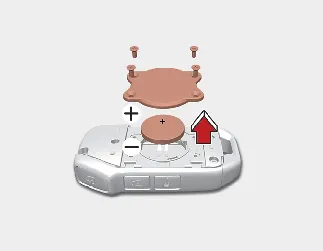
Folding key
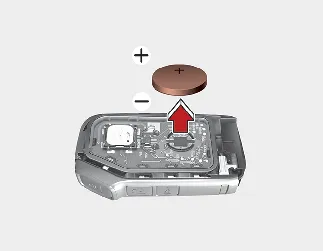
Smart key
If you are not sure how to use the key or replace the battery correctly, contact an authorized Kia dealer.
-
Remove the mechanical key if you are replacing the battery in a smart key.
-
Insert a slim tool into the slot and gently pry open the key cover. Work carefully to avoid damaging the case.
-
For a folding key, loosen the retaining screw of the battery cover and then remove the cover.
-
Replace the old battery with a new CR2032 battery. When installing the battery, make sure the polarity and position are correct.
If the battery is installed with incorrect polarity, it may discharge or make the Kia Seltos key unusable.
-
Reassemble the key in the reverse order of removal and check that the remote buttons operate normally.
The remote keyless entry is designed to provide years of reliable service, but it may malfunction if exposed to moisture, static electricity, impact, heat, or direct sunlight. If you are unsure about battery replacement, contact an authorized Kia dealer.
Using the wrong battery type may cause the remote keyless entry to malfunction. Always use the correct battery specification for the Kia Seltos key.

An improperly disposed battery can be harmful to the environment and human health. Dispose of the used battery according to local laws and regulations.

WARNING
THIS PRODUCT CONTAINS A BUTTON BATTERY
If swallowed, a lithium button battery can cause severe or fatal injuries within 2 hours.
Keep all batteries out of reach of children.
If you think a battery may have been swallowed or placed inside any part of the body, seek immediate medical attention.

CAUTION
Remote keyless entry damage
The remote keyless entry transmitter can malfunction if it is dropped, exposed to moisture, affected by static electricity, overheated, or left in direct sunlight for a long time.
To help protect the Kia Seltos key, keep it dry, avoid strong impacts, and do not store it near heat sources or electronic devices that may interfere with the signal.
This device complies with Part 15 of the FCC rules.
Operation of this Kia Seltos device is permitted only under the following two conditions:
-
This device may not cause harmful interference.
-
This device must accept any interference received, including interference that may cause undesired operation.

NOTICE
Changes or modifications that are not expressly approved by the party responsible for compliance may void the user's authority to operate this equipment. If the Kia Seltos keyless entry system stops operating because of unauthorized changes or modifications, the issue may not be covered by the manufacturer's vehicle warranty.
For reliable operation, always use the smart key system as designed and avoid altering, repairing, or replacing electronic components with unapproved parts.


Other information:
Kia Seltos SP2 (2021-2026) Owner's Manual: Head-Up Display (HUD)
The Kia Seltos Head-Up Display is a transparent display system that projects selected information from the instrument cluster and navigation system onto the HUD screen. This allows the driver to view key information while keeping attention closer to the road ahead. Combiner Shutter The hidden HUD screen rises when you press the screen operation switch located on the left side of the lower crash pad.Use the following information to maintain the exterior of your Kia Seltos. Keeping the exterior clean is not only visually pleasing, but also helps protect paint, trim, lamps, and body components from wear, contamination, and environmental damage. NOTICE If the Kia Seltos is parked near a stainless signboard, glass building, or other highly reflective structure, reflected sunlight may damage plastic exterior trim such as the bumper, spoiler, trim pieces, lamps, or outside mirrors.