
Kia Seltos SP2 (2021-2026) Owner's Manual / Features of your vehicle / LCD display
Kia Seltos: Features of your vehicle / LCD display
Contents:
The Kia Seltos LCD display modes can be changed using the control buttons on the steering wheel. These modes provide access to driving information, vehicle settings, warning messages, and system status screens.
LCD Display Control
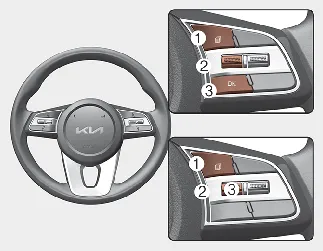
-
 : MODE button for changing display modes
 -
 /
/  : MOVE switch for changing items
 -
OK: SELECT/RESET button for selecting, confirming, or resetting the highlighted item
LCD display modes ➤
Trip information (trip computer) ➤


Other information:
Kia Seltos SP2 (2021-2026) Owner's Manual: Integrated Memory System
The Integrated Memory System in the Kia Seltos is designed to store and recall selected driver comfort settings with a simple button operation. This feature helps the driver quickly return the vehicle to a preferred driving position after another driver has used the vehicle. The Kia Seltos Integrated Memory System can store and recall the following settings, depending on vehicle equipment: Driver's seat position Head-Up Display (HUD): position WARNING Never attempt to operate the integrated memory system while the Kia Seltos is moving.When selecting a Child Restraint System for your child, always choose a restraint that fits the child, fits the Kia Seltos seating position, and can be installed according to the manufacturer's instructions. Make sure the CRS has a label certifying that it meets FMVSS 213. Select a child restraint based on your child's height and weight.