
Kia Seltos: Features of your vehicle / Infotainment system vehicle settings
Contents:
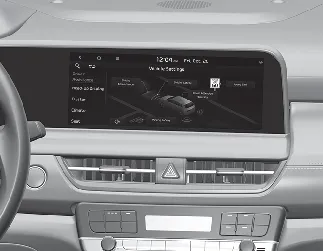
Vehicle Settings in the Kia Seltos infotainment system provide user options for adjusting door lock and unlock behavior, convenience features, driver assistance functions, display preferences, and other vehicle settings. Available menus may vary depending on trim level and equipment.

WARNING
Do not operate the Vehicle Settings menu while driving. Adjusting settings while the vehicle is moving may distract the driver and could result in an accident.
Setting your vehicle
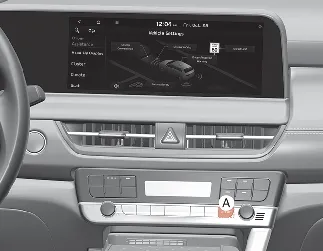
[A]: SETUP
-
Press the SETUP button on the head unit of the Kia Seltos infotainment system.
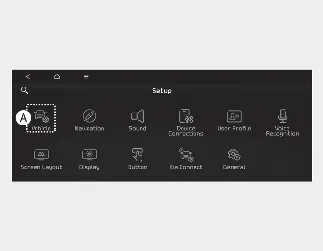
[A]: Vehicle
-
Select Vehicle, then change the available feature settings according to your preference.
Vehicle Settings menu
-
Driver Assistance
-
Head-Up Display
-
Cluster
-
Climate
-
Seat
-
Lights
-
Door
-
Digital Key
-
Convenience

NOTICE
The information provided may differ depending on which features are available on your Kia Seltos.

NOTICE
The infotainment system menu layout may change after software updates. For the most accurate information, refer to the user's manual provided in the Kia Seltos infotainment system.


Other information:
Kia Seltos SP2 (2021-2026) Owner's Manual: Idle Stop and Go (ISG) system
The Idle Stop and Go (ISG) system in the Kia Seltos helps reduce fuel consumption by automatically turning off the engine when the vehicle is stopped, such as at a red light, stop sign, or in heavy traffic. The engine restarts automatically as soon as the required starting conditions are met, allowing the driver to continue smoothly without using the ignition switch or ENGINE START/STOP button manually.Kia Seltos SP2 (2021-2026) Owner's Manual: Manual Speed Limit Assist (MSLA)
Speed Limit indicator Set speed Manual Speed Limit Assist allows the Kia Seltos driver to set a speed limit when they do not want the vehicle to exceed a specific speed. If the vehicle speed goes above the preset limit, MSLA will operate. The set speed limit will blink and a warning chime will sound until the Kia Seltos returns to a speed within the selected limit.