
Kia Seltos: Features of your vehicle / Smart liftgate
Contents:
- How to use the smart liftgate
- How to deactivate the smart liftgate function using the smart key
- Detecting area
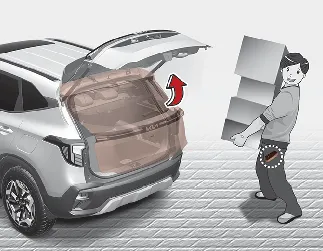
On a Kia Seltos equipped with a smart key, the liftgate can be opened with no-touch activation using the smart liftgate system.
This feature is helpful when your hands are full, allowing easier access to the cargo area when the smart key is detected near the rear of the vehicle.
How to use the smart liftgate
The Kia Seltos smart liftgate can open with no-touch activation when all required conditions are satisfied. This feature is designed to make cargo access easier when you are carrying the smart key and your hands are full.
-
At least 15 seconds have passed after all doors are closed and locked.
-
You remain in the detecting area for more than 3 seconds while carrying the smart key.

NOTICE
The Kia Seltos smart liftgate does not operate in the following situations:
-
The smart key is detected within 15 seconds after the doors are closed and locked, and continues to be detected.
-
A door is not locked or not fully closed.
-
The smart key is inside the vehicle.
-
Setting
-
Instrument cluster
Select 'User Settings → Door → Smart Liftgate'.
-
Infotainment system
Select 'Setup → Vehicle → Door → Smart Liftgate'.

NOTICE
The infotainment system may change after software updates. For the latest menu layout and detailed operation, refer to the user's manual provided in the Kia Seltos infotainment system and the quick reference guide.
-
-
Detect and Alert
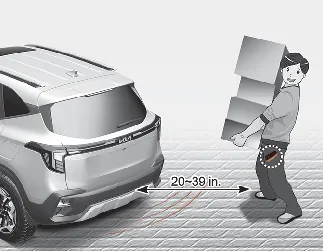
If you stand in the detecting area, approximately 20–39 in (50–100 cm) behind the Kia Seltos, while carrying the smart key, the hazard warning lights will blink and the chime will sound for about 3 seconds. This alerts you that the smart key has been detected and that the liftgate is preparing to open.

NOTICE
Do not approach the detecting area if you do not want the liftgate to open. If you unintentionally enter the detecting area and the hazard warning lights and chime begin to operate, leave the detecting area with the smart key. The liftgate will remain closed.
-
Automatic opening
The hazard warning lights will blink, the chime will sound 2 times, and then the Kia Seltos liftgate will slowly open.

WARNING
-
Make sure the liftgate is fully closed before driving your Kia Seltos.
-
Before opening or closing the liftgate, make sure no people, animals, or objects are near the rear of the vehicle.
-
When opening the liftgate on a slope, make sure items in the rear cargo area do not fall out. Falling cargo may cause serious injury.
-
Deactivate the smart liftgate function before washing the vehicle. Otherwise, the liftgate may open unexpectedly.
-
Keep the smart key out of reach of children. Children may accidentally activate the Kia Seltos smart liftgate while playing near the rear of the vehicle.
How to deactivate the smart liftgate function using the smart key
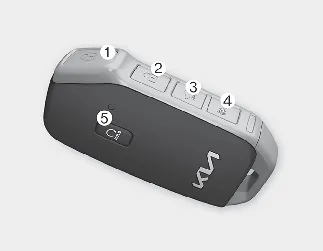
-
Door lock
-
Door unlock
-
Liftgate open/close
-
Panic
-
Remote start
If you press any button on the smart key during the Detect and Alert stage, the smart liftgate function will be deactivated.
Make sure you know how to deactivate the Kia Seltos smart liftgate function in case you need to stop the liftgate from opening unexpectedly.

NOTICE
-
If you press the door unlock button (2), the smart liftgate function will be deactivated temporarily. However, if you do not open any door for 30 seconds, the smart liftgate function will be activated again.
-
If you press the liftgate open button (3) for more than 1 second, the liftgate opens.
-
If you press the door lock button (1) or liftgate open button (3) when the smart liftgate function is not in the Detect and Alert stage, the smart liftgate function will not be deactivated.
-
If you deactivate the smart liftgate function by pressing a smart key button and then open a door, the Kia Seltos smart liftgate function can be activated again by closing and locking all doors.
Detecting area
-
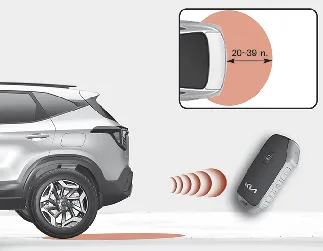
The Kia Seltos smart liftgate operates with a welcome alert when the smart key is detected approximately 20–39 in (50–100 cm) from the liftgate.
-
The alert stops immediately if the smart key moves outside the detecting area during the Detect and Alert stage.

NOTICE
-
The Kia Seltos smart liftgate function may not work properly if any of the following occurs:
-
The smart key is close to a strong radio transmitter, such as a radio station or airport equipment, which may interfere with normal signal operation.
-
The smart key is near a mobile two-way radio system or a mobile phone.
-
Another vehicle's smart key is being operated close to your Kia Seltos.
-
-
The detecting range may decrease or increase in the following conditions:
-
One side of the vehicle is raised for tire replacement or vehicle inspection.
-
The vehicle is parked on a slope, unpaved road, or uneven surface.
-


Other information:
Kia Seltos SP2 (2021-2026) Owner's Manual: LCD display
The Kia Seltos LCD display modes can be changed using the control buttons on the steering wheel. These modes provide access to driving information, vehicle settings, warning messages, and system status screens. LCD Display Control : MODE button for changing display modes / : MOVE switch for changing items OK: SELECT/RESET button for selecting, confirming, or resetting the highlighted itemKia Seltos SP2 (2021-2026) Owner's Manual: Folding key immobilizer system
Your Kia Seltos may be equipped with an electronic engine immobilizer system designed to help reduce the risk of unauthorized vehicle use. The immobilizer system consists of a small transponder built into the ignition key and electronic control components installed inside the vehicle. When you insert the ignition key into the ignition switch and turn it to the ON position, the Kia Seltos immobilizer system checks the key and verifies whether it is valid for the vehicle.