
Kia Seltos: Features of your vehicle / Smart key
Contents:
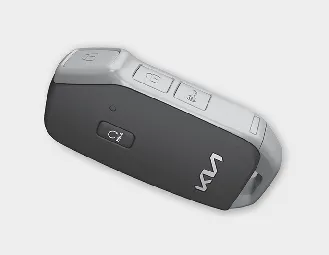
Type A
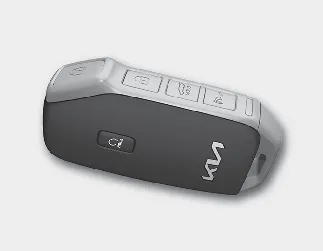
Type B
With the Kia Seltos smart key, you can lock or unlock the doors and start the engine without inserting a traditional key. This convenient system allows everyday access to the vehicle while keeping the key in your pocket, bag, or hand.
The buttons on the smart key provide functions similar to the folding key, including door locking, door unlocking, and other remote operations depending on vehicle equipment.
For additional operating details, refer to the related section of the Kia Seltos owner's information.

WARNING
Smart key
Never leave the smart key inside your Kia Seltos with unsupervised children. Leaving children unattended in the vehicle is dangerous, even when the ENGINE START/STOP button is not in the ACC or ON position. Children may imitate adults and press the ENGINE START/STOP button, operate power windows or other controls, or accidentally cause the vehicle to move. This could result in serious injury or death.
Smart key functions
When carrying the Kia Seltos smart key, you can lock and unlock the vehicle doors and liftgate, as well as start the engine when the key is detected inside the vehicle.
Locking
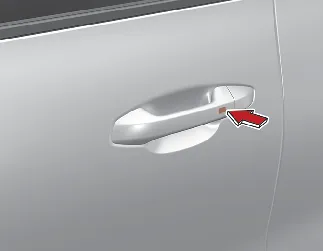
Button type
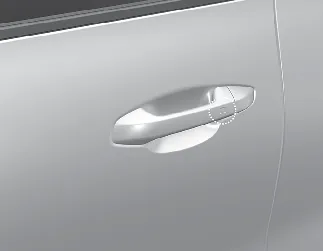
Touch sensor type
When all doors and the liftgate are closed and at least one door is unlocked, pressing the button on the front driver's outside door handle or touching the door lock sensor will lock all doors and the liftgate.
If all doors, the liftgate, and the hood are properly closed, the hazard warning lights will blink once and the chime will sound once to confirm that the Kia Seltos has been locked.
The button or touch sensor operates only when the smart key is within approximately 28–40 in (0.7–1 m) of the driver's door handle. After locking, gently pull the driver's door handle to confirm that the door is securely locked.
Even if you press the driver's door handle button or touch the sensor, the doors will not lock and the chime will sound for about 3 seconds if any of the following conditions occur:
-
The smart key is inside the vehicle.
-
The ENGINE START/STOP button is in the ACC or ON position.
-
Any door, except the liftgate, is open.
Unlocking
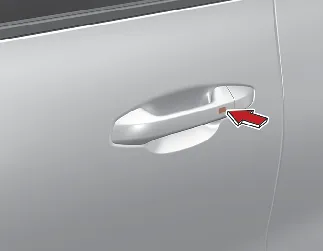
Button type
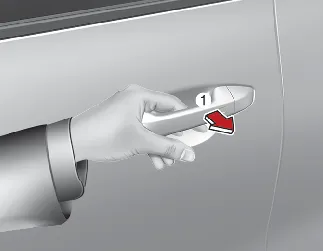
Touch sensor type
When all doors and the liftgate are closed and locked, pressing the button on the front outside door handle or placing your hand inside the door handle pocket (1) and touching the unlock sensor will unlock the doors and liftgate if the 2 Press Unlock function is deactivated.
The button or touch sensor works only when the Kia Seltos smart key is within approximately 28–40 in (0.7–1 m) of the outside door handle.
When the 2 Press Unlock function is activated:
-
Pressing the Door Unlock button on the smart key unlocks only the driver's door.
-
Pressing the Door Unlock button again within four seconds unlocks all doors.
-
Pressing the driver's outside door handle button or touching the unlock sensor unlocks only the driver's door.
-
Pressing the driver's outside door handle button or touching the unlock sensor again within four seconds unlocks all doors.
To activate or deactivate 2 Press Unlock in the Kia Seltos, select 'User Settings → Door → 2 Press Unlock' on the instrument cluster, or select 'Setup → Vehicle → Door → 2 Press Unlock' on the infotainment system.

NOTICE
The infotainment system interface may change after software updates. For the latest menu layout and detailed instructions, refer to the user's manual available in the Kia Seltos infotainment system and the quick reference guide.
Liftgate open
While carrying the Kia Seltos smart key, press the liftgate handle switch and open the liftgate. After the liftgate has been opened and closed again, it will lock automatically when all doors are locked.
This feature makes loading and unloading more convenient, especially when the smart key is kept in your pocket or bag.
Start-up
You can start the Kia Seltos without inserting a traditional key, as long as the smart key is detected inside the vehicle.
* For more information, refer to the related operating details in the Kia Seltos owner's information.

NOTICE
Loss of the smart key
A maximum of 2 smart keys can be registered to one Kia Seltos.
If you lose your smart key, you may not be able to start the vehicle. To help protect the Kia Seltos from possible theft, immediately take the vehicle and the remaining key to an authorized Kia dealer. If necessary, have the vehicle towed.

NOTICE
Smart key precautions
The Kia Seltos smart key may not operate correctly in the following situations:
-
The smart key is close to a strong radio transmitter, such as a broadcasting station or airport equipment, which may interfere with normal operation.
-
The smart key is near a mobile two-way radio system or a mobile phone.
-
Another vehicle's smart key is being used close to your Kia Seltos.
If the smart key does not work properly, open and close the door using the mechanical key and contact an authorized Kia dealer.
If the smart key is placed too close to your phone, the smart key signal may be blocked during normal phone operation. This is especially important when the phone is active, such as during calls, text messaging, or sending and receiving emails. Avoid keeping the smart key and phone in the same pants or jacket pocket, and maintain enough distance between the two devices.
Window tint film, especially metalized film, may interfere with the radio frequency transmitted by the smart key and reduce the operating range of the Kia Seltos smart key system.

NOTICE
To help prevent the electronic key from being damaged by magnetic fields, do not leave it near the following electrical appliances:
-
TVs
-
Personal computers
-
Mobile phones, cordless phones, and battery chargers
-
Table lamps
-
Induction cookers

NOTICE
If you need to leave your Kia Seltos key with a parking attendant, remove the mechanical key for your own use and provide only the electronic key to the attendant.

NOTICE
When bringing the smart key onto an airplane, make sure that no button on the key is pressed while inside the cabin. If the key is carried in a bag or pocket, ensure that the buttons cannot be pressed accidentally. Pressing a button may cause the key to emit radio waves that could interfere with aircraft operation.
This device complies with Part 15 of the FCC rules.
Operation of this Kia Seltos device is subject to the following two conditions:
-
This device may not cause harmful interference.
-
This device must accept any interference received, including interference that may cause undesired operation.

NOTICE
Changes or modifications that are not expressly approved by the party responsible for compliance may void the user's authority to operate this equipment. If the Kia Seltos smart key becomes inoperative because of unauthorized changes or modifications, the repair may not be covered by the manufacturer's vehicle warranty.


Other information:
Kia Seltos SP2 (2021-2026) Owner's Manual: Air bag - advanced Supplemental Restraint System
* The actual air bags and their locations in your Kia Seltos may differ from the illustration depending on model, trim, and equipment. Driver's front air bag Passenger's front air bag Side air bag Curtain air bag Even in vehicles equipped with air bags, the driver and all passengers must always wear the safety belts provided.Kia Seltos SP2 (2021-2026) Owner's Manual: For safe AWD operation
WARNING All Wheel Drive Driving conditions that require All Wheel Drive place greater stress on the Kia Seltos than normal paved-road driving. When traveling on rough, slippery, muddy, snowy, or uneven surfaces, reduce your speed and be prepared for sudden changes in traction under the tires. If you are unsure whether the conditions are safe, stop the vehicle in a secure location and carefully decide the best way to continue.