
Kia Seltos: Features of your vehicle / Head-Up Display (HUD)
Contents:
The Kia Seltos Head-Up Display is a transparent display system that projects selected information from the instrument cluster and navigation system onto the HUD screen. This allows the driver to view key information while keeping attention closer to the road ahead.
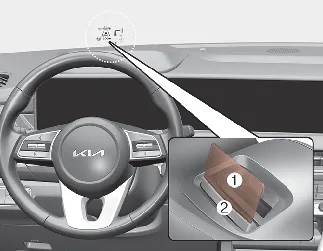
-
Combiner
-
Shutter
The hidden HUD screen rises when you press the screen operation switch located on the left side of the lower crash pad. Pressing the switch again returns the screen to its original hidden position.
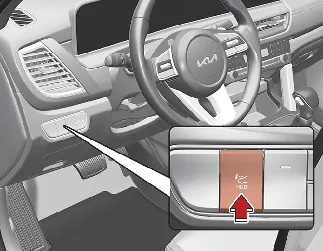
-
The Head-Up Display image may be difficult to see or may appear invisible in the following situations:
-
The driver's sitting posture is not properly aligned with the HUD screen.
-
The driver is wearing polarized sunglasses.
-
An object is placed on the Head-Up Display cover.
-
The vehicle is being driven on a wet road.
-
Inappropriate interior lighting is turned on inside the vehicle.
-
Strong light enters from outside the vehicle.
-
The driver is wearing glasses that are not suitable for their eyesight.
-
-
If the Head-Up Display image is not shown clearly, adjust the height, rotation, or illumination of the HUD through the Kia Seltos cluster settings.
-
If the Head-Up Display requires inspection or repair, consult an authorized Kia dealer.

WARNING
Head-Up Display
-
Do not place accessories, objects, or decorative items on the Head-Up Display shutter. They may fall into the HUD mechanism and damage the Head-Up Display.
Head Up Display Information
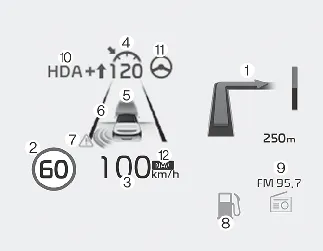
-
Turn By Turn navigation information
-
Road signs
-
Speedometer
-
SCC set speed information
-
SCC vehicle distance information
-
Lane Safety information
-
Blind-Spot Safety information
-
Warning lights, such as Low Fuel
-
Infotainment system information
-
Highway Driving Assist information
-
Lane Following Assist information
-
Highway Auto Speed Change information
The Kia Seltos Head Up Display can show key driving details in the driver's forward view, helping reduce the need to look down at the instrument cluster during normal driving.

NOTICE
Road Signs and Turn By Turn navigation information are available depending on the region, navigation data, and vehicle equipment.
Head up Display Setting
On the LCD display or infotainment system, you can change the Kia Seltos Head Up Display settings to improve visibility and match your driving position.
-
Display height
-
Rotation
-
Brightness
-
Content selection
Select Setup → Vehicle → Head-Up Display from the Settings menu on the infotainment system screen while the ENGINE START/STOP button is in the ON position.

NOTICE
The infotainment system may change after software updates. For more information, refer to the user's manual provided in the Kia Seltos infotainment system.


Other information:
Kia Seltos SP2 (2021-2026) Owner's Manual: Selecting a CRS
When selecting a Child Restraint System for your child, always choose a restraint that fits the child, fits the Kia Seltos seating position, and can be installed according to the manufacturer's instructions. Make sure the CRS has a label certifying that it meets FMVSS 213. Select a child restraint based on your child's height and weight.Kia Seltos SP2 (2021-2026) Owner's Manual: Vehicle Stability Management (VSM) system
The Vehicle Stability Management (VSM) system in the Kia Seltos provides additional support for vehicle stability and steering response under certain driving conditions. VSM may assist in the following situations: When driving on a slippery road surface. When the system detects a difference in traction between the left and right wheels.