
Kia Seltos: Features of your vehicle / Windshield defrosting and defogging
Contents:
- Defogging logic
- Automatic Air Ventilation
- Activate upon Washer Fluid Use
- System cancellation
- Sunroof inside air recirculation
When the Kia Seltos windshield is covered with frost, fog, or moisture, the front view may become blurred. Remove frost and moisture before driving to maintain clear visibility and safer vehicle control.
 WARNING
Windshield heating
Do not use the  or
or  position during cooling operation in extremely humid weather. The temperature difference between the outside air and the windshield may cause the outer surface of the windshield to fog, reducing visibility. In this case, set the mode selection to the
  position and set the fan speed to a lower level.
-
To speed up defrosting, turn the temperature control fully to the warmest setting and set the fan speed to the highest level.
-
If you want warm air to flow toward the floor while defrosting or defogging, select the floor-defrost position.
-
Before driving the Kia Seltos, clear all snow and ice from the windshield, rear window, outside rearview mirrors, and side windows.
-
Clear snow and ice from the hood and the air inlet area in the cowl grille. This improves heater and defroster performance and helps reduce the chance of fog forming inside the windshield.

CAUTION
Do not place objects on the instrument panel where they may cover the air outlets. Blocked airflow can reduce windshield defogging performance and limit driver visibility.
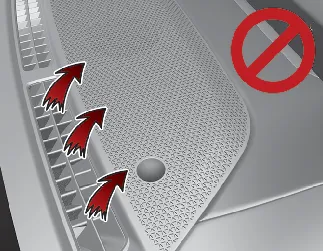
Defogging logic
To reduce the possibility of fog forming on the inside of the windshield, the Kia Seltos may automatically control the air intake or air conditioning system under certain conditions, such as when the  or
or  position is selected.
To cancel automatic defogging logic or return to automatic defogging operation, follow the applicable vehicle procedure. This feature helps maintain clear glass and improves visibility during humid or cold-weather driving.
Automatic Air Ventilation
When the heater and air conditioner are used for vehicle ventilation, and Recirculation mode remains selected for 30 minutes or more at low temperature, the Kia Seltos automatically changes to Fresh mode. This helps bring outside air into the cabin and reduces the chance of stale air or window fogging.
Activate upon Washer Fluid Use
To help prevent washer fluid odor from entering the Kia Seltos cabin, the ventilation system temporarily changes to Recirculated Air mode when windshield washer fluid is sprayed. After a short period, the system returns to the previous ventilation setting.
System cancellation
-
Make sure the ENGINE START/STOP button is in the ON position.
-
Select the Floor-Level (
 ) airflow direction by pressing the Mode Selection button.
 -
While pressing the A/C button, press the Recirculated Air button more than 4 times within 2 seconds.
-
If the system is canceled, the indicator on the Recirculated Air button will blink 3 times.
The washer fluid recirculation function can also be activated by selecting Settings → Vehicle → Climate → Recirculate Air → Activate upon Washer Fluid Use from the infotainment system screen of the Kia Seltos.

NOTICE
The infotainment system may change after software updates. For more information, refer to the user's manual provided in the Kia Seltos infotainment system and the quick reference guide.
Sunroof inside air recirculation
When the Kia Seltos sunroof is opened, the outside fresh air position is selected automatically. If you select the recirculated air position while the sunroof is open, the system will maintain recirculated air for about 3 minutes, then automatically switch back to the outside fresh air position.
When the sunroof is closed, the air intake position will return to the originally selected setting. This function helps maintain cabin ventilation and reduces stale air while the sunroof is open.


Other information:
Kia Seltos SP2 (2021-2026) Owner's Manual: Theft-alarm system
The Kia Seltos theft-alarm system is designed to help protect the vehicle from unauthorized entry and unwanted access. This system operates in three stages: the first is the "Armed" stage, the second is the "Theft-alarm" stage, and the third is the "Disarmed" stage. If the system is triggered, the Kia Seltos provides an audible alarm and the hazard warning lights blink to draw attention to the vehicle.Kia Seltos SP2 (2021-2026) Owner's Manual: Safe Exit Warning (SEW)
Safe Exit Warning (SEW) in the Kia Seltos is designed to help protect occupants when the vehicle is stopped. If an approaching vehicle from the rear area is detected as a passenger opens a door, SEW may warn the driver with a warning message and an audible alert to help reduce the risk of a collision. CAUTION The warning timing may vary depending on the speed of the approaching vehicle and the surrounding traffic conditions.