
Kia EV6: Driver assistance system
Contents:
- Overview
- Forward Collision-avoidance Assist (FCA) (Sensor Fusion)
- Junction Crossing, Lane-Change Oncoming, Lane-Change Side, Evasive Steering Assist function: (if equipped)
- Lane Keeping Assist (LKA)
- Lane Following Assist (LFA)
- Blind-spot Collision-avoidance Assist (BCA) : (if equipped)
- Safe Exit Warning (SEW): (if equipped)
- Safe Exit Assist (SEA): (if equipped)
- Blind-spot View Monitor (BVM): (if equipped)
- Operating conditions
- Manual Speed Limit Assist (MSLA)
- Intelligent Speed Limit Assist (ISLA) : (if equipped)
- Driver Attention Warning (DAW)
- Leading vehicle departure alert function
- Smart Cruise Control (SCC)
- Basic function
- Emergency Stop (ES)
- Navigation-based Smart Cruise Control (NSCC)
- Highway Driving Assist (HDA)
- Rear View Monitor (RVM): (if equipped)
- Operating conditions
- Operating conditions
- Surround View Monitor (SVM): (if equipped)
- Parking
- Parking
- Rear Cross-traffic Collision-avoidance Assist (RCCA): (if equipped)
- Parking Distance Warning (PDW): (if equipped)
- Warning indicator and warning sound
- Warning indicator and warning sound
- Warning indicator and warning sound
- Reverse Parking Collision-Avoidance Assist (PCA): (if equipped)
- Forward/Side/Reverse Parking Collision-Avoidance Assist (PCA): (if equipped)
- Forward/Side Safety Function
- Forward/side safety function
- Remote Smart Parking Assist 2 (RSPA 2): (if equipped)
- Method (1): Using the function with vehicle off
- How to turn off Remote Operation function while operating
- 1. Getting ready for parking
- The function will pause in the following conditions when:
- 1. Getting ready for exit
- How to turn off Smart function while operating
- Remote Smart Parking Assist check
- Declaration of Conformity: (if equipped)
TIP
The driver assistance system information displayed on the Kia EV6 infotainment screen may differ slightly from the descriptions provided in this manual depending on the installed infotainment software version, regional specifications, or system updates.
Overview ➤
Forward Collision-avoidance Assist (FCA) (Sensor Fusion) ➤
Junction Crossing, Lane-Change Oncoming, Lane-Change Side, Evasive Steering Assist function: (if equipped) ➤
Lane Keeping Assist (LKA) ➤
Lane Following Assist (LFA) ➤
Blind-spot Collision-avoidance Assist (BCA) : (if equipped) ➤
Safe Exit Warning (SEW): (if equipped) ➤
Safe Exit Assist (SEA): (if equipped) ➤
Blind-spot View Monitor (BVM): (if equipped) ➤
Operating conditions ➤
Manual Speed Limit Assist (MSLA) ➤
Intelligent Speed Limit Assist (ISLA) : (if equipped) ➤
Driver Attention Warning (DAW) ➤
Leading vehicle departure alert function
-
When the vehicle cuts in
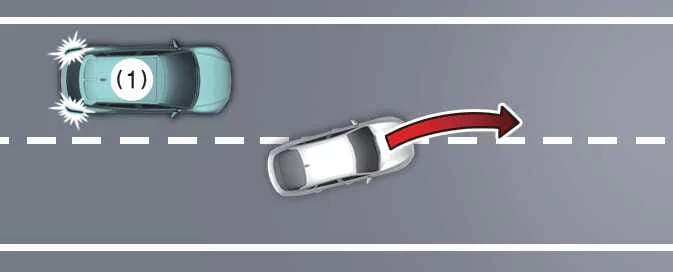
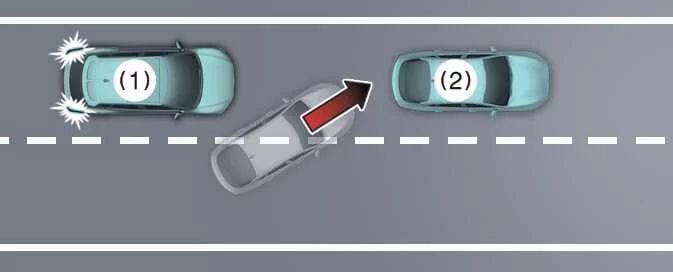
-
Your vehicle
-
Vehicle ahead
If another vehicle suddenly cuts in front of the Kia EV6, Leading Vehicle Departure Alert may not operate correctly or may not recognize the new vehicle ahead in time.
Always monitor the road ahead directly, especially in dense traffic or stop-and-go conditions.
-
-
When the vehicle ahead sharply steers
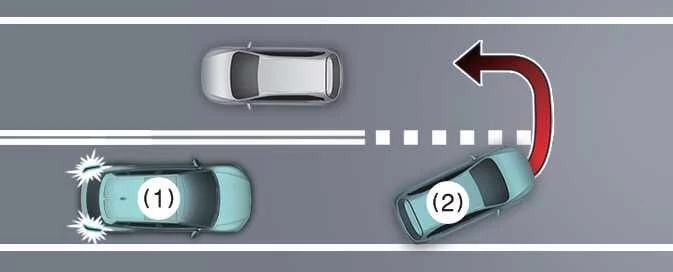
-
Your vehicle
-
Vehicle ahead
If the vehicle ahead makes a sharp maneuver, such as turning left, turning right, or making a U-turn, Kia EV6 Leading Vehicle Departure Alert may not operate properly.
The system may have difficulty determining whether the vehicle ahead is departing normally or leaving the detection path.
-
-
When the vehicle ahead abruptly departs
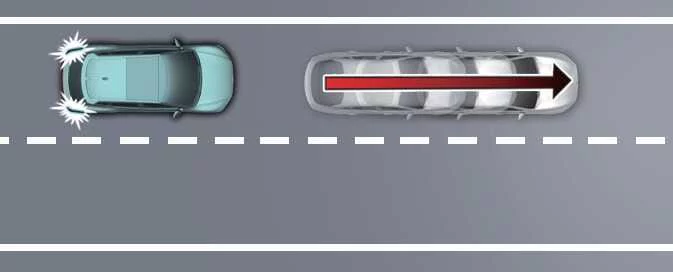
If the vehicle ahead accelerates or departs abruptly, Leading Vehicle Departure Alert in the Kia EV6 may not respond as expected.
The driver should always remain prepared to move safely when traffic ahead begins to flow.
-
When a pedestrian or cyclist is between you and the vehicle ahead
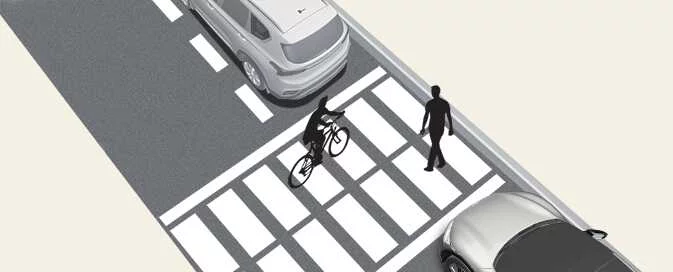
If pedestrians, cyclists, or other road users are positioned between the Kia EV6 and the vehicle ahead, Leading Vehicle Departure Alert may not operate properly.
In this situation, the driver should check the road ahead carefully before accelerating.
-
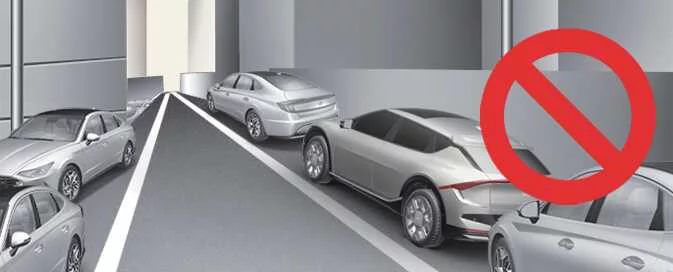
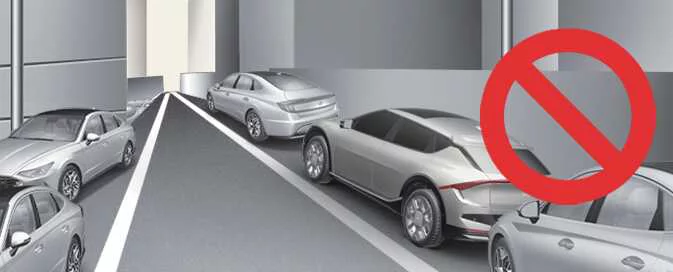
When in a car park
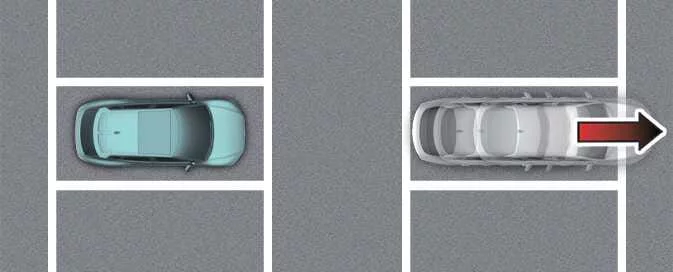
If a parked vehicle ahead starts to move away in a parking area, Kia EV6 Leading Vehicle Departure Alert may notify the driver that the vehicle is departing.
Because parking lots often contain pedestrians, shopping carts, reversing vehicles, and tight spaces, always check the surroundings before moving the Kia EV6.
-
When driving at a tollgate or intersection
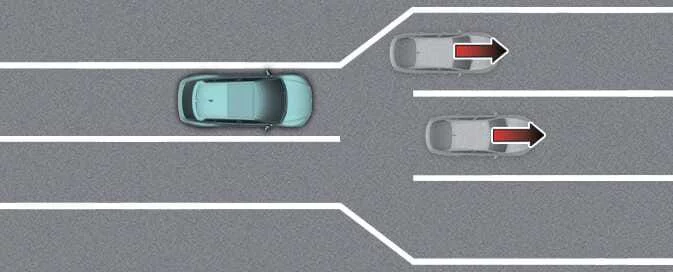
If the Kia EV6 passes through a tollgate, intersection, merging area, or section where lanes frequently divide, Leading Vehicle Departure Alert may not operate correctly.
Complex lane layouts and multiple nearby vehicles can affect how the system recognizes the vehicle ahead.
WARNING
Kia EV6 Driver Attention Warning may not activate for approximately 15 seconds after restarting the vehicle or initializing the front view camera.
NOTE
For additional information about Kia EV6 front view camera operation and limitations, refer to Forward Collision-Avoidance Assist (FCA) (Sensor Fusion).
Smart Cruise Control (SCC) ➤
Basic function ➤
Emergency Stop (ES) ➤
Navigation-based Smart Cruise Control (NSCC) ➤
Highway Driving Assist (HDA) ➤
Rear View Monitor (RVM): (if equipped) ➤
Operating conditions
The Kia EV6 Rear View function activates under the following conditions:
-
The gear is shifted to R (Reverse).
-
The Parking/View button (1) is pressed while the gear is in P (Park), N (Neutral), or D (Drive), and the Kia EV6 speed is below 6 mph (10 km/h).
Pressing the View Switching button (2) while the Rear Top View is displayed allows the driver to switch between rear top view, rear standard view, and rear wide-angle view.
Non-operating conditions
The Rear View while driving function turns OFF under the following conditions while parking:
-
The gear is shifted to P (Park).
-
The Parking/View button (1) is pressed.
-
The back button (3) is pressed on the Kia EV6 Rear View Monitor screen.
-
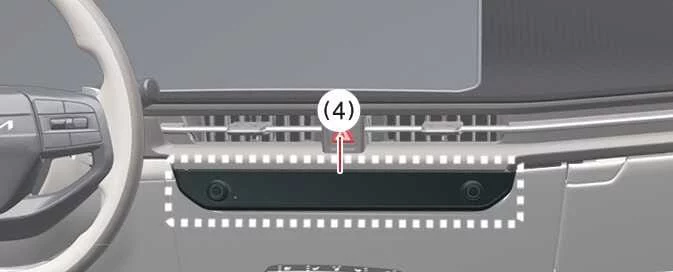
An infotainment system operation button (4) is pressed.
-
The gear is in N (Neutral) or D (Drive), and the Kia EV6 speed exceeds 6 mph (10 km/h).
NOTE
The Rear View display does not turn OFF while the Kia EV6 is in R (Reverse).
Extended Rear View Monitor
The Extended Rear View Monitor function keeps displaying the rear view after shifting from R (Reverse) to N (Neutral) or D (Drive), helping the Kia EV6 driver park more safely and maintain awareness of nearby objects or vehicles.
Operating conditions ➤
Surround View Monitor (SVM): (if equipped) ➤
Parking
While parking, the front view of the Kia EV6 Surround View Monitor activates under the following conditions:
-
The gear is in P (Park), N (Neutral), or D (Drive), the vehicle speed is below 6 mph (10 km/h), and the Parking/View button (1) is pressed.
-
The gear is shifted from R (Reverse) to N (Neutral) or D (Drive).
-
The automatic Surround View Monitor activation function is enabled.
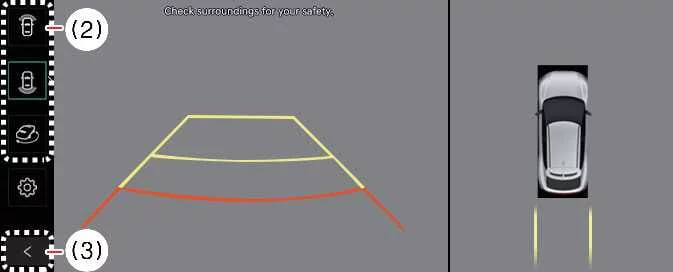
Press the view switching button (2) on the Surround View Monitor screen to select Top View, Front View, Side View, or Wide View modes.
While parking, the front view of the Surround View Monitor turns OFF under the following conditions:
-
The gear is shifted to P (Park) or R (Reverse).
-
The Parking/View button (1) is pressed.
-
The back button (3) on the Surround View Monitor screen is pressed.
-
The infotainment system power button (4) is pressed.
-
The Kia EV6 speed exceeds 6 mph (10 km/h).
NOTE
When the front camera view is activated, the Kia EV6 displays the most recently used camera view mode.
Rear view
|
|
The rear view function of the Kia EV6 Surround View Monitor displays the area behind the vehicle on the infotainment system according to the driver’s selected settings, helping improve visibility and assisting with safer parking and low-speed driving maneuvers.
Parking ➤
Rear Cross-traffic Collision-avoidance Assist (RCCA): (if equipped) ➤
Parking Distance Warning (PDW): (if equipped) ➤
Warning indicator and warning sound
|
Distance from object |
Warning indicator |
Warning sound |
|
|---|---|---|---|
|
Instrument cluster |
Infotainment system screen |
||
|
24–48 in (60–120 cm) |
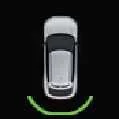
|
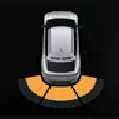
|
Buzzer beeps intermittently (Front inner side) |
|
12–24 in (30–60 cm) |
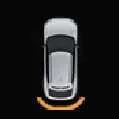
|
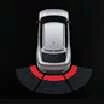
|
Buzzer beeps more frequently |
|
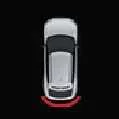
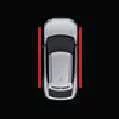
Within 12 in (30 cm) |
|
|
Buzzer beeps continuously |
-
The corresponding Kia EV6 warning indicator appears and an audible alert sounds whenever the ultrasonic sensors detect a person, object, or animal within the sensing range.
-
If multiple objects are detected simultaneously, the Kia EV6 warning system prioritizes the closest obstacle.
-
When the detected object is farther than 24 in (60 cm), the forward and outer warning areas may not appear on the instrument cluster.
-
The shape and appearance of the warning indicator illustrations may differ slightly from the actual indicators displayed in your Kia EV6.
Side Parking Distance Warning: (if equipped)
The Kia EV6 Side Parking Distance Warning system operates whenever one of the following conditions is satisfied:
-
The gear selector is shifted into R (Reverse).
-
The gear is in D (Drive) and the Parking Safety (
 ) button indicator remains illuminated.
 -
The Kia EV6 Forward Parking Distance Warning system is actively providing alerts while the gear is in D (Drive).
(If Setup > Vehicle > Driver Assistance > Parking Safety > Parking Distance Warning Auto On is selected in the infotainment system.)
-
The Kia EV6 speed remains below 6 mph (10 km/h).
NOTE
-
Kia EV6 Side Parking Distance Warning operates only at speeds below 6 mph (10 km/h).
-
Side Parking Distance Warning functions only when the Kia EV6 Forward or Reverse Parking Distance Warning systems are active.
Warning indicator and warning sound
|
Distance from object |
Warning indicator |
Warning sound |
|
|---|---|---|---|
|
Instrument cluster |
Infotainment system screen |
||
|
24–48 in (60–120 cm) |
|
|
- |
|
12–24 in (30–60 cm) |
|
|
- |
|
Within 12 in (30 cm) |
|
|
Buzzer beeps continuously |
-
When the Kia EV6 side ultrasonic sensors detect an obstacle or person, warning indicators appear on the cluster or infotainment display according to the detected distance.
-
An audible warning sounds when an object is detected within 12 in (30 cm) of the vehicle’s side exit path.
-
If the object is outside the immediate exit path of the Kia EV6, only the visual warning indicator is displayed.
-
The warning indicator graphics shown in illustrations may differ slightly from the actual displays shown in your Kia EV6.
Reverse Parking Distance Warning
The Reverse Parking Distance Warning system in the Kia EV6 is designed to assist the driver when maneuvering in reverse by monitoring the area behind the vehicle and providing visual and audible alerts whenever an obstacle is detected.
-
The system automatically activates when the gear selector is moved into R (Reverse).
Warning indicator and warning sound ➤
Reverse Parking Collision-Avoidance Assist (PCA): (if equipped) ➤
Forward/Side/Reverse Parking Collision-Avoidance Assist (PCA): (if equipped) ➤
Forward/Side Safety Function
After selecting Rear Safety within the Parking Safety menu, the Forward/Side Safety function of the Kia EV6 becomes operational when all of the following conditions are satisfied:
-
Forward/Side Safety has been selected within the Parking Safety settings menu.
-
All doors and the liftgate are securely closed.
-
The Electronic Parking Brake (EPB) has been released.
-
The transmission is shifted into either R (Reverse) or D (Drive).
-
The vehicle is traveling at 2 mph (4 km/h) or less when detecting pedestrians and objects.
-
The wide-view cameras, ultrasonic sensors, and all related Parking Collision-Avoidance Assist components are functioning normally.
Rear Safety Functions
After Rear Safety is selected in the Parking Safety settings menu, the Kia EV6 activates Rear Safety monitoring when the following requirements are met:
-
The liftgate and all doors are fully closed.
-
The Electronic Parking Brake (EPB) is disengaged.
-
The transmission is shifted into R (Reverse).
-
Vehicle speed remains at or below 6 mph (10 km/h) when detecting pedestrians.
-
Vehicle speed remains at or below 2 mph (4 km/h) when detecting objects.
-
The wide rear-view camera, rear ultrasonic sensors, and related components are operating normally.
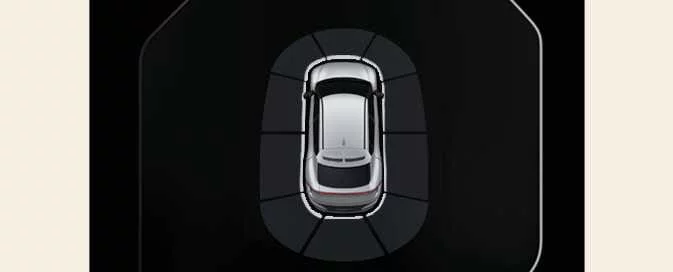
|
When Parking Collision-Avoidance Assist becomes active, a guidance line appears behind the vehicle image in the instrument cluster, indicating that the system is monitoring the surrounding area.
NOTE
Parking Collision-Avoidance Assist operates once after shifting into R (Reverse). To reactivate the system, shift to another gear and then return the transmission to R (Reverse).
Non-operating conditions
Forward/side safety function ➤
Remote Smart Parking Assist 2 (RSPA 2): (if equipped) ➤
Method (1): Using the function with vehicle off
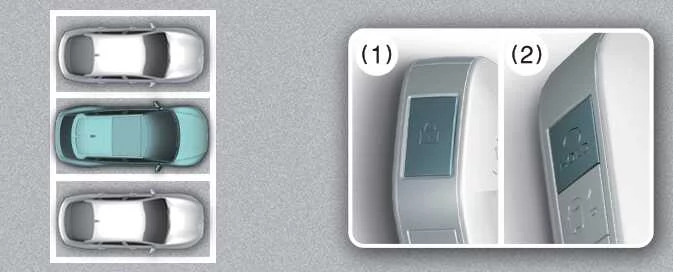
|
-
Stand within the specified operating range of the Kia EV6, press the door lock button (
 ) on the smart key, and confirm that all doors are securely
locked.
) on the smart key, and confirm that all doors are securely
locked. -
Within four seconds, press and hold the Remote Start button (
 ) until the vehicle starts remotely.
For additional information regarding remote vehicle startup, refer to the Kia EV6 Remote Start section of the owner's manual.
Method (2): Using the function with vehicle on
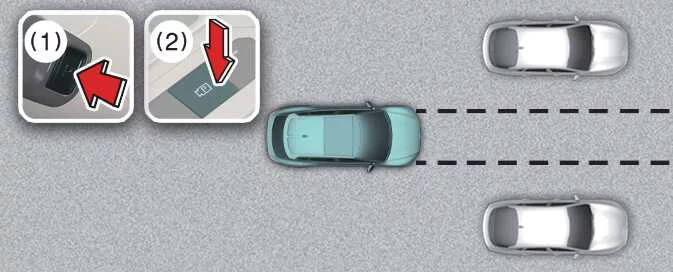
|
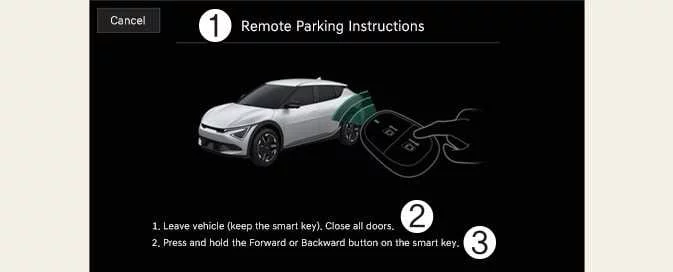
|
-
Remote Parking Instructions
-
1. Exit the Kia EV6 while carrying the smart key and ensure that all doors are completely closed.
-
2. Press and hold either the Forward or Backward button on the smart key.
-
Position the Kia EV6 in front of the desired parking area and shift the transmission into P (Park).
-
Press and hold the Parking/View button (
 ) to activate Smart Parking Assist. A message indicating that
the
vehicle is under remote control will appear on the infotainment display.
) to activate Smart Parking Assist. A message indicating that
the
vehicle is under remote control will appear on the infotainment display. -
Exit the vehicle with the smart key and close all doors before initiating the Remote Operation function.
NOTE
-
You must select Agree on the infotainment display and the infotainment system must be functioning properly before Remote Operation can be used.
-
Method (2) becomes available after the Kia EV6 has been driven at speeds exceeding 3 mph (5 km/h).
-
If Remote Smart Parking Assist has completed a parallel parking maneuver and is activated again, Remote Operation can continue using Method (2).
-
Before activating Remote Operation from outside the vehicle, verify that no smart keys or digital keys remain inside the Kia EV6.
-
The Remote Operation function will not activate if an additional smart key or digital key remains inside the vehicle.
2. Remote Operation
|
-
Press and hold either the Forward button (
 ) or the Backward button (
 ) on the smart key.
-
Remote Smart Parking Assist automatically manages steering input, vehicle speed, and gear selection. The Kia EV6 will move in the direction corresponding to the button being pressed.
-
If the function pauses, operation can resume by pressing and holding the desired direction button again.
-
-
Continue holding the Forward button (
 ) or Backward button (
 ) until the Kia EV6 reaches the intended position.
 -
When the remote maneuver is complete, enter the Kia EV6 with the smart key or press the Remote Start button (
 ) from outside the vehicle.
-
A confirmation message will appear on the infotainment display. The Kia EV6 automatically shifts into P (Park) and engages the electronic parking brake.
-
If the Remote Start button (
 ) is pressed from outside, the vehicle turns
off.
If the driver is seated inside the vehicle, the DRIVE READY state remains active.
) is pressed from outside, the vehicle turns
off.
If the driver is seated inside the vehicle, the DRIVE READY state remains active.
-
NOTE
-
Remote Operation allows the Kia EV6 to be controlled from outside the vehicle using the smart key.
-
Ensure that every smart key is outside the vehicle before activating Remote Operation.
-
The Remote Operation function works only when the smart key remains within approximately 13 ft (4 m) of the Kia EV6. If the vehicle does not respond, verify your distance from the vehicle and try again.
-
Smart key operating range may vary depending on environmental conditions and radio-frequency interference from sources such as communication towers and broadcasting equipment.
-
When Method (1) is used to move the Kia EV6 forward while the vehicle is off, Remote Smart Parking Assist interprets the maneuver as an exit operation. Approximately 4 meters ahead, the system evaluates parking lines, pedestrians, animals, and surrounding obstacles before adjusting steering accordingly.
-
When Method (2) is used while the Kia EV6 is in the DRIVE READY state, the system interprets the operation as a parking maneuver. Remote Smart Parking Assist 2 immediately controls steering to help align and position the vehicle inside the parking space. Performance may vary depending on parking line visibility, obstacle placement, and environmental conditions.
-
When moving backward remotely, both Method (1) and Method (2) first align the steering wheel and then move the Kia EV6 in a straight line.
WARNING
-
Before activating Remote Operation, ensure that all passengers have exited the Kia EV6.
-
Close all windows and sunroofs before leaving the vehicle, and verify that the vehicle is properly switched off before locking the doors.
-
If the Kia EV6 battery becomes discharged or Remote Smart Parking Assist experiences a malfunction while parked in a narrow area, the Remote Operation function may become unavailable. Always select a parking space that provides sufficient room for vehicle access.
-
Depending on parking conditions and surrounding obstacles, the Kia EV6 may not always be able to exit a parking space using Remote Operation.
-
Conditions around the vehicle may change after parking because of moving vehicles or newly introduced obstacles. In such situations, Remote Operation may not function as expected.
Remote Smart Parking Assist operation status
|
Operation Status |
Smart key LED |
Hazard warning light |
|---|---|---|
|
Under control |
Green LED continuously flashes |
- |
|
Pause |
Red LED continuously flashes |
Flashes repeatedly |
|
Off |
Red LED remains illuminated for 4 seconds and then switches off |
Flashes 3 times and turns off |
|
Complete |
Green LED remains illuminated for 4 seconds and then switches off |
Flashes once and turns off |
NOTE
-
Hazard warning light indications may vary depending on local regulations and market specifications.
-
If the smart key is outside the operating range of approximately 13 ft (4 m), the LED indicators may not illuminate or flash. For reliable operation, keep the smart key within the specified range of the Kia EV6.
How to turn off Remote Operation function while operating
-
While using Method 2 and following the guidance displayed on the infotainment screen, press the Parking/View button (
 ) or
shift
the transmission to any gear other than P (Park) to immediately stop the Remote Operation function.
) or
shift
the transmission to any gear other than P (Park) to immediately stop the Remote Operation function. -
Press the Parking Safety button (
 ) or select
Cancel on the infotainment display to deactivate the Remote Smart Parking Assist
function.
) or select
Cancel on the infotainment display to deactivate the Remote Smart Parking Assist
function.
-
Press the Remote Start button (
 ) on the smart key while
the
Kia EV6 is being controlled remotely. The Remote Operation function will immediately stop, and the
vehicle
will automatically switch off.
) on the smart key while
the
Kia EV6 is being controlled remotely. The Remote Operation function will immediately stop, and the
vehicle
will automatically switch off. -
Enter the Kia EV6 with the smart key. Remote Operation will be terminated automatically, while the vehicle will remain powered on and ready for normal driving operation.
The function will pause in the following conditions when:
Whenever Remote Operation is paused, the Kia EV6 will come to a controlled stop. If the condition causing the interruption is removed, the system may automatically resume operation once the appropriate button is pressed again.
-
A pedestrian, animal, bicycle, vehicle, or obstacle is detected in the direction of travel.
-
A door or the liftgate is opened during operation.
-
The Forward button (
 ) or Backward button (
 ) is released and no longer held
continuously.
) is released and no longer held
continuously.
-
Multiple buttons on the smart key are pressed simultaneously.
-
The smart key moves beyond approximately 13 ft (4 m) from the Kia EV6.
-
A button on another smart key is pressed while Remote Operation is active (excluding the Remote Start button).
-
Parking Collision-Avoidance Assist or Rear Cross-Traffic Collision-Avoidance Assist intervenes while the Kia EV6 is moving in reverse.
-
The vehicle has traveled approximately 22 ft (7 m) while the button remains pressed, which is the maximum distance allowed for a single continuous button press.
-
The system detects an environmental condition that requires additional safety verification before continuing movement.
The function will cancel in the following conditions when:
If any of the following situations occur, Remote Operation will be completely cancelled. The Kia EV6 will automatically stop, shift into P (Park), and engage the EPB (Electronic Parking Brake) for safety.
-
The steering wheel is manually turned.
-
The transmission gear is changed while the vehicle is moving.
-
The Electronic Parking Brake (EPB) is activated during vehicle movement.
-
The hood is opened.
-
The brake pedal or accelerator pedal is pressed while all doors remain closed.
-
The smart key is outside the Kia EV6 while the brake pedal is pressed and the driver's door is open.
-
Rapid acceleration or abnormal vehicle movement is detected.
-
The vehicle experiences wheel slip or skidding.
-
A wheel becomes trapped by an obstacle and cannot rotate normally.
-
Approximately 3 minutes and 50 seconds have elapsed since Remote Operation began.
-
The road gradient exceeds the allowable operating range of the system.
-
The function remains paused for more than one minute.
-
The Kia EV6 has traveled more than 45 ft (14 m) during the current Remote Operation session.
-
Steering, braking, gear selection, or drive system controls are not functioning normally.
-
A problem with the smart key is detected or the smart key battery charge is too low.
-
The ABS, TCS, or ESC systems intervene because of slippery road conditions.
-
The Theft Alarm System is activated and begins sounding.
-
The charging door is opened while Remote Operation is active.
-
A critical safety condition is detected that requires immediate termination of Remote Smart Parking Assist operation.
Smart Parking, Remote Parking
The Kia EV6 Remote Smart Parking Assist system provides two primary operating modes: the Smart Parking function,
which is activated using the Parking/View button (), and the Remote Parking function, which can be controlled
externally
using the smart key. Together, these features help simplify parking maneuvers in tight spaces and crowded
parking
environments.
Operating order
The Smart Parking function follows the sequence below:
-
Preparing the Kia EV6 for parking assistance.
-
Searching for a suitable parking space.
-
Selecting the desired parking type and operating mode.
-
Executing the Smart Parking maneuver.
-
Completing the Remote Parking operation if selected.
1. Getting ready for parking ➤
The function will pause in the following conditions when:
Whenever the Parking function is temporarily paused, the Kia EV6 will automatically come to a controlled stop. If the condition that caused the interruption is removed and all operating requirements are satisfied again, the system may resume operation when appropriate.
-
Smart Parking
-
A pedestrian, animal, vehicle, or other obstacle is detected in the intended travel path of the Kia EV6.
-
A door or the liftgate is opened while the Smart Parking function is active.
-
The driver's seat belt is not fastened properly.
-
Parking Collision-Avoidance Assist or Rear Cross-Traffic Collision-Avoidance Assist intervenes while the Kia EV6 is performing a reverse maneuver.
-
The Parking/View button (
 ) is
released and
not continuously pressed as required.
) is
released and
not continuously pressed as required. -
The vehicle is brought to a stop by pressing the brake pedal.
-
-
Remote Parking
-
A pedestrian, animal, vehicle, or obstacle is detected in the direction the Kia EV6 is moving.
-
A door or the liftgate is opened during the Remote Parking process.
-
The Forward button (
 ) or Backward
button (
) or Backward
button ( ) is
released before the
maneuver is completed.
) is
released before the
maneuver is completed. -
Multiple buttons on the smart key are pressed at the same time.
-
The smart key moves beyond the operating range of approximately 13 ft (4 m) from the Kia EV6.
-
A button on another smart key is pressed while the system is operating.
-
Parking Collision-Avoidance Assist or Rear Cross-Traffic Collision-Avoidance Assist activates while the Kia EV6 is reversing.
-
The function will cancel in the following conditions when:
-
Smart Parking
If Smart Parking is cancelled, the Kia EV6 will automatically stop, shift into P (Park), and engage the EPB (Electronic Parking Brake) to secure the vehicle.
-
The steering wheel is manually turned by the driver.
-
The transmission is shifted while the Kia EV6 is moving.
-
The EPB is activated while the vehicle is in motion.
-
The hood is opened.
-
The driver's door is opened while the seat belt is unfastened.
-
Rapid acceleration or abnormal vehicle movement is detected.
-
The Kia EV6 experiences wheel slip or skidding.
-
A wheel becomes trapped against an obstacle and cannot rotate normally.
-
Pedestrians, animals, or obstacles are detected simultaneously in front of and behind the vehicle.
-
Approximately 3 minutes and 50 seconds have elapsed since Smart Parking began operating.
-
The road gradient exceeds the allowable operating range of the system.
-
The function remains paused for longer than one minute.
-
The steering, braking, transmission, or drive systems are not functioning normally.
-
The ABS, TCS, or ESC systems intervene because of slippery road conditions.
-
The charging door is opened.
-
-
Remote Parking
If Remote Parking is cancelled, the Kia EV6 will automatically stop, shift into P (Park), and engage the EPB (Electronic Parking Brake).
-
The steering wheel is manually turned.
-
The transmission gear is changed.
-
The EPB is activated while the vehicle is moving.
-
The hood is opened.
-
The brake pedal or accelerator pedal is pressed while all doors remain closed.
-
The smart key remains outside the Kia EV6 while the brake pedal is pressed and the driver's door is open.
-
Rapid acceleration or abnormal movement is detected.
-
The vehicle begins to skid.
-
A wheel is blocked by an obstacle and cannot move freely.
-
Pedestrians, animals, or obstacles are detected simultaneously at both the front and rear of the Kia EV6.
-
Approximately 3 minutes and 50 seconds have passed since the Remote Parking operation started.
-
The road slope exceeds the designed operating limits of the system.
-
The function remains paused for more than one minute.
-
The steering, braking, gear selection, or drive systems are not functioning correctly.
-
A malfunction is detected with the smart key or the smart key battery charge is critically low.
-
The ABS, TCS, or ESC systems intervene because of reduced traction.
-
The Theft Alarm System is triggered and begins sounding.
-
The charging door is opened while the Remote Parking function is active.
-
Smart Exit
Operating order
The Smart Exit function in the Kia EV6 is designed to assist drivers when leaving a parallel parking space. The operation follows the sequence outlined below:
-
Preparing the Kia EV6 for the exit maneuver.
-
Checking the available surrounding space.
-
Selecting the preferred exit direction.
-
Executing the Smart Exit maneuver automatically.
1. Getting ready for exit
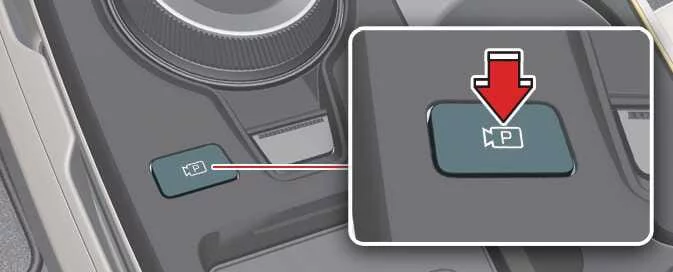
|
-
With the Kia EV6 switched on, firmly press the brake pedal and place the transmission in P (Park) or N (Neutral).
-
Press and hold the Parking/View button (
 ) to activate
Remote Smart
Parking Assist and prepare the Smart Exit feature.
) to activate
Remote Smart
Parking Assist and prepare the Smart Exit feature.
NOTE
-
You must select Agree on the infotainment display, and the infotainment system must be operating normally before the Smart Exit function can be used in the Kia EV6.
-
When the Kia EV6 is moving below 3 mph (5 km/h) and the transmission is shifted into N (Neutral), the Smart Exit feature may be activated.
-
If the system is reactivated after a successful parallel parking maneuver performed by Remote Smart Parking Assist, the Smart Exit function becomes available immediately.
-
For optimal performance, ensure that all cameras and ultrasonic sensors on the Kia EV6 are clean and unobstructed before starting the exit procedure.
2. Checking space
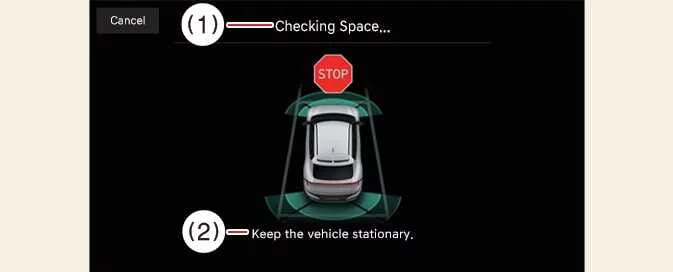
|
|
-
Once the Kia EV6 is stopped with the brake pedal applied, the vehicle's ultrasonic sensors and cameras evaluate nearby obstacles and calculate whether sufficient room is available for a safe exit maneuver.
-
When the space analysis is complete, an audible notification sounds and a confirmation message appears on the infotainment display indicating that the search process has been completed.
WARNING
-
During the space-checking process, if the Kia EV6 detects a potential collision risk involving a pedestrian, animal, vehicle, or other obstacle in the intended exit path, the Smart Exit function may automatically deactivate for safety reasons.
-
Even when the space-checking process is completed successfully, certain objects located within blind-spot areas may not be detected. The driver must visually inspect all surrounding areas before continuing with the maneuver.
NOTE
Because of ultrasonic sensor limitations, environmental influences, reflective surfaces, weather conditions, or surrounding obstacles, the Kia EV6 may occasionally fail to identify a suitable exit space or may identify a location that is not appropriate for a Smart Exit maneuver.
3. Select exiting direction
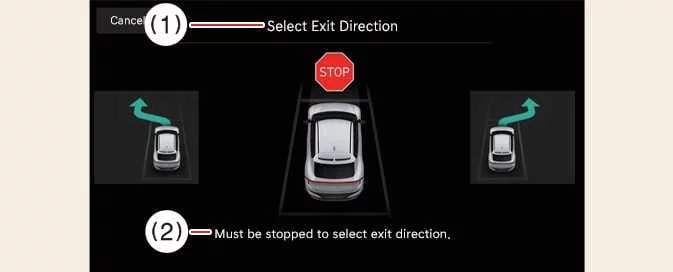
|
|
-
With the brake pedal applied and the Kia EV6 fully stopped, the infotainment display presents all available directions for exiting the parallel parking space.
-
Touch the infotainment screen to select the preferred exit direction and confirm the maneuver.
WARNING
Before selecting an exit direction, carefully verify that the available space is suitable for the Kia EV6. If the detected exit path appears too narrow, obstructed, or unsafe because of nearby vehicles or surrounding conditions, do not use the Smart Exit function and leave the parking space manually.
4. Smart Exit
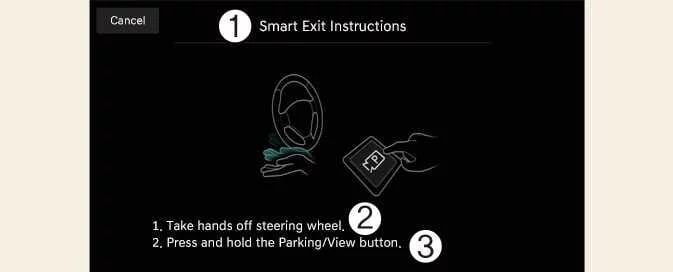
|
|
-
Press the Parking/View button (
 ) while the Kia EV6 remains stationary and the
brake pedal is pressed.
) while the Kia EV6 remains stationary and the
brake pedal is pressed.While holding the Parking/View button (
 ), follow the instructions
displayed on the
infotainment screen and gradually release the brake pedal.
), follow the instructions
displayed on the
infotainment screen and gradually release the brake pedal.-
Once the brake pedal is released, Remote Smart Parking Assist automatically controls steering, vehicle speed, braking, and gear selection to guide the Kia EV6 safely out of the parking space.
-
If the Parking/View button is released during operation, the Kia EV6 will stop and Smart Exit will pause. Press and hold the button again to resume operation.
-
-
Continue holding the Parking/View button (
 ) until the Kia EV6
reaches
the target exit position.
) until the Kia EV6
reaches
the target exit position.-
When the exit maneuver is completed, a confirmation message will appear on the infotainment display informing the driver that the Smart Exit process has finished successfully.
-
NOTE
-
The Smart Exit function will not operate if a door is open or if the driver's seat belt is not fastened.
-
Vehicle speed can be reduced by pressing the brake pedal while Smart Exit is operating. However, pressing the accelerator pedal will not increase the speed of the Kia EV6 during automated control.
-
If the exit maneuver is completed while the brake pedal is pressed, the Kia EV6 will finish the operation with the transmission remaining in D (Drive).
-
If the exit maneuver is completed while the accelerator pedal is pressed, you must release the pedal once before normal accelerator operation resumes.
-
If neither the brake pedal nor accelerator pedal is operated within approximately four seconds after completion, the Kia EV6 automatically shifts into P (Park) and engages the EPB (Electronic Parking Brake).
-
After the Smart Exit function is complete, always check the surroundings of the Kia EV6 carefully before driving away.
-
Environmental conditions, road slope, nearby obstacles, and sensor visibility may influence Smart Exit performance.
Smart Exit operation status
|
Operation status |
Turn signal |
|---|---|
|
Under control |
The turn signal corresponding to the selected exit direction flashes continuously until the Smart Exit maneuver is completed or cancelled. |
How to turn off Smart function while operating ➤
Remote Smart Parking Assist check ➤
Declaration of Conformity: (if equipped)
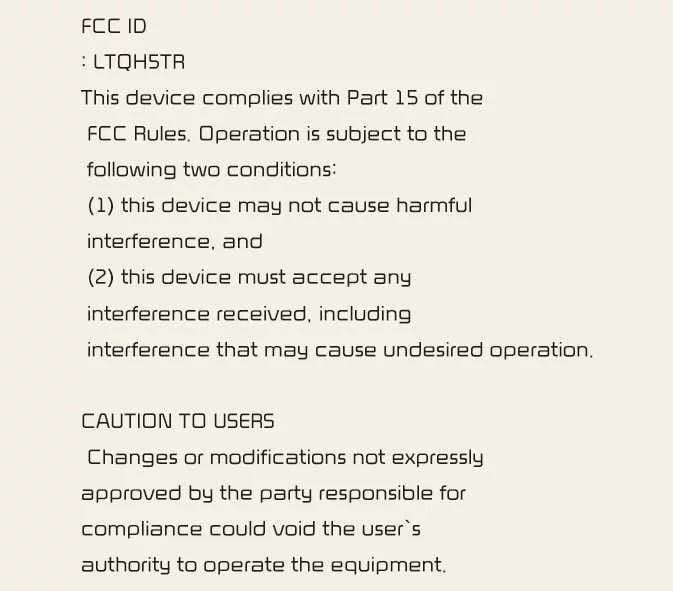
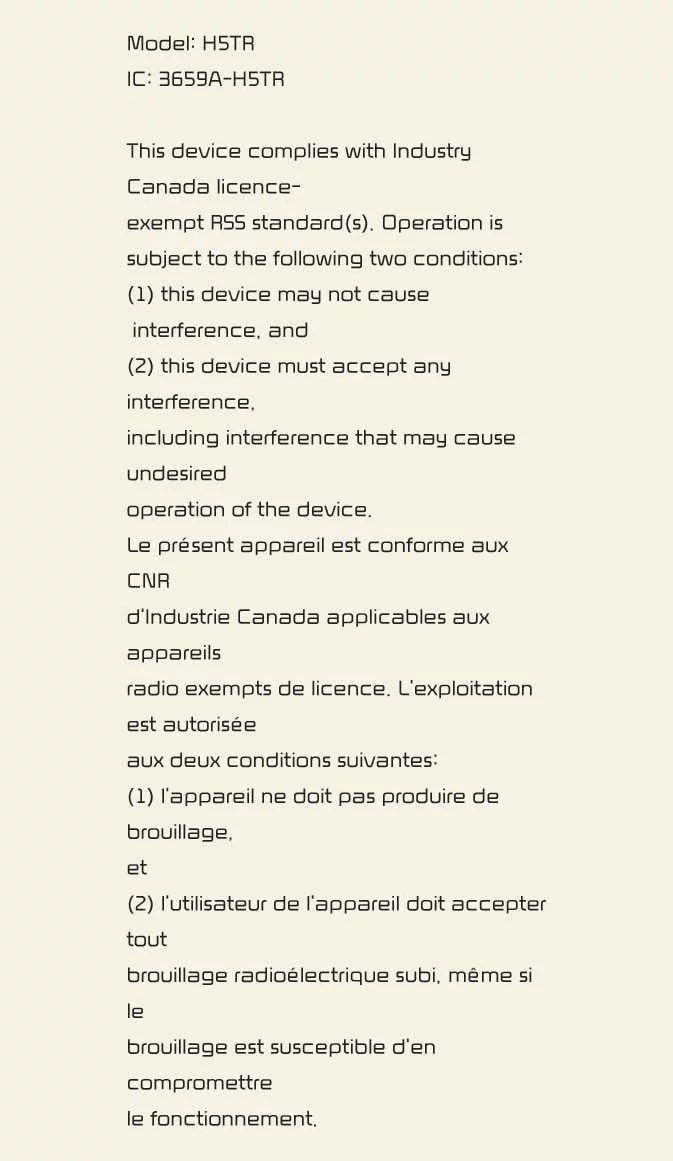
The radio frequency components (Front Radar) comply with the following regulatory requirements:
For the United States and United States territories
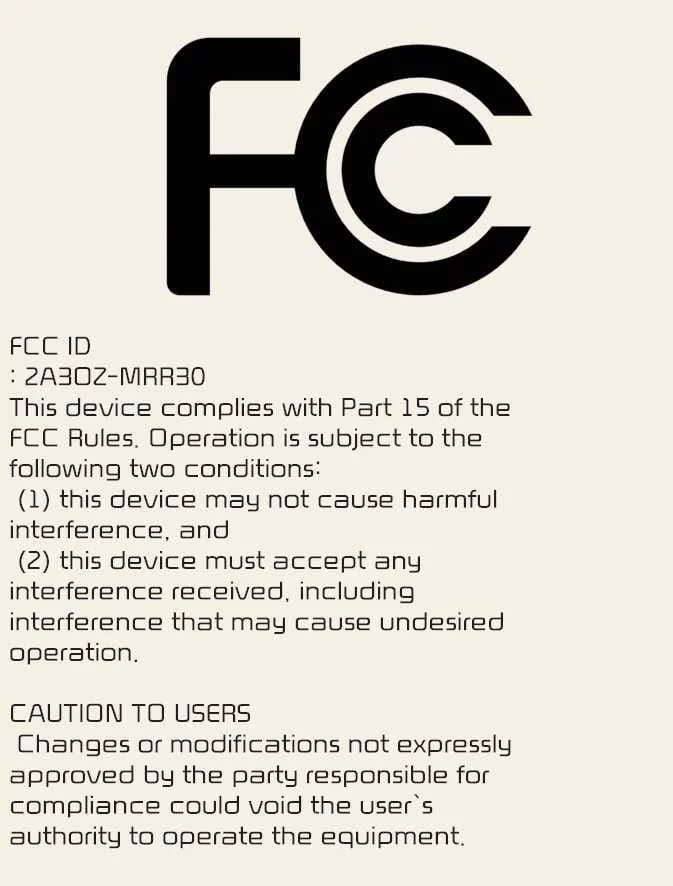
|
For Canada
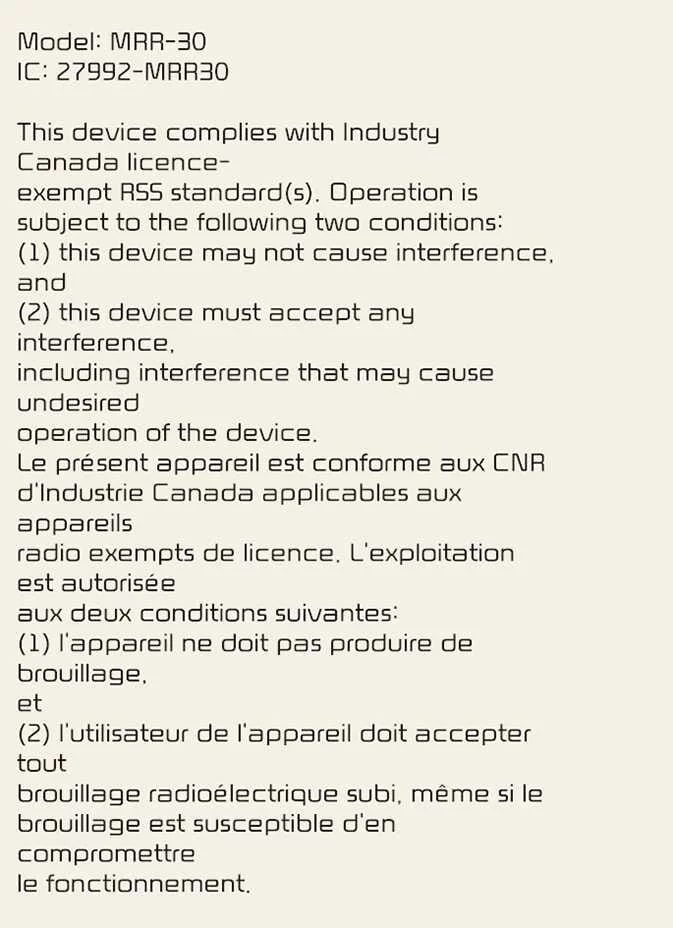
|
The front radar system installed in the Kia EV6 is designed to comply with applicable radio-frequency regulations and supports the safe operation of advanced driver assistance technologies. Compliance certifications may vary depending on market specifications and vehicle configuration.
The radio frequency components (Front Corner Radar / Rear Corner Radar) comply with the following requirements: (if equipped)
For the United States and United States territories

|
|
For Canada
|
These radar-based systems help support various Kia EV6 safety and driver-assistance functions, including collision warning and lane-related technologies. All radio-frequency components are engineered to meet the regulatory requirements applicable in their intended markets.


Other information:
The front view camera of the Kia EV6 is used as the primary detection sensor for the High Beam Assist system. The camera continuously monitors surrounding brightness, approaching vehicles, taillights, and road lighting conditions while driving. Please refer to the Detecting sensor(s) section for additional details regarding applicable sensors and installation locations.To adjust the steering wheel angle, pull the lock release lever (1) downward. Adjust the steering wheel to the preferred angle (2) and move it forward or backward (3) to achieve the ideal driving position. Pull the lock-release lever (1) upward to securely lock the steering wheel into place. Always confirm that the steering wheel is securely locked in the desired position before driving the Kia EV6.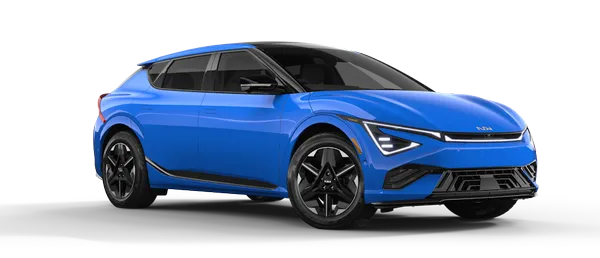
Contents
- Overview
- Forward Collision-avoidance Assist (FCA) (Sensor Fusion)
- Junction Crossing, Lane-Change Oncoming, Lane-Change Side, Evasive Steering Assist function: (if equipped)
- Lane Keeping Assist (LKA)
- Lane Following Assist (LFA)
- Blind-spot Collision-avoidance Assist (BCA) : (if equipped)
- Safe Exit Warning (SEW): (if equipped)
- Safe Exit Assist (SEA): (if equipped)
- Blind-spot View Monitor (BVM): (if equipped)
- Operating conditions
- Manual Speed Limit Assist (MSLA)
- Intelligent Speed Limit Assist (ISLA) : (if equipped)
- Driver Attention Warning (DAW)
- Leading vehicle departure alert function
- Smart Cruise Control (SCC)
- Basic function
- Emergency Stop (ES)
- Navigation-based Smart Cruise Control (NSCC)
- Highway Driving Assist (HDA)
- Rear View Monitor (RVM): (if equipped)
- Operating conditions
- Operating conditions
- Surround View Monitor (SVM): (if equipped)
- Parking
- Parking
- Rear Cross-traffic Collision-avoidance Assist (RCCA): (if equipped)
- Parking Distance Warning (PDW): (if equipped)
- Warning indicator and warning sound
- Warning indicator and warning sound
- Warning indicator and warning sound
- Reverse Parking Collision-Avoidance Assist (PCA): (if equipped)
- Forward/Side/Reverse Parking Collision-Avoidance Assist (PCA): (if equipped)
- Forward/Side Safety Function
- Forward/side safety function
- Remote Smart Parking Assist 2 (RSPA 2): (if equipped)
- Method (1): Using the function with vehicle off
- How to turn off Remote Operation function while operating
- 1. Getting ready for parking
- The function will pause in the following conditions when:
- 1. Getting ready for exit
- How to turn off Smart function while operating
- Remote Smart Parking Assist check
- Declaration of Conformity: (if equipped)
Categories
- Manuals Home
- Kia EV6 Owners Manual
- Questions & Answers
- Video Guides
- Useful Resources
- New on site
- Most important about Kia EV6
- Privacy Policy
