
Kia EV6: Driver assistance system / 1. Getting ready for parking
|
-
With the Kia EV6 powered on, firmly press the brake pedal and shift the transmission into D (Drive) or N (Neutral).
-
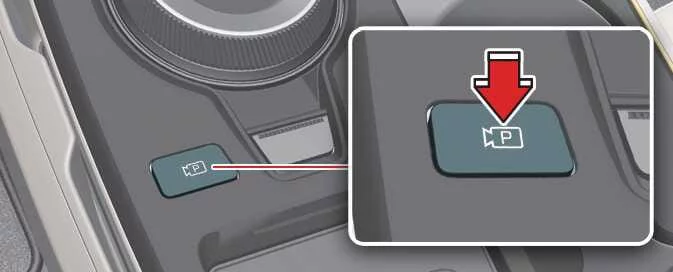
Press and hold the Parking/View button (
 ) to activate Remote Smart
Parking
Assist.
) to activate Remote Smart
Parking
Assist.
NOTE
-
You must select Agree on the infotainment display, and the infotainment system must be operating normally before the Kia EV6 Parking function can be used.
-
If the Kia EV6 has been driven above 3 mph (5 km/h), the Parking function may also be activated while the transmission is in N (Neutral).
-
For optimal performance, ensure that all camera lenses and ultrasonic sensors are clean before activating the parking assistance system.
2. Searching for parking space
|
|
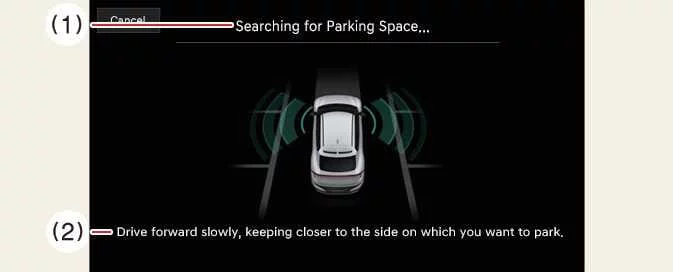
Slowly drive the Kia EV6 forward while maintaining an approximate distance of 40 inches (1 meter) from the row of parking spaces. Remote Smart Parking Assist uses ultrasonic sensors and camera systems to identify parking lines as well as vehicles parked in front, behind, and alongside the target area.
Once the search process has been completed, an audible notification will sound and a parking-space search completion message will appear on the infotainment display. The system will then present available parking types, while the selected parking location is highlighted in the Surround View Monitor top-view display.
NOTE
-
Remote Smart Parking Assist in the Kia EV6 searches for parking spaces located next to parked vehicles or spaces bounded by vehicles at the front or rear.
-
If vehicle speed exceeds 12 mph (20 km/h) while searching, a warning message will advise the driver to slow down. If speed exceeds 18 mph (30 km/h), the Parking function will automatically deactivate.
-
The search process is completed only when sufficient space exists not only for parking, but also for maneuvering the Kia EV6 safely into the selected location.
-
Even after the completion chime sounds, parking-space recognition may be cancelled immediately if surrounding conditions change.
NOTE
-
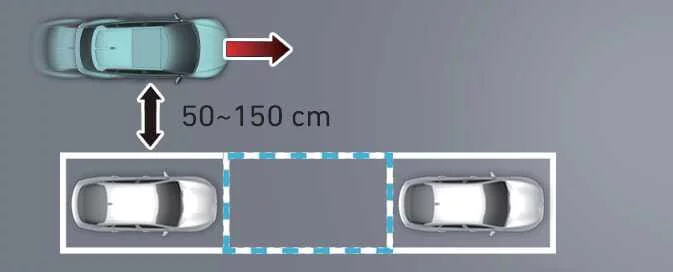
If the distance between the Kia EV6 and the parked vehicles is less than 20 inches (50 cm) or greater than 59 inches (150 cm), the system may not be able to identify a suitable parking space.
-
Failure to maintain a consistent distance from adjacent vehicles may reduce parking-space detection performance.
-
Although diagonal spaces may occasionally be recognized by the system, normal parking assistance may not be available for such locations.
-
Because of ultrasonic sensor limitations or environmental influences, the Kia EV6 may occasionally fail to detect an available parking space or may identify a location that is not suitable for parking.
-
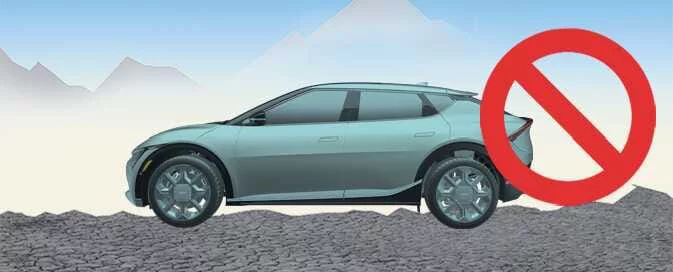
If the parking area is located on an incline or at an unusual angle, the displayed parking-space type may differ from the actual space. In this situation, avoid selecting the displayed parking type and continue searching for another suitable parking location.
-
Weather conditions, nearby obstacles, reflective surfaces, and heavy traffic may also influence parking-space recognition accuracy.
3. Select parking type and operating mode
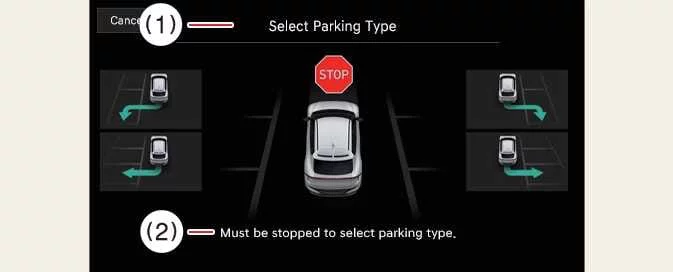
1. Parking type – Perpendicular reverse (Left/Right), Parallel reverse (Left/Right)
|
|
With the Kia EV6 stationary and the brake pedal applied, touch the infotainment screen to choose the desired parking type based on the available space.
NOTE
-
If you continue driving after the parking-type selection screen appears, Remote Smart Parking Assist will return to the previous stage and resume searching for a parking space.
-
If the Parking function is unintentionally cancelled by pressing the Parking/View button (
 ) before selecting a parking type, you can return to
the
selection screen by pressing and holding the button again while the Kia EV6 remains stationary.
) before selecting a parking type, you can return to
the
selection screen by pressing and holding the button again while the Kia EV6 remains stationary. -
The selected parking type should always match the actual parking environment and available maneuvering space.
WARNING
Before selecting a parking type, the driver must personally verify that the identified parking space is safe, legal, and suitable for the dimensions of the Kia EV6.
If the parking space identified by Remote Smart Parking Assist appears too narrow, obstructed, or otherwise unsuitable, do not proceed with the maneuver. Move the Kia EV6 and search for another parking location.
2. Operating mode – Remote Parking, Smart Parking
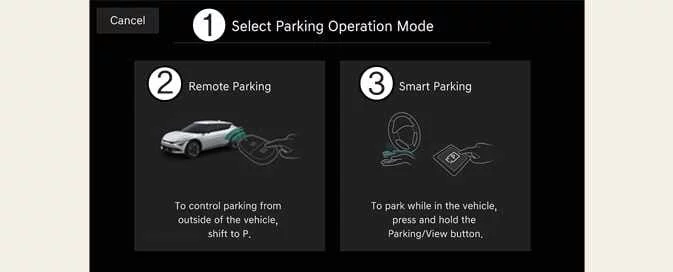
|
Select operating mode |
After a parking type has been selected, the Kia EV6 infotainment display will present both Remote Parking and Smart Parking options. Follow the on-screen instructions carefully to activate and operate Remote Smart Parking Assist according to your preferred parking method.
NOTE
-
When a parking function is selected, Remote Smart Parking Assist provides detailed step-by-step guidance directly on the infotainment display to assist the driver throughout the maneuver.
-
Do not remove your foot from the brake pedal while the Parking Function instructions are being displayed. If the Kia EV6 begins moving before the parking procedure starts correctly, Remote Smart Parking Assist may automatically deactivate.
-
Always verify that the selected parking mode matches the actual parking environment before proceeding.
NOTE
|
|
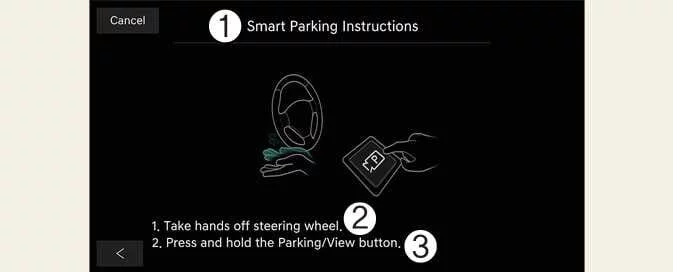
If the Kia EV6 is unable to activate the Remote Parking function because of vehicle conditions, surroundings, or system limitations, only Smart Parking guidance will be displayed on the infotainment screen.
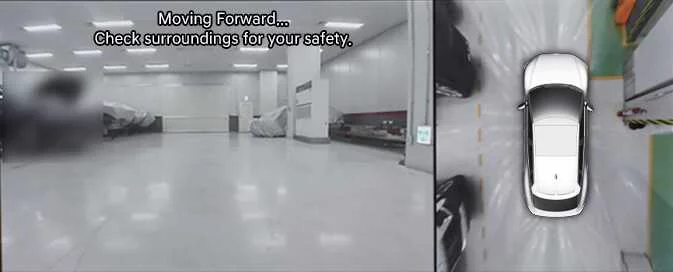
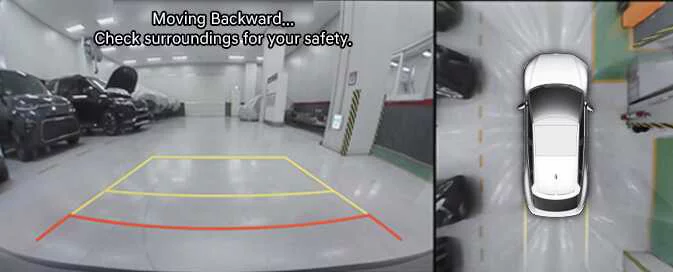
4. Smart Parking
|
|
-
Press the Parking/View button (
 ) while the Kia EV6 is
stationary and the brake pedal is applied.
) while the Kia EV6 is
stationary and the brake pedal is applied. -
Release the brake pedal while continuing to hold the Parking/View button (
 ).
).-
Remote Smart Parking Assist automatically manages steering, vehicle speed, braking, and gear selection throughout the maneuver.
-
If the Parking/View button is released, the Kia EV6 will stop and Smart Parking will pause. Operation can resume by pressing and holding the button again.
-
-
Continue holding the Parking/View button (
 ) until the vehicle reaches
the
desired parking position.
) until the vehicle reaches
the
desired parking position.-
Once the parking maneuver is complete, a notification message will appear on the infotainment display. The Kia EV6 will automatically shift into P (Park) and engage the parking brake.
-
-
If additional repositioning is required after parking, manually complete the maneuver using normal vehicle controls.
NOTE
-
The Smart Parking function will not operate if a door is open or if the driver's seat belt is not fastened.
-
The parking position indicator remains visible on the Surround View Monitor display until the Kia EV6 enters the parking space for the first time during the Smart Parking process.
-
Vehicle speed can be reduced by pressing the brake pedal while Smart Parking is active. However, pressing the accelerator pedal will not increase vehicle speed.
-
Depending on parking lot design and environmental conditions, the Kia EV6 may consider the maneuver complete when the vehicle reaches a wheel stopper or parking barrier.
-
Always monitor the surroundings even while Smart Parking is operating automatically.
5. Remote Parking
|
|
-
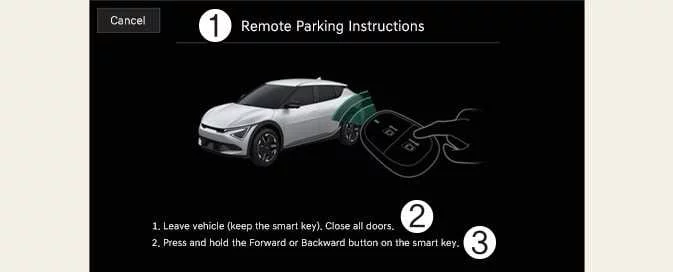
Shift the Kia EV6 transmission into P (Park).
-
Exit the vehicle with the smart key and ensure that all doors are completely closed.
-
Press and hold either the Forward button (
 ) or the Backward button
(
) or the Backward button
( ) on the smart key.
-
Remote Smart Parking Assist automatically controls steering, vehicle speed, braking, and gear changes to guide the Kia EV6 into the selected parking space.
-
If the Forward button (
 ) or Backward button (
 ) is released, the vehicle will stop and
the
Remote Parking process will pause. Press and hold the desired button again to continue the
maneuver.
) is released, the vehicle will stop and
the
Remote Parking process will pause. Press and hold the desired button again to continue the
maneuver.
-
-
Once the Kia EV6 reaches the designated parking position, a confirmation message will appear on the infotainment display indicating that parking has been completed successfully. The vehicle will automatically shift into P (Park), engage the EPB (Electronic Parking Brake), and power down automatically for additional safety and convenience.
-
If further adjustments are required after the automated maneuver is finished, manually reposition the Kia EV6 to achieve the desired final parking position.
Continue holding either the Forward button ( ) or the Backward
button
(
) or the Backward
button
( ) on the smart key until the Kia EV6
completes
the parking maneuver.
) on the smart key until the Kia EV6
completes
the parking maneuver.
NOTE
-
When using the Remote Parking function, verify that all smart keys are outside the Kia EV6 before initiating the maneuver.
-
The Remote Parking feature operates only when the smart key remains within approximately 13 ft (4 m) of the Kia EV6. If the vehicle does not respond after pressing the Remote Forward or Remote Backward button, move closer to the vehicle and try again.
-
The operating range of the smart key may vary depending on environmental conditions and radio-frequency interference from transmission towers, communication equipment, broadcasting stations, or other electronic devices.
-
The parking position indicator remains visible on the Surround View Monitor display until the Kia EV6 enters the parking space for the first time while Remote Parking is active.
-
Depending on the parking environment, wheel stoppers, curbs, or parking barriers may cause the Kia EV6 to determine that the parking maneuver has been completed earlier than expected.
-
Always observe the surroundings of the Kia EV6 during Remote Parking, even when the system is controlling the vehicle automatically.
WARNING
-
Before activating the Remote Parking function, make certain that all passengers have exited the Kia EV6 and are standing in a safe location away from the vehicle.
-
After completing or cancelling Remote Parking, close all windows and the sunroof, ensure the Kia EV6 is completely switched off, and then lock the doors before leaving the vehicle unattended.
-
Never rely exclusively on Remote Smart Parking Assist. The driver remains responsible for continuously monitoring the area around the Kia EV6 and intervening whenever necessary.
Smart Parking function
|
Operation status |
Turn signal |
|---|---|
|
Under control |
The turn signal corresponding to the selected parking direction continues flashing until the Kia EV6 completes the initial reverse movement. |
|
Operation status |
Smart key LED |
Turn signal |
Hazard warning light |
|---|---|---|---|
|
Under control |
Green LED continuously flashes |
The turn signal for the selected parking direction flashes until the first reversing maneuver is completed. |
- |
|
Pause |
Red LED continuously flashes |
- |
Flashes repeatedly |
|
Off |
Red LED remains illuminated for approximately 4 seconds and then switches off |
- |
Flashes three times and then turns off |
|
Complete |
Green LED remains illuminated for approximately 4 seconds and then switches off |
- |
Flashes once and then turns off |
NOTE
-
Hazard warning light indications may vary according to local regulations and market specifications applicable to the Kia EV6.
-
If the smart key is outside the operating range of approximately 13 ft (4 m), the LED indicators may not illuminate or flash. Always keep the smart key within the specified operating distance from the Kia EV6.
-
LED status indications provide quick confirmation of the current operating condition of the Remote Smart Parking Assist system.
How to turn off Parking function while operating
-
Press the Parking Safety button (
 ) or select Cancel on the infotainment
display
to deactivate the Parking function.
) or select Cancel on the infotainment
display
to deactivate the Parking function. -
Press the Parking Safety button (
 ) while the Kia EV6 is in the parking-space search stage
or
parking-type selection stage.
) while the Kia EV6 is in the parking-space search stage
or
parking-type selection stage. -
Shift the transmission into R (Reverse) during the parking-space search, parking-type selection, or operating-mode selection stages to cancel the parking procedure.
-
While the Smart Parking function is operating, press the brake pedal to stop the Kia EV6 immediately. Under these conditions, the EPB (Electronic Parking Brake) will not engage automatically.
-
While Smart Parking is active, press the Remote Start button (
 ) on the smart key to terminate
operation.
) on the smart key to terminate
operation.
NOTE
If you enter the Kia EV6 while carrying the smart key, the Remote Parking function will automatically deactivate. The vehicle will remain powered on and ready for normal driving operation.
Parking function operation status


Other information:
Kia EV6 2022-2026 Owner's Manual: Temperature control (Manual)
Each time the Kia EV6 seat warmer button is pressed, the seat temperature setting changes as follows: Figure 1. Front seat Figure 2. Rear seat (if equipped) The Kia EV6 seat warmer automatically returns to the OFF position whenever the vehicle is restarted.Kia EV6 2022-2026 Owner's Manual: Setting the charge level of the portable charger
Before connecting the plug to a household outlet, check the rated current capacity of the electrical outlet to confirm that it can safely support Kia EV6 portable charging. Connect the portable charger plug securely to a suitable household electrical outlet. Check the display window on the portable charger control box.
Categories
- Manuals Home
- Kia EV6 Owners Manual
- Questions & Answers
- Video Guides
- Useful Resources
- New on site
- Most important about Kia EV6
- Privacy Policy
