
Kia EV6: Driver assistance system / Manual Speed Limit Assist (MSLA)
Contents:
|
|
The Kia EV6 Manual Speed Limit Assist (MSLA) system allows the driver to set a maximum preferred driving speed when it is not desirable to exceed a certain speed limit.
If the Kia EV6 exceeds the preset speed limit, the Manual Speed Limit Assist system provides a warning by flashing the set speed indicator and sounding an audible chime until the vehicle speed returns within the selected limit.
This Kia EV6 feature is especially useful during highway driving, construction zones, urban speed-controlled areas, or long-distance travel where maintaining a consistent speed is important.
Manual Speed Limit Assist operation
Setting the speed limit
-
While driving the Kia EV6 at the desired speed, press and hold the Driving Assist (
 )
button.
)
button.The Speed Limit (
 ) indicator will appear on the instrument cluster.
-
Push the (+) switch upward or the (-) switch downward and release it at the preferred speed.
The Kia EV6 set speed increases or decreases in increments of 1 mph (1 km/h).
Push and hold the (+) or (-) switch to increase or decrease the speed to the nearest multiple of 5 mph (10 km/h), after which the speed adjusts continuously in 5 mph (10 km/h) increments.
-
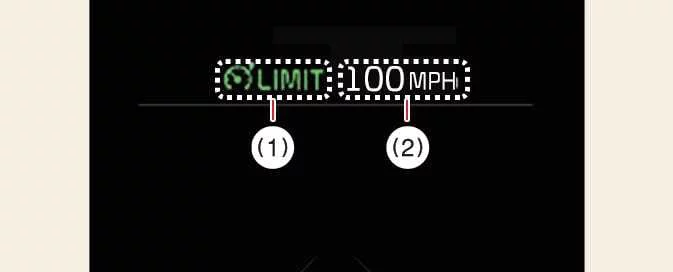
The selected Kia EV6 speed limit will be displayed on the instrument cluster (1).
If you need to temporarily exceed the preset speed limit, depress the accelerator pedal.
The Kia EV6 set speed limit indicator will blink and an audible chime will sound until the vehicle speed returns within the selected limit.

NOTE
When the Kia EV6 accelerator pedal is not depressed beyond the pressure point, the vehicle speed remains within the selected speed limit range.
Temporarily pausing Manual Speed Limit Assist
|
|
Press the () switch to temporarily pause the Kia EV6 set
speed
limit.
The selected speed limit will turn OFF, but the Speed Limit indicator () remains displayed on the
instrument
cluster.
Resuming Manual Speed Limit Assist
|
|
To resume Kia EV6 Manual Speed Limit Assist after the function has been paused, operate the (+), (-), or () switch.
If you push the (+) switch upward or the (-) switch downward, the Kia EV6 current driving speed displayed on the instrument cluster will become the new set speed limit.
If you press the () switch, the Kia EV6 resumes the previously preset speed
limit.
Turning OFF Manual Speed Limit Assist
|
|
Press the Kia EV6 Driving Assist () button to turn Manual Speed Limit Assist OFF.
The Speed Limit indicator () will disappear from the instrument cluster display.
WARNING
Take the following precautions when using Kia EV6 Manual Speed Limit Assist:
-
Always set the Kia EV6 speed below the legal speed limit applicable in your country or region.
-
Keep Kia EV6 Manual Speed Limit Assist turned OFF whenever the function is not needed to avoid unintentionally setting a speed limit.
Always confirm that the Speed Limit indicator (
) is OFF. -
Kia EV6 Manual Speed Limit Assist is not a substitute for attentive and safe driving practices.
The driver remains fully responsible for controlling vehicle speed and responding to unexpected road situations.
-
Always pay close attention to traffic conditions, weather, pedestrians, road signs, and surrounding vehicles while operating the Kia EV6.


Other information:
Kia EV6 2022-2026 Owner's Manual: When the Approach unlock is activated
When approaching the Kia EV6 within approximately 1 ft. (30 cm) of either the driver’s or front passenger’s door while carrying the registered smart key, the exterior door handles automatically extend outward and the doors unlock for convenient entry. At the same time, the hazard warning lights flash twice and the confirmation chime sounds twice, notifying the driver that the Kia EV6 has recognized the smart key and unlocked the vehicle successfully.Kia EV6 2022-2026 Owner's Manual: Front seat adjustment for manual seat: (if equipped)
Forward/backward seat adjustment Seat cushion height adjustment Seatback recline angle adjustment Use the manual adjustment levers located on the outer side of the Kia EV6 seat cushion to adjust the front seat position. Proper seat adjustment improves driving comfort, visibility, and control of the Kia EV6 steering wheel, pedals, and dashboard controls.
Contents
Categories
- Manuals Home
- Kia EV6 Owners Manual
- Questions & Answers
- Video Guides
- Useful Resources
- New on site
- Most important about Kia EV6
- Privacy Policy
