
Kia EV6: Driver assistance system / Parking
Contents:
While parking, the rear view of the Kia EV6 Surround View Monitor is activated under the following conditions:
-
The gear is in P (Park), N (Neutral), or D (Drive), the Kia EV6 speed is below 6 mph (10 km/h), and the Parking/View button (1) is pressed. The driver can then press the view switching button (2) to select the rear camera view.
-
The gear selector is shifted into R (Reverse).
Press the view switching button (2) on the Surround View Monitor screen to select rear view, rear top view, rear side view, or rear wide-angle view.
While parking, the rear view function of the Kia EV6 Surround View Monitor turns OFF under the following conditions when the vehicle is in P (Park), N (Neutral), or D (Drive):
-
The gear is shifted from N (Neutral) or D (Drive) into P (Park).
-
The Parking/View button (1) is pressed again.
-
The back button (3) on the Surround View Monitor screen is pressed.
-
The infotainment system power button (4) is pressed.
-
The Kia EV6 speed exceeds 6 mph (10 km/h).
When the Kia EV6 is in R (Reverse), the rear view function of the Surround View Monitor turns OFF under the following condition:
-
The gear is shifted to P (Park).
NOTE
-
When the rear view is activated during parking, the Kia EV6 automatically displays the most recently used camera view.
-
When the gear selector is shifted into R (Reverse), the video display remains active even if the infotainment system power button (4) is pressed.
3D View function
|
|
The Kia EV6 Surround View Monitor 3D View function displays the vehicle from multiple angles to provide a more realistic and detailed parking perspective. To select a different viewing angle, press the 3D View icon on the Surround View Monitor display. Press the 3D View icon again to reset the viewing angle.
The Kia EV6 Surround View Monitor 3D View function activates under the following conditions:
-
The gear is in P (Park), N (Neutral), or D (Drive) while the Kia EV6 speed remains below 6 mph (10 km/h), or when the 3D View button (2) is selected while the Surround View Monitor is active in R (Reverse) mode.
The Kia EV6 Surround View Monitor 3D View function turns OFF while parking under the following conditions:
-
The gear is shifted from N (Neutral) or D (Drive) into P (Park).
-
The Parking/View button (1) is pressed.
-
The back button (3) on the Surround View Monitor screen is pressed.
-
The infotainment system power button (4) is pressed.
-
The Kia EV6 speed exceeds 6 mph (10 km/h).
When the Kia EV6 is in R (Reverse), the 3D View function of the Surround View Monitor turns OFF under the following condition:
-
The gear is shifted to P (Park).
NOTE
-
The 3D View mode does not display parking guidelines.
-
The top-view screen displayed together with the Front/Rear View or 3D View combines original images from the four wide-angle cameras to create a 360-degree overhead image around the Kia EV6.
-
Top View is not displayed when Front Wide View or Rear Wide View modes are selected.
-
You can zoom in or out on the Kia EV6 top-view image by pinching within the top-view area on the screen.
Surround View Monitor malfunction and limitations
Surround View Monitor malfunction
If there is a malfunction with the Kia EV6 Surround View Monitor system, the display may show a green, blue, or black screen instead of the normal camera image.
If the Kia EV6 Surround View Monitor does not operate properly, the screen flickers, freezes, or the camera image is unclear or missing, have the vehicle inspected by an authorized Kia dealer or qualified service center.
Limitations of Surround View Monitor
-
The screen may display abnormally, and a warning icon may appear in the upper left corner of the display under the following conditions:
-
The liftgate is opened.
-
The driver’s door or front passenger door is opened.
-
The outside rearview mirrors are folded inward.
-
WARNING
-
Always visually check for objects, pedestrians, obstacles, or vehicles around the Kia EV6 before moving the vehicle. Objects displayed on the screen may appear different from their actual position or distance.
-
The Kia EV6 Rear View Monitor may display objects at a different distance than they actually are because of wide-angle camera image correction. In addition, rear parking guidelines may not display accurately if the vehicle is tilted due to heavy cargo or uneven loading conditions. Always directly check the surroundings before maneuvering.
-
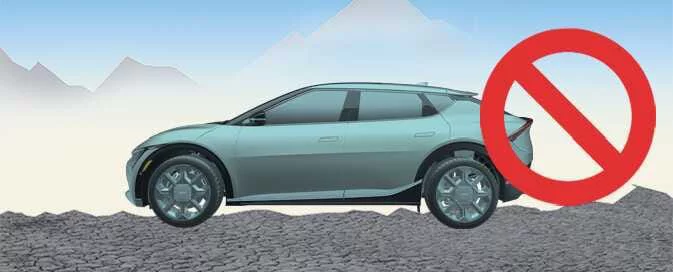
The Kia EV6 Surround View Monitor system is designed primarily for use on level surfaces. When driving on uneven terrain, steep inclines, curbs, ramps, or speed bumps, the displayed image may appear distorted or inaccurate.
-
Always keep the camera lenses clean and free from snow, mud, rain, or foreign materials. Dirty camera lenses may reduce image quality and affect proper operation of the Kia EV6 Surround View Monitor. Do not use strong chemical cleaners, gasoline, acetone, or highly alkaline detergents because these substances may damage the camera lenses.
-
Driving the Kia EV6 with the liftgate open is not recommended. If driving with the liftgate open is unavoidable, use extreme caution and continuously monitor the surrounding environment.


Other information:
Kia EV6 2022-2026 Owner's Manual: 1. Getting ready for parking
With the Kia EV6 powered on, firmly press the brake pedal and shift the transmission into D (Drive) or N (Neutral). Press and hold the Parking/View button () to activate Remote Smart Parking Assist. NOTE You must select Agree on the infotainment display, and the infotainment system must be operating normally before the Kia EV6 Parking function can be used.Kia EV6 2022-2026 Owner's Manual: Interior general precautions
CAUTION Avoid allowing chemicals such as perfume, cosmetic oils, sunscreen, hand sanitizers, lotions, air fresheners, or similar products to come into contact with interior surfaces of the Kia EV6. These substances may cause staining, discoloration, surface deterioration, or permanent damage. If accidental contact occurs, remove the substance immediately using a soft cloth.
Contents
Categories
- Manuals Home
- Kia EV6 Owners Manual
- Questions & Answers
- Video Guides
- Useful Resources
- New on site
- Most important about Kia EV6
- Privacy Policy
