
Kia EV6: Driver adjustments
Contents:
- Steering wheel
- Manual type
- Mirrors
- Automatic-Dimming Night Vision Safety™ (NVS®) Mirror
- 1) Programming Preparation
- 1) Operating HomeLink®
- 1) Erasing and Reprogramming a Single HomeLink® Button:
- FCC (USA) and ISED (Canada)
- Adjusting the mirror height
- Integrated memory system: (if equipped)
- Resetting integrated memory system
- Exiting the vehicle:
- Instrument cluster
- LCD display
- Average energy economy (1)
- Range guide
- Door, hood, liftgate, sunroof open warning display
- Warning and indicator lights
- Service warning light
- Ready indicator light (READY)
- Head-Up Display (HUD) : (if equipped)
- Lighting
- Position & Taillamp
- Detection sensor
- Wipers and washers
Steering wheel ➤
Manual type ➤
Mirrors ➤
Automatic-Dimming Night Vision Safety™ (NVS®) Mirror
The NVS® Mirror automatically minimizes glare by monitoring light levels at both the front and rear of the Kia EV6. Objects blocking the mirror sensors may reduce automatic dimming performance.
For additional information regarding NVS® mirrors and related technologies, please visit the Gentex website: www.gentex.com
The mirror automatically darkens whenever glare from following vehicles is detected behind the Kia EV6.
The automatic dimming feature defaults to the ON position each time the vehicle is started.
Integrated HomeLink® Wireless Control System
The HomeLink® Wireless Control System provides a practical replacement for up to three handheld radio-frequency (RF) transmitters used to operate compatible devices such as garage door openers, electric gates, security systems, entry locks, and home lighting controls.
This integrated convenience feature enhances the premium technology experience of the Kia EV6 and reduces the need for separate remote transmitters inside the vehicle.
NOTE
When the Kia EV6 is parked outside the garage, the HomeLink system will operate ONLY when the vehicle is in the POWER ON or DRIVE READY position.
NOTE
Before programming HomeLink to a garage door opener or gate operator, ensure that all people, pets, and objects are safely out of the operating area to prevent injury or property damage. When programming a garage door opener, park the Kia EV6 outside the garage.
Do not use HomeLink with garage door systems lacking safety stop and reverse functions required by U.S. federal safety regulations. This includes garage door openers manufactured before April 1, 1982. A garage door opener that cannot detect an obstruction and reverse direction does not comply with modern safety standards. For additional information, visit www.homelink.com, or contact HomeLink customer support at 1-800-355-3515.
For faster and more reliable programming, it is recommended to install a fresh battery in the handheld transmitter being programmed to the HomeLink system.
1. Programming HomeLink®
The following instructions explain how to program the HomeLink system in the Kia EV6. If you experience difficulty during setup, refer to the HomeLink website or contact HomeLink customer support before visiting a dealership.
-
Visit the HomeLink website at: www.homelink.com. At the top of the page, select your vehicle manufacturer and model to access setup instructions, YouTube tutorial videos, and additional support information.
-
If accessing the HomeLink website using a mobile device, scan the QR code shown below.

-
Or contact HomeLink customer support directly at 1-800-355-3515
(Please have both the Kia EV6 vehicle information and the garage opener or device model information available before calling.)
1) Programming Preparation ➤
1) Operating HomeLink®
-
Press and release the desired programmed HomeLink button (1, 2, or 3) to activate the connected garage door opener, gate operator, security system, or compatible home automation device.
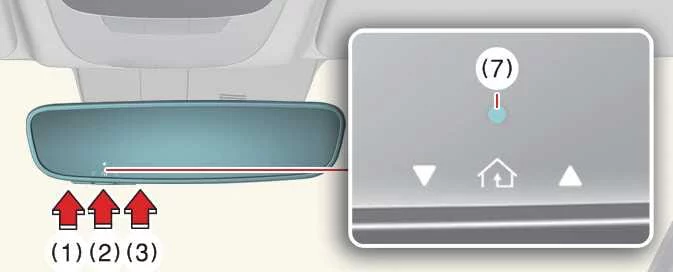
The integrated HomeLink® system in the Kia EV6 provides convenient wireless access to compatible garage doors, gates, and smart home devices directly from the vehicle interior without requiring separate remote transmitters.
NOTE
The HomeLink indicator light (7) should illuminate green, either solid or flashing, and the programmed device should respond accordingly.
If the connected device does not operate, the HomeLink programming procedure may not have been completed successfully. In this case, repeat the programming process for the desired HomeLink button.
2) Two-Way Communication Display Behavior
-
Press and release one of the programmed HomeLink buttons (1, 2, or 3).
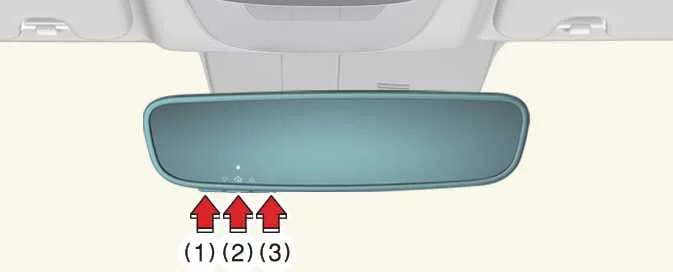
-
If your garage door opener supports Two-Way Communication functionality, indicators (4) and (6) will operate as described below.
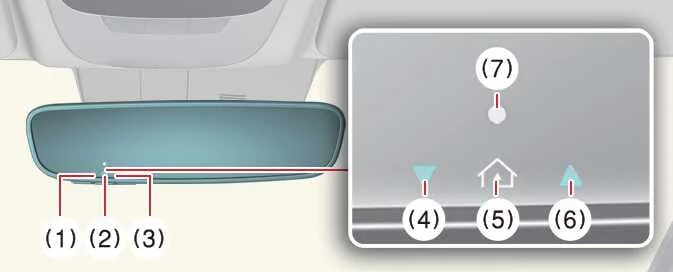
-
If indicator (4) flashes orange, the garage door is currently closing.
-
Indicator (4) changes to solid green once the garage door has fully closed.
-
If indicator (6) flashes orange, the garage door is currently opening.
-
Indicator (6) changes to solid green after the garage door has fully opened.
-
If indicator (4) or (6) does not illuminate green, the last garage door status signal may not have been received correctly. In this situation, the Kia EV6 HomeLink mirror attempts to retrieve and display the most recently known garage door status for several seconds.
-
The Two-Way Communication feature of the Kia EV6 improves convenience by allowing the driver to confirm garage door movement and final status directly through the mirror indicators.
3) Recalling Garage Door Status
The HomeLink mirror with Two-Way Communication technology allows the Kia EV6 driver to review the last stored status message received from the garage door opener.
To recall the last recorded status of the most recently activated device, press buttons “1 and 2� OR buttons “2 and 3� simultaneously.
-
If indicator (4) illuminates solid green, the last activated garage door or connected device was successfully closed.
-
If indicator (6) illuminates solid green, the last activated garage door or connected device was successfully opened.
This feature provides additional convenience and reassurance when operating garage doors remotely using the Kia EV6 HomeLink® system.
3. Erasing HomeLink® Buttons
1) Erasing and Reprogramming a Single HomeLink® Button:
-
Press and hold the specific HomeLink button that you want to erase and reprogram. Do not release the button during this step.
-
The HomeLink indicator light (7) will illuminate solid green. Release the button once the indicator light begins flashing orange, which usually occurs after approximately 20 seconds.
-
Continue with the instructions found in the “Programming a New HomeLink Button� section to complete setup of the new device.
NOTE
If you do not complete programming of a new device after erasing the button, the HomeLink system may automatically restore the previously stored programming information.
The Kia EV6 HomeLink system allows selective reprogramming of individual buttons without affecting other stored HomeLink settings.
2) The following instructions will erase ALL HomeLink® programming from ALL buttons:
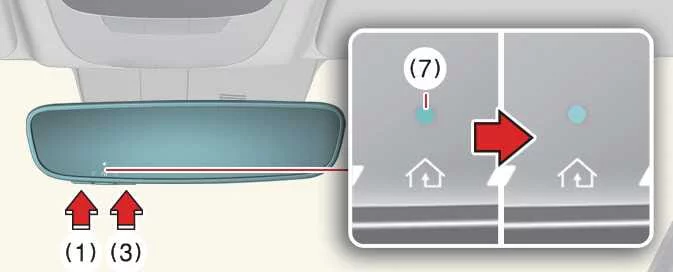
|
-
Press and hold HomeLink buttons (1) and (3) simultaneously.
-
The HomeLink indicator light (7) will remain solid orange for approximately 10 seconds.
-
Release both buttons once the HomeLink indicator light (7) changes to green and begins flashing rapidly.
-
At this point, all three HomeLink buttons (1), (2), and (3) in the Kia EV6 will be completely cleared of all stored programming information.
Performing a full HomeLink reset may be useful when transferring ownership of the Kia EV6 or when replacing connected garage door systems and wireless devices.
Information
HomeLink and the HomeLink House logo are registered trademarks of Gentex Corporation.
The myQ logo is a registered trademark of The Chamberlain Group, Inc.
FCC (USA) and ISED (Canada)
This device complies with FCC Part 15 regulations and Innovation, Science, and Economic Development Canada RSS-210 requirements. Operation is subject to the following two conditions: (1) this device may not cause harmful interference, and (2) this device must accept any interference received, including interference that may cause undesired operation.
WARNING: The transmitter system installed in the Kia EV6 has been tested and confirmed to comply with FCC and ISED requirements. Changes or modifications not expressly approved by the responsible compliance authority could void the user’s authority to operate the equipment.
This equipment complies with FCC and ISED radiation exposure limits established for uncontrolled environments. End users must follow all operating instructions to ensure proper RF exposure compliance.
The transmitter should remain at least 8 inches (20 cm) away from the user and must not be positioned together with any other antenna or transmitter device.
The advanced wireless communication technologies integrated into the Kia EV6 are designed to provide safe, reliable, and convenient operation while meeting applicable regulatory standards in both the United States and Canada.
HomeLinkâ„¢ 5 programming flow chart
Digital center mirror: (if equipped)
The Kia EV6 Digital Center Mirror system utilizes the vehicle’s rear-mounted camera to display a live rearward image directly on the digital center mirror screen. This advanced system helps maintain rear visibility even when the rear window view is partially obstructed by passengers, headrests, cargo, or luggage.
The Digital Center Mirror in the Kia EV6 enhances rearward awareness and provides a modern driving experience by combining traditional mirror functionality with high-resolution camera technology.
WARNING
-
Failure to follow all warnings and operating instructions related to the Digital Center Mirror may result in a serious accident or personal injury.
-
The Digital Center Mirror is intended as a convenience feature only and is not a replacement for safe driving practices or proper vehicle operation. Certain areas around the vehicle may not be visible through the camera system. Always check surrounding traffic conditions and blind spots before driving the Kia EV6.
-
Do not attempt to operate or adjust the Digital Center Mirror while driving. Doing so may distract the driver, reduce concentration, and increase the risk of losing vehicle control or causing an accident.
-
Do not disassemble, alter, or modify the Digital Center Mirror, rear camera unit, or related wiring components. Unauthorized modifications may cause electrical malfunction, fire, or safety hazards. If smoke, unusual odor, or abnormal operation is noticed, stop using the system immediately and have the Kia EV6 inspected by an authorized Kia dealer.
-
NOTE
-
Always adjust the Digital Center Mirror before beginning to drive the Kia EV6.
-
First switch the system to the conventional optical rearview mirror mode while sitting in the normal driving position. Adjust the mirror to achieve the clearest possible rearward view through the rear window.
-
Push the lever fully to switch into Digital Mirror mode (camera view mode) and adjust the display settings as necessary. Driving without proper adjustment may make it difficult to clearly view the digital display because of reflections or viewing angle issues.
-
-
If the Digital Center Mirror system malfunctions or the display becomes difficult to view, immediately switch the system back to conventional rearview mirror mode.
-
Strong sunlight or high-beam headlights from vehicles behind the Kia EV6 may create glare or reflections on the Digital Center Mirror screen. In such situations, switching temporarily to conventional mirror mode may improve visibility.
-
If the rear camera lens (1) becomes dirty or contaminated, image quality may decrease. Clean the lens carefully using a soft cloth or cotton swab lightly dampened with clean water.
The advanced camera mirror system of the Kia EV6 helps provide improved rear visibility while contributing to the vehicle’s high-tech interior design and driver convenience features.
System component
|
|
-
Icon display area
Displays system icons and provides adjustment settings for brightness and display tilt.
-
Lever
Used to switch between digital camera mirror mode and standard optical mirror mode.
-
Menu button
Press this button to display the icon menu area and select settings such as brightness or tilt adjustment.
-
Select/adjust button
Used to modify and confirm the selected display settings or adjustment values.
-
Camera indicator
Indicates that the rear camera system of the Kia EV6 is operating normally and transmitting video correctly.
-
HomeLink buttons
Used for operation of the integrated “HomeLink® Universal Transceiver� system and compatible wireless devices.
The Digital Center Mirror controls are designed for intuitive operation and allow the Kia EV6 driver to customize display settings according to personal driving preferences and lighting conditions.
Changing the mode
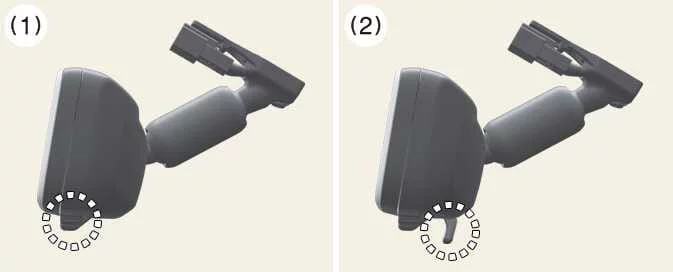
The Digital Center Mirror mode can be changed whenever the vehicle is in the ON position.
|
-
Pull the mode select lever fully to switch to Digital Center Mirror mode (1), also known as camera view mode.
In this mode, the system displays a live camera image of the area behind the Kia EV6. The camera operation indicator will also appear on the mirror display.
-
Push the mode select lever fully to switch back to standard optical inside rearview mirror mode (2).
This action turns off the Digital Center Mirror display and allows the mirror to function as a traditional reflective rearview mirror.
The ability to quickly alternate between digital and optical mirror modes provides the Kia EV6 driver with added flexibility in changing weather, lighting, or driving conditions.
Adjusting the mirror height ➤
Integrated memory system: (if equipped) ➤
Resetting integrated memory system ➤
Exiting the vehicle:
The driver’s seat and steering wheel move automatically when the EV button is in the OFF position, the vehicle is shifted into P (Park), and the driver’s door is opened.
-
Driver’s seat: Automatically moves rearward according to the distance selected in the infotainment Setup menu.
However, the driver’s seat may not move fully rearward if insufficient space exists between the front and rear seats.
-
Steering wheel: Automatically moves upward to improve entry and exit space.
The Kia EV6 Seat Easy Access function is designed to improve comfort and make entering or exiting the vehicle more convenient in daily driving situations.
Entering the vehicle:
The driver’s seat and steering wheel automatically return to their previous driving positions when the EV button is pressed to the POWER ON or DRIVE READY position, or when the driver carrying the smart key closes the driver’s door while the EV button remains in the OFF position.
-
Driver’s seat: Returns automatically to the previously stored driving position.
-
Steering wheel: Returns automatically to the stored driving position.
You can customize the Seat Easy Access settings through the infotainment system menu of the Kia EV6.
-
Driver’s seat: Select Setup > Vehicle > Seat > Seating Easy Access > Driver Seat Easy Access > Extended/ > Normal > /Off
-
Steering wheel: Select Setup > Vehicle > Seat > Seating Easy Access > Steering Easy Access
TIP
The Kia EV6 infotainment menu structure may change after future software updates. For additional details, refer to the infotainment user manual or quick reference guide available within the vehicle system.
Instrument cluster ➤
LCD display ➤
Average energy economy (1)
The average energy economy of the Kia EV6 is calculated based on the total driving distance and energy usage since the last reset.
-
On vehicle start: The information automatically resets when the driver’s door is opened after the vehicle has been turned off, or after approximately 3 minutes following vehicle shutdown.
-
After recharging: The displayed information automatically resets after the Kia EV6 battery is recharged.
-
Manually: Press and hold the OK button on the steering wheel while the average energy economy screen is displayed.
The average energy economy display helps Kia EV6 drivers monitor driving efficiency and optimize battery usage.
Instant energy economy (2)
Displays the real-time energy economy of the Kia EV6 during the previous several seconds whenever vehicle speed exceeds approximately 6 mph (10 km/h).
Driving assist view
|
|
This mode displays the operational status of the following Kia EV6 driver assistance systems:
-
Lane Keeping Assist
Blind-Spot Collision-Avoidance Assist
Smart Cruise Control
Lane Following Assist
Highway Driving Assist
The Driving Assist view provides quick access to important safety and convenience system information while driving.
Navigation view
|
|
This mode displays navigation guidance, route information, and current navigation system status for the Kia EV6.
Utility information view
Range guide ➤
Door, hood, liftgate, sunroof open warning display ➤
Warning and indicator lights ➤
Service warning light ➤
Ready indicator light (READY) ➤
Head-Up Display (HUD) : (if equipped) ➤
Lighting ➤
Position & Taillamp ➤
Detection sensor ➤
Wipers and washers ➤


Other information:
Kia EV6 2022-2026 Owner's Manual: Adjusting the mirror height
The Kia EV6 allows the driver to adjust the height and position of the rearview mirror to match individual driving posture and seating preferences. For the best possible visibility, adjust the rearview mirror while seated in your normal driving position before operating the vehicle. To adjust the mirror angle manually, switch the system to optical mirror mode and carefully move the rearview mirror upward or downward until the desired viewing angle is achieved.Kia EV6 2022-2026 Owner's Manual: 1. Manufacturer or Brand Identification
The tire sidewall of your Kia EV6 displays the name of the manufacturer or the tire brand. This information helps identify the tire model and ensures that replacement tires meet the original equipment specifications recommended for the Kia EV6. 2. Maximum Permissible Inflation Pressure This value indicates the highest air pressure that may safely be placed inside the tire.
Contents
- Steering wheel
- Manual type
- Mirrors
- Automatic-Dimming Night Vision Safety™ (NVS®) Mirror
- 1) Programming Preparation
- 1) Operating HomeLink®
- 1) Erasing and Reprogramming a Single HomeLink® Button:
- FCC (USA) and ISED (Canada)
- Adjusting the mirror height
- Integrated memory system: (if equipped)
- Resetting integrated memory system
- Exiting the vehicle:
- Instrument cluster
- LCD display
- Average energy economy (1)
- Range guide
- Door, hood, liftgate, sunroof open warning display
- Warning and indicator lights
- Service warning light
- Ready indicator light (READY)
- Head-Up Display (HUD) : (if equipped)
- Lighting
- Position & Taillamp
- Detection sensor
- Wipers and washers
Categories
- Manuals Home
- Kia EV6 Owners Manual
- Questions & Answers
- Video Guides
- Useful Resources
- New on site
- Most important about Kia EV6
- Privacy Policy
