
Kia EV6: Driver adjustments / Instrument cluster
Contents:
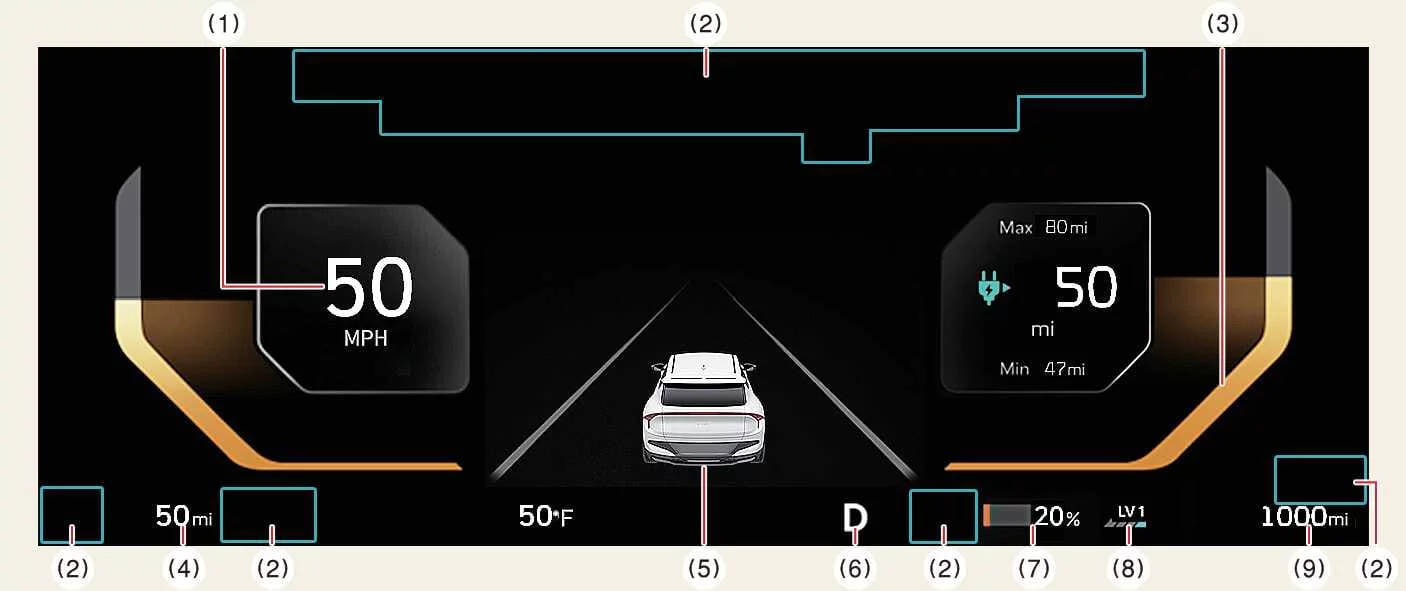
1. Speedometer
-
MPH, km/h
-
Displays the current driving speed of the Kia EV6 in either kilometers per hour (km/h) or miles per hour (mph), depending on the selected regional settings.
The digital speedometer of the Kia EV6 is designed for clear visibility and quick driver recognition under various driving conditions.
2. Warning and indicator lights
The instrument cluster displays important warning lights and system indicators related to vehicle operation, safety systems, charging status, and driver assistance functions.
For additional information, refer to the Warning and indicator lights section of the Kia EV6 owner’s manual.
3. Power/Charge gauge
-
Displays the current energy consumption level of the Kia EV6 and indicates the charging or regenerative braking status of the high-voltage battery system.
The gauge helps drivers monitor driving efficiency and regenerative braking performance in real time.
4. Distance to empty
-
Displays the estimated remaining driving distance available with the current battery charge level.
The remaining range estimate in the Kia EV6 continuously updates according to driving style, climate conditions, road conditions, and energy consumption.
5. LCD display
The LCD display provides various types of driving information, warnings, energy economy data, navigation information, and driver assistance system status updates.
For more information, refer to the LCD display section.
6. Gear shift indicator
-
The indicator displays the currently selected gear position of the Kia EV6.
7. Battery SOC (State of Charge) gauge
-
Displays the charging level and current status of the high-voltage battery pack.
The State of Charge gauge allows the Kia EV6 driver to quickly monitor available battery capacity during driving and charging operations.
8. Regenerative braking level indicator
-
Displays the currently selected regenerative braking level and energy recovery status.
For additional information, refer to the Regenerative braking system section.
9. Odometer
-
The odometer indicates the total accumulated driving distance of the Kia EV6.
NOTE
-
Some information displayed on the Kia EV6 instrument cluster may be provided through GPS-based weather and location data services. Depending on GPS reception quality and regional conditions, displayed weather information may differ from actual local conditions.
-
Exercise caution while driving, as dynamic themes, animated display effects, or changing instrument cluster graphics may distract the driver and increase the risk of an accident.
NOTE
-
When the remaining battery level of the Kia EV6 high-voltage battery falls below approximately 10%, vehicle speed may become limited and the vehicle may eventually shut down. Recharge the battery immediately.
-
If the vehicle is parked on uneven ground or battery power has been interrupted, the distance-to-empty calculation may not operate accurately.
-
The displayed remaining driving range is only an estimate and may differ from the actual available driving distance.
-
The remaining range estimate of the Kia EV6 may vary significantly depending on driving habits, ambient temperature, road conditions, and overall vehicle condition.
-
Use a clean microfiber cloth to gently remove fingerprints or dust from the digital display surfaces to maintain display clarity.
Instrument panel illumination control
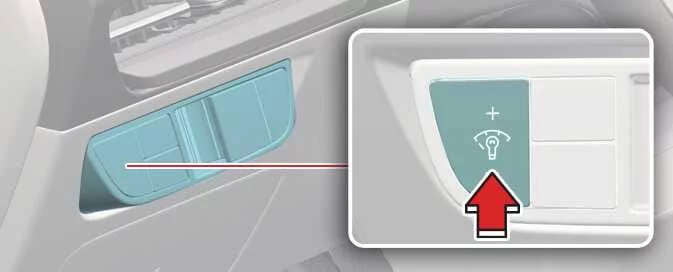
The brightness level of the Kia EV6 instrument panel illumination can be adjusted by pressing the illumination control buttons (“+� or “-�) when the vehicle position lights or headlamps are turned on.
|
-
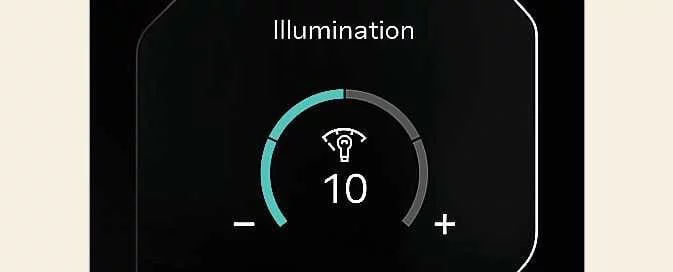
If you continue holding the illumination control button (“+� or “-�), the display brightness level changes continuously.
-
If the brightness level reaches the maximum or minimum setting, the Kia EV6 will emit an audible notification sound.
The customizable illumination system helps improve instrument visibility during both daytime and nighttime driving.
WARNING
Never adjust the instrument cluster brightness or display settings while driving the Kia EV6. Driver distraction may result in loss of vehicle control, accidents, serious injury, or vehicle damage.


Other information:
Kia EV6 2022-2026 Owner's Manual: Smart regeneration system will be temporarily canceled when:
Canceled manually The Smart Regeneration System temporarily turns off and the AUTO regenerative braking indication disappears from the Kia EV6 cluster display. Pull and hold the right-side paddle shifter for longer than 0.5 second. Canceled automatically The vehicle is shifted into N (Neutral), R (Reverse), or P (Park).NOTE If aftermarket HID headlamps are installed on the Kia EV6, interference may occur with the audio system or electronic components. Applying metallic window tint film to the Kia EV6 glass may affect radio reception, connected vehicle services, wireless communication features, and automatic headlamp operation.
Contents
Categories
- Manuals Home
- Kia EV6 Owners Manual
- Questions & Answers
- Video Guides
- Useful Resources
- New on site
- Most important about Kia EV6
- Privacy Policy
