
Kia EV6: Driver adjustments / 1) Programming Preparation
-
When programming a garage door opener with the Kia EV6 HomeLink® system, it is strongly recommended to park the vehicle outside the garage for improved signal reception and additional safety.
-
Install a fresh battery in the handheld transmitter of the device being programmed to HomeLink. A new battery helps ensure faster synchronization, stronger radio-frequency transmission, and more accurate programming performance.
-
Place the EV button in the POWER ON position before beginning the HomeLink programming procedure in the Kia EV6.
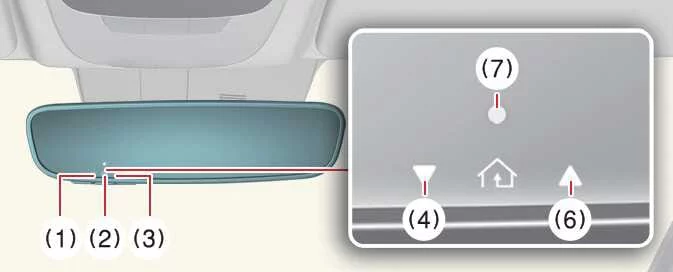
The integrated HomeLink® system in the Kia EV6 is designed to provide convenient wireless control of compatible garage doors, security gates, and home automation systems directly from the vehicle interior.
2) Programming a New HomeLink® Button
-
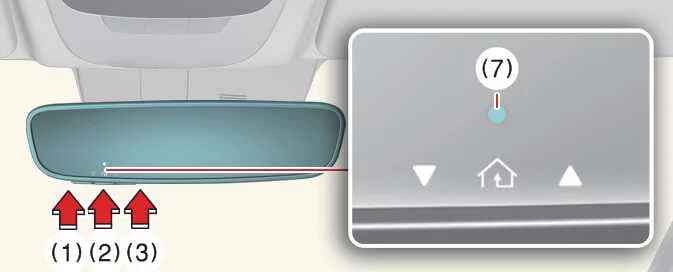
Press and release the desired HomeLink button (1), (2), or (3) that you would like to program. The HomeLink indicator light (7) will begin flashing orange slowly. If the indicator light does not flash properly, follow the “Erasing HomeLink Buttons� procedure and restart the programming process.
-
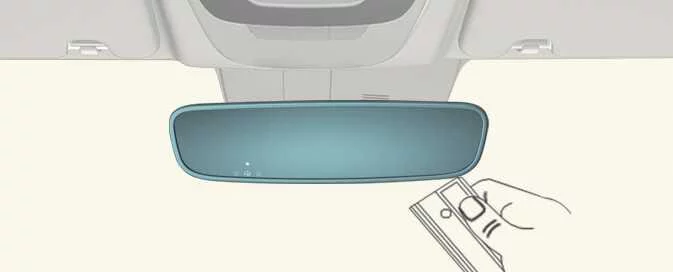
Position the garage door opener remote approximately 1–3 inches (2–8 cm) away from the HomeLink buttons inside the Kia EV6.
-
While the HomeLink indicator light (7) continues flashing orange, press and hold the handheld remote button. Keep holding the remote button until the HomeLink indicator changes from orange to solid green. Once the indicator changes color, release the handheld transmitter button.
-
Wait until the garage door or connected device comes to a complete stop before proceeding to the next step.
-
Press and release the programmed HomeLink button and observe the indicator light behavior.
-
If the indicator light remains solid green, the device has been successfully programmed and should operate whenever the HomeLink button is pressed.
-
If the indicator light flashes green rapidly, firmly press and hold the HomeLink button for approximately two seconds, then release it. Repeat this process slowly up to three times if necessary. Do not press the button rapidly. If the device operates correctly, programming is complete. If not, continue to step 6.
-
-
Locate the “Learn,� “Smart,� “Set,� or “Program� button on the garage door opener motor, gate controller, or compatible device motor. This button is typically located near the hanging antenna wire (1) attached to the motor housing. Refer to the device manufacturer’s instructions if necessary, as button names and colors may vary.
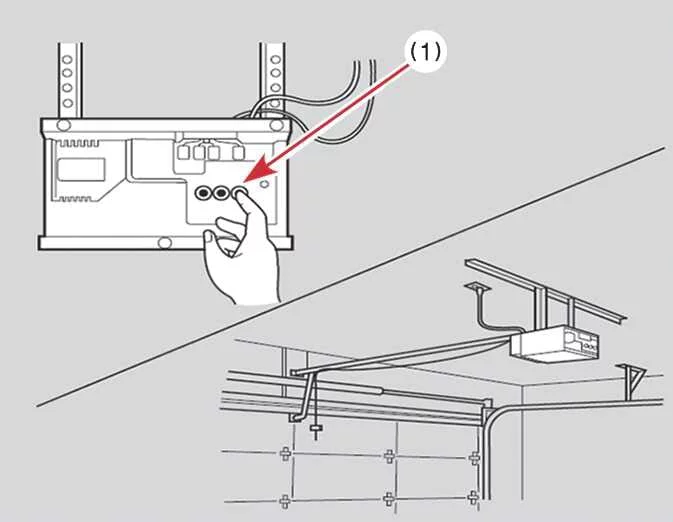
Using a ladder or assistance from another person may make the following steps easier and safer.
-
Firmly press and release the “Learn,� “Smart,� “Set,� or “Program� button. You will now have approximately 30 seconds to complete the next programming step.
-
Return to the Kia EV6 and firmly press, hold for two seconds, and release the programmed HomeLink button slowly up to three times in succession. Do not repeatedly press the button too quickly. Once the garage door begins moving, stop pressing buttons and wait until the door completely stops moving. Programming is now complete, and the HomeLink system should operate the connected device properly.
The Kia EV6 HomeLink® system allows convenient wireless operation of garage doors and compatible smart home devices without requiring separate handheld remotes.
3) Two-Way Communication Programming (For select garage door openers)
If your garage door opener displays the 'myQ' logo, the opener supports Two-Way Communication functionality. The Kia EV6 HomeLink system can establish communication with compatible garage door openers and display “opening,� “closing,� “opened,� or “closed� status messages directly through the mirror indicators.
HomeLink can also store and display the most recently received garage door status information for improved convenience and security.
To verify compatibility with this feature, visit www.homelink.com/compatible/Two-way-Communication. If your garage door opener supports this technology AND the Two-Way Communication indicators (4), (6) appear while the garage door is operating, no additional setup is required.
However, if the garage door opener supports Two-Way Communication and the indicators do not appear during operation, follow the instructions below to enable the feature.
-
Inside the Kia EV6, press and hold the programmed HomeLink button for approximately 2 seconds, then release it. Confirm that the garage door begins moving. After the movement stops, you will have approximately one minute to complete the following steps.
Using a ladder and assistance from another person may simplify the process.
-
Locate the “Learn� button on the garage door opener motor inside your garage. This button is commonly found near the hanging antenna wire attached to the garage door opener housing. If necessary, refer to the garage door opener owner’s manual.
-
Press and release the “Learn� button.
-
A light on the garage door opener may begin flashing, and the Two-Way Communication indicators (4), (6) inside the Kia EV6 may also flash, confirming successful communication setup.
-
Return to the vehicle and firmly press and release the programmed HomeLink button to activate the garage door. The Two-Way Communication indicators (4), (6) will flash orange while the garage door is moving. Do not press any buttons again until the garage door has completely stopped.
-
The Two-Way Communication programming process is now complete.
NOTE
If your garage door opener supports Two-Way Communication, HomeLink operation may stop shortly after initial setup if the Two-Way Communication procedure was not completed correctly. This commonly occurs after the first several uses of the programmed HomeLink button. Repeating both the “Programming a New HomeLink Button� and “Two-Way Communication Programming� procedures should restore proper operation.
4) Canadian Programming
Canadian radio-frequency regulations require some transmitter remote signals to automatically stop transmitting after several seconds. In certain cases, this shortened signal duration may not provide enough time for the Kia EV6 HomeLink system to detect and learn the signal during programming.
If you are located in Canada or experience difficulties programming a garage door opener or gate operator, replace step 3 in the “Programming a New HomeLink Button� procedure with the following instructions:
While the HomeLink indicator light (7) is flashing orange, repeatedly press and release (“cycle�) the handheld remote button every two seconds until the HomeLink indicator changes from orange to green. Once the indicator turns green, release the handheld transmitter button and continue with step 4 of the standard HomeLink programming process.
This alternate method helps ensure reliable signal recognition for Canadian-compatible garage door systems and RF transmitters.
2. Operating HomeLink®


Other information:
Kia EV6 2022-2026 Owner's Manual: Highway Driving Assist settings
Driver Assistance Driving Convenience Highway Driving Assist When the Kia EV6 is in DRIVE READY mode, tap Setup > Vehicle > Driver Assistance > Driving Convenience on the infotainment system screen to set the available options for each related function. When Highway Driving Assist is selected, the system helps maintain distance from the vehicle ahead, maintain the set speed, and keep the Kia EV6 centered in the lane while driving on supported highways.If you recently purchased a pre-owned Kia EV6, it is strongly recommended to remove all previously registered Digital Key 2 devices, including smartphone keys and card keys (if equipped), that may still be connected to the vehicle by the previous owner. Performing this step helps improve security and ensures that only authorized users can access your Kia EV6.
Categories
- Manuals Home
- Kia EV6 Owners Manual
- Questions & Answers
- Video Guides
- Useful Resources
- New on site
- Most important about Kia EV6
- Privacy Policy
