
Kia EV6: Driver adjustments / Range guide
Contents:
- Other view modes
- Driver Assistance settings (infotainment system) : (if equipped)
- Instrument cluster messages
|
|
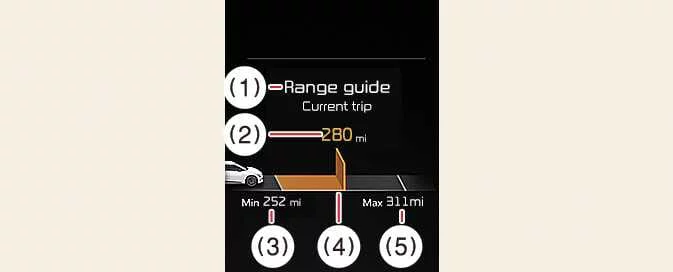
The Kia EV6 Range Guide is designed to help drivers achieve more efficient and economical electric driving by analyzing current energy usage and historical driving data.
The Distance to Empty value (2) is calculated by evaluating previous driving patterns, present battery charge level, and current trip energy consumption. The estimated remaining driving distance continuously updates while driving the Kia EV6.
The system visually displays energy-saving efficiency using a green or orange indicator bar (3). This allows the driver to quickly recognize whether the current driving style is more efficient or consuming additional energy.
The length of the energy economy bar changes dynamically according to the overall efficiency of the current trip.
-
Green: Indicates the Kia EV6 is being driven more efficiently and consuming less energy than usual.
-
Orange: Indicates higher-than-normal energy consumption during driving.
The Range Guide system of the Kia EV6 helps drivers optimize battery usage, extend driving range, and improve overall electric vehicle efficiency in everyday driving conditions.
NOTE
-
The energy economy gauge displays efficiency bars only after the Kia EV6 has traveled a certain distance and enough driving data has been collected for accurate calculations.
-
This function provides additional information intended to support economical driving habits. However, actual effectiveness may vary depending on traffic conditions, road surfaces, driving style, weather, steep inclines or declines, curved roads, and stop-and-go traffic situations.
-
Always prioritize real-time road conditions and maintain a safe distance from surrounding vehicles while driving the Kia EV6.
Tire pressure
|
|
-
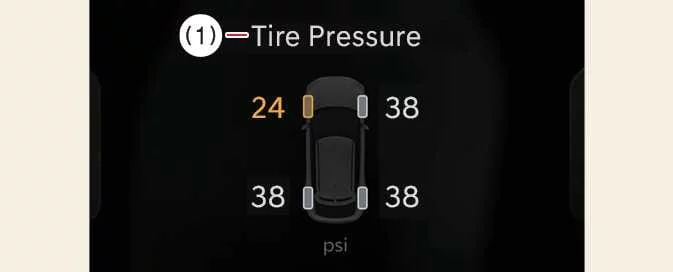
Displays tire pressure information and Tire Pressure Monitoring System (TPMS) status for the Kia EV6.
For additional details, refer to the Tire Pressure Monitoring System (TPMS) section.
The TPMS system of the Kia EV6 helps improve driving safety, tire longevity, and vehicle efficiency by continuously monitoring tire pressure conditions.
Current Driving Info
|
|
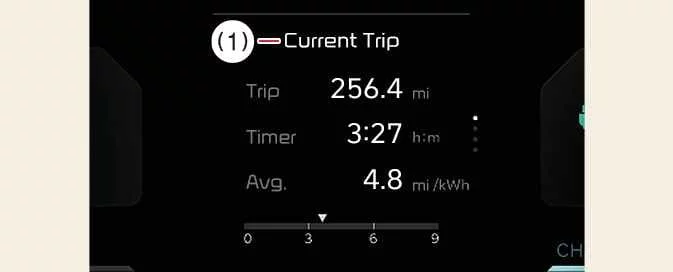
The Current Driving Info screen displays trip-related information such as driving time, energy economy, and traveled distance during the present driving session.
The Kia EV6 Drive Info screen automatically resets when the driver’s door is opened after the vehicle has been turned off, or when the vehicle is restarted after approximately 3 minutes.
After Charging
|
|
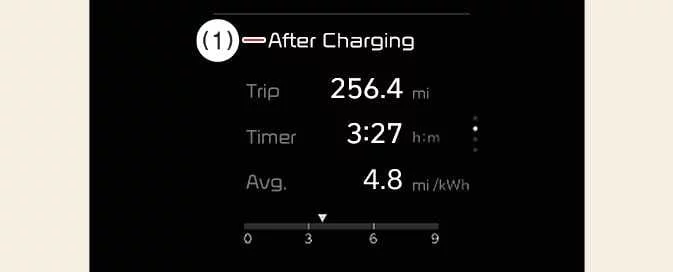
This screen displays driving and energy usage information collected after the Kia EV6 battery has been charged.
To manually reset the displayed information, press and hold the OK button while viewing the After Charging menu.
The After Charging information helps Kia EV6 drivers monitor efficiency between charging sessions and better understand battery consumption habits.
Accumulated Info
|
|
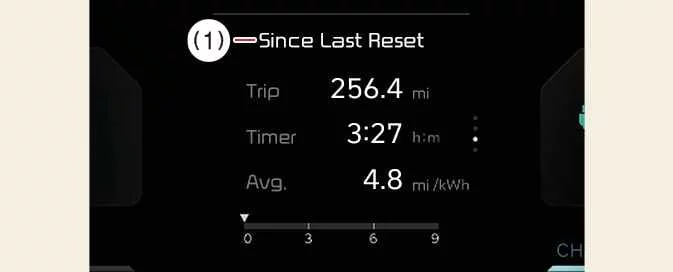
The accumulated information screen stores and displays driving statistics beginning from the most recent manual reset.
To manually clear and restart the stored information, press and hold the OK button while viewing the Since Last Reset screen.
NOTE
-
The Kia EV6 must be driven at least 0.19 miles (300 meters) after the previous driving cycle before accumulated information can be recalculated accurately.
-
The average energy economy value may not appear if the Kia EV6 has not been driven for more than approximately 10 seconds or at least 0.03 miles (50 meters) after the EV button has been turned on.
Energy flow
|
|
-
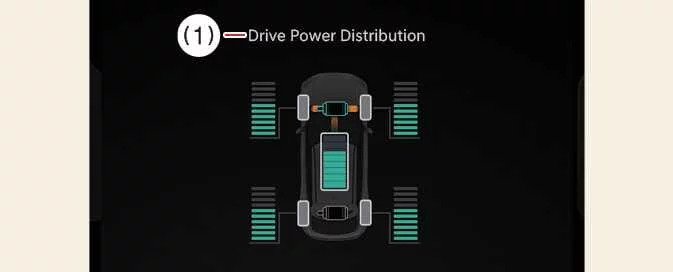
The Kia EV6 electric vehicle system displays energy flow information in various operating conditions, including acceleration, regenerative braking, charging, and battery power distribution.
The Energy Flow display helps drivers better understand how electric power is transferred throughout the Kia EV6 during driving and charging operation.
Master warning mode

|
The Master Warning mode of the Kia EV6 informs the driver about important warning situations or system malfunctions requiring attention.
This mode may display alerts related to the following conditions:
-
Driver assistance system malfunction, limited operation, or radar/camera obstruction
-
LED headlamp malfunction
-
Exterior or interior lamp malfunction
-
TPMS malfunction, low tire pressure warning, or related tire system alerts
A Master Warning icon ( ) appears in the lower-right area of the Kia EV6 LCD display
whenever an active warning condition is detected.
) appears in the lower-right area of the Kia EV6 LCD display
whenever an active warning condition is detected.
Once the warning condition is resolved, the Master Warning light and warning icon automatically disappear.
Other view modes
|
|
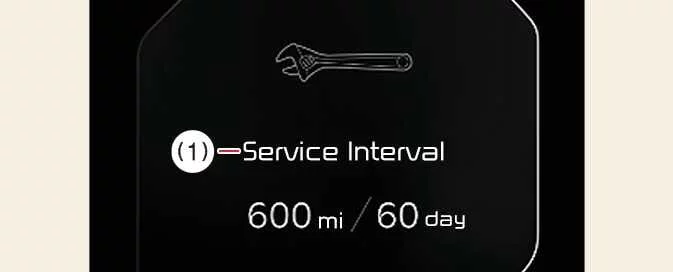
The service interval screen provides maintenance reminders and scheduled service information for the Kia EV6.
To reset the service interval, select Setup > Vehicle > Convenience > Service Interval > Enable Service Interval > Reset
Driver Assistance settings (infotainment system) : (if equipped)
|
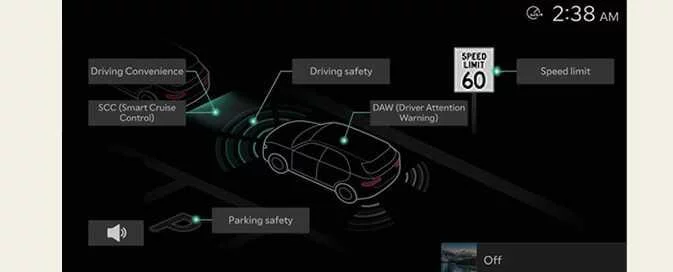
Select Setup > Vehicle > Driver Assistance on the infotainment display of the Kia EV6 to configure available Driver Assistance functions.
-
Driver Assistance
-
Driving Convenience
-
Speed Limit functions
-
Warning Methods
-
Driving Safety
-
Parking Safety
TIP
The Kia EV6 infotainment menu layout and available functions may change after future software updates. For additional information, refer to the infotainment system manual and quick reference guide.
-
Instrument cluster messages


Other information:
Kia EV6 2022-2026 Owner's Manual: Trouble shooting status indicator lamp
Indicator Details On: Charging error or self-diagnosis failure detected during Kia EV6 charging operation. Error code Item Cause E1 Control pilot communication Vehicle communication error E2 Leakage Current leakage detecWhen the windshield wipers no longer clean the windshield effectively, the wiper blades may be worn, hardened, cracked, or damaged and should be replaced. To prevent damage to the wiper mechanism, wiper arms, or related components, never move the wiper blades manually. The use of non-approved wiper blades on the Kia EV6 may lead to poor wiping performance, excessive noise, or premature failure.
Contents
- Other view modes
- Driver Assistance settings (infotainment system) : (if equipped)
- Instrument cluster messages
Categories
- Manuals Home
- Kia EV6 Owners Manual
- Questions & Answers
- Video Guides
- Useful Resources
- New on site
- Most important about Kia EV6
- Privacy Policy
