
Kia EV6: Driver adjustments / LCD display
Kia EV6 2022-2026 Owner's Manual / Driver adjustments / LCD display
Contents:
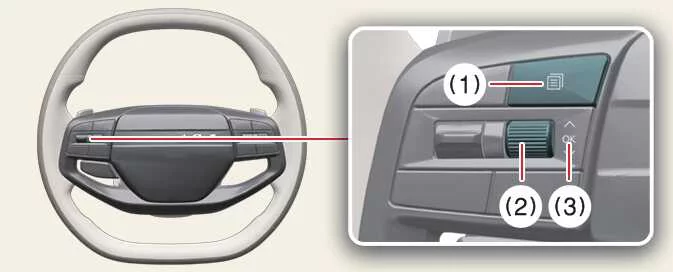
Changing LCD display modes
|
|
Switch |
Control |
Action |
|---|---|---|
|
Mode (1) ( |
Short Press |
Switches between different LCD display view modes. |
|
Up/Down (2)
|
Short Roll |
Searches and scrolls through utility and driving information. |
|
OK (3) |
Short Press |
Activates or confirms additional functions and menu items. |
|
Long Press |
Resets displayed menu information or trip data. |
 )
) ,
, 
LCD display modes ➤


Other information:
Kia EV6 2022-2026 Owner's Manual: 1) Programming Preparation
When programming a garage door opener with the Kia EV6 HomeLink® system, it is strongly recommended to park the vehicle outside the garage for improved signal reception and additional safety. Install a fresh battery in the handheld transmitter of the device being programmed to HomeLink. A new battery helps ensure faster synchronization, stronger radio-frequency transmission, and more accurate programming performance.Kia EV6 2022-2026 Owner's Manual: Main components of the occupant detection system
A highly sensitive detection sensor is integrated into the front passenger seat cushion of the Kia EV6. An advanced electronic monitoring system continuously evaluates occupant conditions to determine whether the front passenger airbag should remain activated or be automatically deactivated. The overhead console indicator illuminates the message PASSENGER AIR BAG OFF ( ) whenever the front passenger airbag system has been deactivated by the Occupant Detection System.
Contents
Categories
- Manuals Home
- Kia EV6 Owners Manual
- Questions & Answers
- Video Guides
- Useful Resources
- New on site
- Most important about Kia EV6
- Privacy Policy

Copyright © 2026 Kia EV6 Manuals � 0.0056