
Kia EV6: Electric vehicle guide
Contents:
- Electric vehicle overview
- Main electric vehicle components
- EV menu
- V2L connector: (if equipped)
- V2L has ended. Battery level has reached the set value
- System setting and activation
- Charge types for electric vehicle
- AC charge
- Charge indicator light for electric vehicle
- Charging connector lock
- When the charging connector is locked
- Scheduled charging
- Charging electric vehicle
- Charging door operation
- Portable charger
- Setting the charge level of the portable charger
- Charging status indicator lamp for portable charger
- Trouble shooting status indicator lamp
- Additional CCS1 adapters: (if equipped)
- How to connect adapter
- Driving electric vehicle
- Change of distance to empty when 100% charging
- If the distance to empty is insufficient
- Ready indicator READY
- Low EV battery
- Countermeasures for accidents or fire
- When flatbed is unavailable
Electric vehicle overview ➤
Main electric vehicle components ➤
EV menu ➤
V2L connector: (if equipped)
|
-
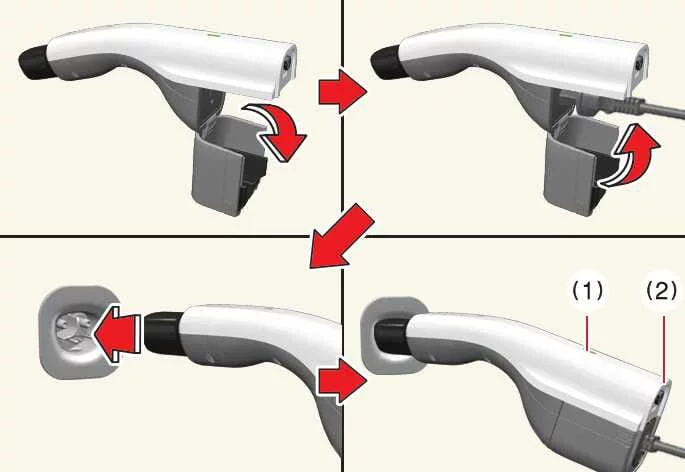
Open the protective cover of the Kia EV6 V2L connector before connecting external electrical devices.
-
Connect the desired electronic device or appliance to the V2L power outlet, then securely close the connector cover.
-
Insert the V2L connector into the Kia EV6 charging port until the connector locks into place correctly.
-
Press the switch (1) on the Kia EV6 V2L connector and confirm whether the indicator light (2) illuminates properly. The indicator light may fail to operate normally under the following conditions:
-
Check the battery discharge limit configured for the high-voltage battery in the Energy Consumption menu. If the discharge limit is higher than the current battery charge level, the indicator light (2) may remain OFF.
-
Verify whether the V2L connector indicator light or the indicator on the interior V2L power outlet is illuminated correctly.
-
If a V2L warning message appears on the Kia EV6 instrument cluster, refer to the Instrument Cluster Messages section for additional information.
-
If the Kia EV6 V2L system still does not operate correctly when connecting electronic appliances, have the vehicle inspected by an authorized Kia dealer.
-
-
Press the switch (1) again to turn OFF the indicator light (2). The V2L connector can be disconnected once the light turns OFF and the charging port lock is released by pressing the door unlock button on the smart key.
V2L power outlet: (if equipped)
-
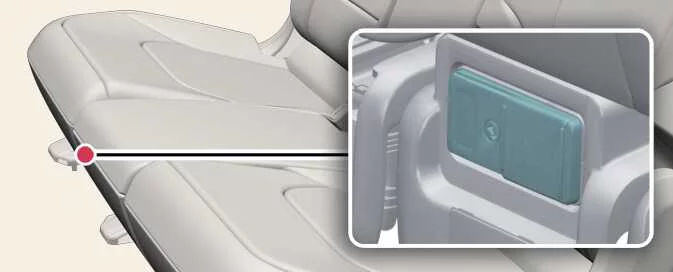
Connect electrical devices to the interior Kia EV6 V2L power outlet located beneath the rear seats while the EV button is in the POWER ON position.
-
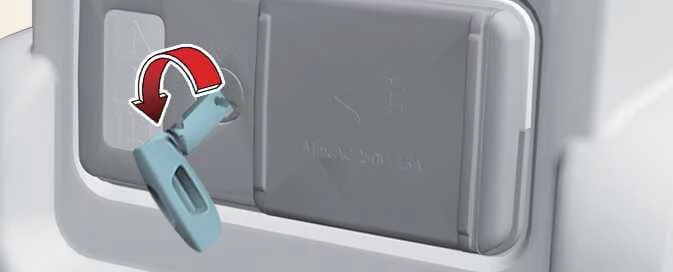
Use the Kia EV6 mechanical key to unlock the protective cover of the V2L interior power outlet.
-
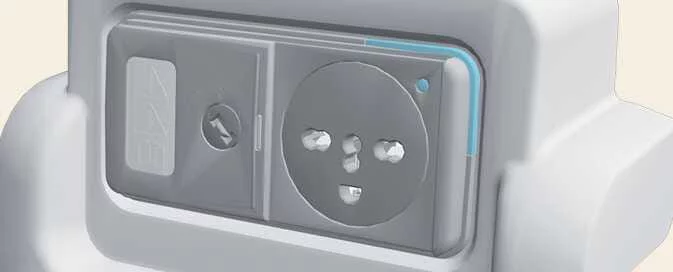
Check the operating status of the Kia EV6 V2L system using the indicator located on the front side of the power outlet:
-
Blue: Standby mode.
-
Red: The Kia EV6 power outlet is connected but currently not supplying power.
-
Green: The V2L outlet is connected correctly and ready to supply electrical power.
-
Instrument cluster messages
V2L has ended. Battery level has reached the set value ➤
System setting and activation
System setting
You can activate Utility Mode in the Kia EV6 only when the following conditions are satisfied:
-
The vehicle is in READY mode and the gear selector is set to P (Park).
-
The Electronic Parking Brake (EPB) system is functioning normally without malfunction.
-
Setup > Electric Vehicle > Utility Mode is selected within the Kia EV6 infotainment system.
When Utility Mode is activated in the Kia EV6:
-
The READY indicator switches OFF, while the UTIL indicator appears on the instrument cluster and the EPB is automatically applied.
-
You may continue using electrical features and convenience systems, but the Kia EV6 cannot be driven while Utility Mode is active.
-
The Electronic Parking Brake can still be released manually using the EPB switch if necessary.
The gear selector cannot be shifted out of P (Park) while Utility Mode is active. If shifting is attempted, the infotainment system displays the message Shifting conditions not met.
System deactivationUtility Mode in the Kia EV6 can be deactivated by pressing the EV button to the OFF position. The function cannot be turned OFF directly through the Electric Vehicle infotainment menu.
Battery conditioning mode : (if equipped)
The Battery Conditioning Mode in the Kia EV6 is designed to help maintain optimal charging performance by regulating high-voltage battery temperature during extremely hot or cold weather conditions.
This system uses battery energy to heat or cool the high-voltage battery toward an ideal operating temperature before charging, helping improve charging speed and efficiency.
Because battery conditioning consumes electrical energy during operation, temporary reductions in available driving range may occur while the system is active.
Sufficient time may be required for the Kia EV6 battery to reach the optimal temperature range, especially during extreme winter or summer conditions. If the battery charge level is low, battery conditioning performance may also be limited.
|
|
A dedicated switch within the Kia EV6 infotainment system allows Battery Conditioning Mode to be activated or deactivated manually.
NOTE
-
If a DC fast charging station is selected as a navigation destination or waypoint, the Kia EV6 Battery Conditioning system automatically adjusts battery temperature before arrival in order to maximize DC charging performance during hot or cold weather.
-
When Battery Conditioning Mode is active, the State of Charge (SOC) indicator for the Kia EV6 high-voltage battery changes to a dedicated battery conditioning indicator symbol.
-
The Battery Conditioning Mode can also be activated remotely using a smartphone application while the Kia EV6 is parked. In remote operation mode, conditioning stops automatically after the battery reaches the desired temperature range or after approximately 30 minutes.
-
You can monitor battery temperature and conditioning status directly through the Kia EV6 infotainment system display.
Charge types for electric vehicle ➤
AC charge ➤
Charge indicator light for electric vehicle ➤
Charging connector lock ➤
When the charging connector is locked
|
Category |
Lock while charging |
Always lock |
Do not lock |
|---|---|---|---|
|
Before charging |
X |
O |
X |
|
While charging |
O |
O |
X |
|
Finished charging |
X |
O |
X |
Always Lock mode
In Always Lock mode, the Kia EV6 charging connector locks immediately after the charging cable is connected to the charging inlet. The connector remains locked until the vehicle doors are unlocked.
This function helps reduce the risk of charging cable theft while charging in public locations.
-
The charging connector automatically locks again if all vehicle doors are unlocked but the charging cable is not disconnected within approximately 15 seconds.
-
The connector also automatically re-locks if the Kia EV6 doors are locked again after unlocking without disconnecting the charging cable.
Lock While Charging mode
In Lock While Charging mode, the Kia EV6 charging connector locks automatically only while charging is actively in progress and unlocks automatically after charging is completed.
This mode is especially convenient when using public charging stations because it balances charging security with easier connector removal after charging finishes.
Do Not Lock mode
In Do Not Lock mode, the Kia EV6 charging connector remains unlocked regardless of charging status.
To disconnect the charging connector, press the charging connector release button manually. When using this mode, remain attentive to possible charging cable theft or unauthorized disconnection.
Scheduled charging
You can configure scheduled charging for the Kia EV6 using either the infotainment system or the Kia Access application. For complete setup instructions and advanced charging options, refer to the infotainment system manual and the quick reference guide supplied with the vehicle.
Scheduled charging on the Kia EV6 is available only when using an AC charger or a portable charger equipped with an ICCB (In-Cable Control Box).
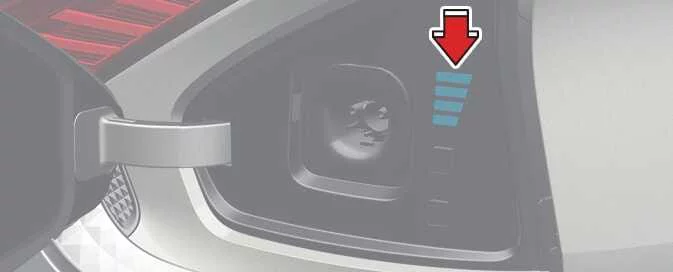
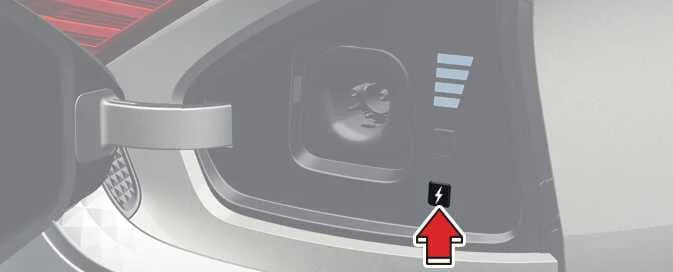
When scheduled charging is enabled and the AC charging cable or portable ICCB charging cable is connected, the scheduled charging release button appears for approximately 3 minutes to indicate that scheduled charging has been activated successfully.
|
When scheduled charging is active on the Kia EV6, charging does not begin immediately after the charging connector is connected to the vehicle.
If immediate charging is required, press and hold the charging button located on the charging door for approximately 2 seconds, or disable the scheduled charging function through the Kia EV6 infotainment system or Kia Access mobile application.
|
|
Refer to the AC charging section of the Kia EV6 manual for detailed information regarding proper connection procedures for AC charging equipment.
Charging electric vehicle ➤
Charging door operation ➤
Portable charger ➤
Setting the charge level of the portable charger ➤
Charging status indicator lamp for portable charger

|
|
Indicator |
Details |
|
|---|---|---|
|
POWER |

|
On: Portable charger power is supplied correctly. |
|
CHARGE |

|
On: Kia EV6 charging is active. Blink: Charging current is temporarily limited because of high plug temperature or excessive internal temperature. |
|
FAULT |

|
Blink: Charging has been interrupted because a fault condition has been detected. |
|
CURRENT |

|
Displays the selected charging current or diagnostic trouble code. |
|
CHARGE LEVEL |
30 |
30 A |
|
24 |
24 A |
|
|
20 |
20 A |
|
|
16 |
16 A |
|
|
12 |
12 A |
|
|
10 |
10 A |
|
|
08 |
8 A |
|
|
06 |
6 A |
|
|
The charging current changes each time the button (1) is pressed in the following sequence:
This flexible charging adjustment allows the Kia EV6 portable charging system to adapt to different outlet capacities safely and efficiently. 
|
||
How to connect detachable connector
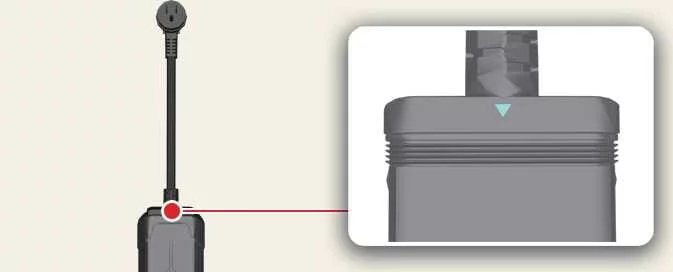
The detachable connector must be fully secured to the ICCB control box before charging the Kia EV6.
Connect the detachable connector to the control box controller socket.
Verify that the arrow located on the top of the connector is no longer visible after connection.
|
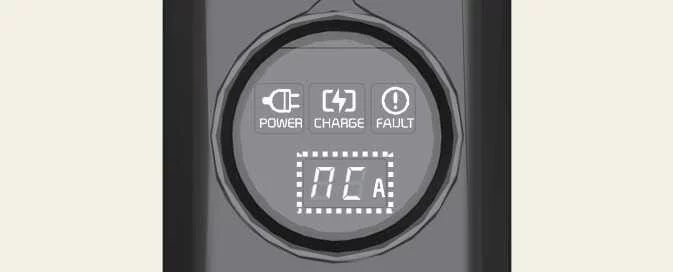
The green power lamp illuminates when the ICCB portable charging system receives electrical power.
NOTE
If “NC� appears on the ICCB display panel or if the directional arrow is still visible, reconnect the detachable connector properly before charging the Kia EV6.
|
Trouble shooting status indicator lamp ➤
Additional CCS1 adapters: (if equipped) ➤
How to connect adapter ➤
Driving electric vehicle ➤
Change of distance to empty when 100% charging ➤
If the distance to empty is insufficient ➤
Ready indicator READY ➤
Low EV battery ➤
Countermeasures for accidents or fire ➤
When flatbed is unavailable ➤


Other information:
Kia EV6 2022-2026 Owner's Manual: All Wheel Drive (AWD) system: (if equipped)
When the All-Wheel Drive (AWD) system is active in the Kia EV6, driving force is automatically distributed between the front and rear wheels according to current traction conditions. The AWD system improves overall driving performance and vehicle stability on difficult road surfaces such as steep hills, muddy terrain, wet roads, gravel, sand, snow, and other low-traction environments.The Kia EV6 Junction Crossing, Lane-Change Oncoming, Lane-Change Side, and Evasive Steering Assist systems may experience reduced performance when the temperature around the front or rear side radar sensors becomes excessively high or low. Installing a trailer, bicycle carrier, cargo carrier, or other accessory near the Kia EV6 rear corner radar may interfere with sensor operation and limit driver assistance performance.
Contents
- Electric vehicle overview
- Main electric vehicle components
- EV menu
- V2L connector: (if equipped)
- V2L has ended. Battery level has reached the set value
- System setting and activation
- Charge types for electric vehicle
- AC charge
- Charge indicator light for electric vehicle
- Charging connector lock
- When the charging connector is locked
- Scheduled charging
- Charging electric vehicle
- Charging door operation
- Portable charger
- Setting the charge level of the portable charger
- Charging status indicator lamp for portable charger
- Trouble shooting status indicator lamp
- Additional CCS1 adapters: (if equipped)
- How to connect adapter
- Driving electric vehicle
- Change of distance to empty when 100% charging
- If the distance to empty is insufficient
- Ready indicator READY
- Low EV battery
- Countermeasures for accidents or fire
- When flatbed is unavailable
Categories
- Manuals Home
- Kia EV6 Owners Manual
- Questions & Answers
- Video Guides
- Useful Resources
- New on site
- Most important about Kia EV6
- Privacy Policy
