
Kia EV6: Electric vehicle guide / How to connect adapter
Contents:
-
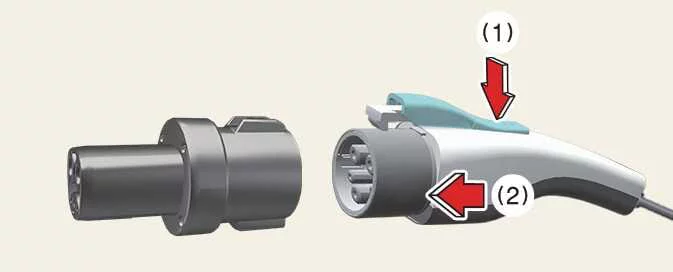
Press the latch release button (1) on the CCS1 charging connector and insert the connector securely into the adapter (2) until it locks completely into place.
-
Insert the CCS1 adapter into the NACS-equipped vehicle charging inlet and verify the charging connection status using the charging station display or charging system indicators.
-
Begin charging the Kia EV6 after confirming that the adapter and charging connector are properly connected.
How to disconnect adapter
After charging is completed, disconnect the CCS1 adapter carefully to protect the charging terminals and adapter components.
-
Stop charging by using the Kia EV6 infotainment system, mobile application, or the charging station control screen.
-
Unlock the vehicle charging inlet before removing the adapter.
-
Disconnect the CCS1 adapter from the vehicle charging inlet.
CAUTION
Never disconnect the charging connector from the CCS1 adapter while the adapter is still connected to the vehicle charging inlet.
-
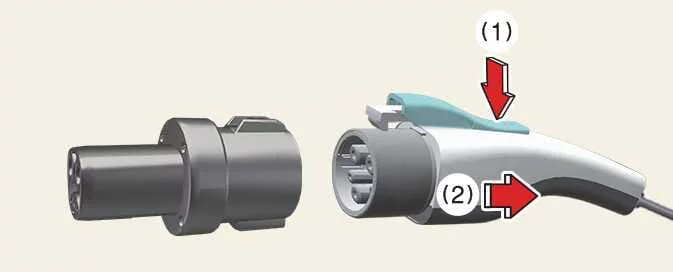
Press the latch release button (1) on the charging connector and pull the connector straight outward to disconnect it safely (2).
-
Return the charging connector to its designated holder at the charging station.
-
Store the Kia EV6 CCS1 adapter safely inside the vehicle storage compartment or protective pouch.
How to store and maintain the adapter
-
To reduce the risk of loss, contamination, or physical damage, always store the CCS1 adapter in its dedicated storage case or protective pouch.
-
Before and after charging the Kia EV6, wipe the exterior of the adapter with a soft, dry cloth before placing it into storage.
-
Store the CCS1 adapter in a cool, clean, and dry environment away from direct sunlight or excessive heat.
-
When storing the adapter inside the Kia EV6, secure it properly to prevent movement or damage while driving.
NOTE
-
Dust, moisture, or contamination on the CCS1 adapter terminals may negatively affect charging performance or charging stability.
-
Storing the adapter in humid conditions may result in corrosion, terminal oxidation, or long-term component damage.
Safety precautions for adapters
WARNING
-
Read all instructions carefully before using the CCS1 adapter with the Kia EV6. Failure to follow the provided warnings and procedures may result in electric shock, fire, severe injury, or death.
-
Make sure the charging cable, charging connector, and CCS1 adapter do not obstruct pedestrians, nearby vehicles, or surrounding objects.
-
Operation of the CCS1 adapter may interfere with nearby electronic medical devices. Drivers or passengers using medical electronic devices should consult the device manufacturer before charging the Kia EV6.
-
Use the CCS1 adapter only with chargers and vehicles that match the specified rated voltage and current. Using incompatible equipment may cause charging interruption, voltage overload, overheating, fire, burns, or exposure to high voltage electricity.
-
Do not insert fingers, tools, or metal objects into any part of the CCS1 adapter.
CAUTION
-
The CCS1 adapter is designed exclusively for vehicle charging. Do not use the adapter for any other application or with non-approved equipment.
-
Do not use the CCS1 adapter if it appears cracked, damaged, worn, deformed, defective, or inoperable.
-
Do not open, disassemble, repair, modify, or tamper with the CCS1 adapter. The adapter contains no user-serviceable components.
-
Do not disconnect the CCS1 adapter or charging connector while the Kia EV6 is actively charging.
-
After charging is complete, disconnect the CCS1 adapter correctly before driving the vehicle.
-
Protect the CCS1 adapter from water, moisture, dirt, and foreign materials at all times. Do not use the adapter if corrosion or contamination is visible.
-
Do not allow sharp metal objects such as wires, tools, or needles to contact the CCS1 adapter terminals.
-
Do not strike, puncture, or damage the CCS1 adapter using sharp or heavy objects.
-
Do not insert foreign substances or objects into any part of the CCS1 adapter.
-
Do not clean the CCS1 adapter using chemical detergents or solvents.
-
Always connect the CCS1 adapter to the charging connector before connecting it to the vehicle charging inlet. Disconnect the adapter in the reverse order after charging is complete.


Other information:
Kia EV6 2022-2026 Owner's Manual: Charging door operation
Pull the Kia EV6 headrest fully forward and release it to adjust the forward position. The adjustable Kia EV6 headrest design allows improved neck support and enhanced driving comfort during long trips. TIP The Kia EV6 headrest can be adjusted forward into 3 different locking positions by repeatedly pulling the headrest forward.Kia EV6 2022-2026 Owner's Manual: Power liftgate: (if equipped)
Power liftgate operating conditions The Kia EV6 power liftgate system operates when the vehicle is in P (Park) while running. When the vehicle is turned off, the power liftgate can still operate regardless of gear position. For safety reasons, the liftgate only opens when vehicle speed remains below 1.8 mph (3 km/h). Before using the Kia EV6 power liftgate, always confirm that the vehicle is securely shifted into P (Park).
Contents
Categories
- Manuals Home
- Kia EV6 Owners Manual
- Questions & Answers
- Video Guides
- Useful Resources
- New on site
- Most important about Kia EV6
- Privacy Policy
