
Kia EV6: Opening and closing / How to register Digital Key 2 (card key)
Contents:
To activate the Kia EV6 Digital Key 2 card key feature, register the NFC card key through the vehicle system by following the registration steps below.
-
Enter the Kia EV6 with both registered smart keys available inside the vehicle.
-
Confirm that the Use menu is enabled.
With the vehicle powered on, select Setup > Vehicle > Digital Keys > NFC Card key > Use on the infotainment display.
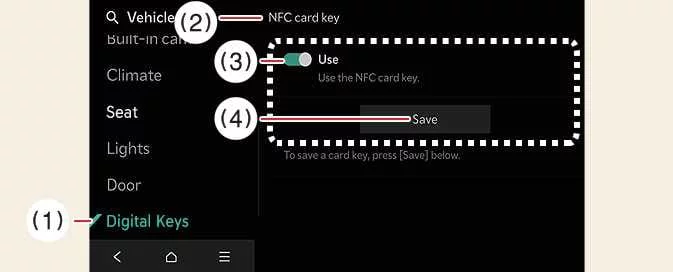
-
Digital Keys
-
NFC Card key
-
Use
-
Save
-
-
With the Kia EV6 switched on, place the NFC card key onto the wireless charging pad and select Save on the infotainment display. Registration begins automatically.
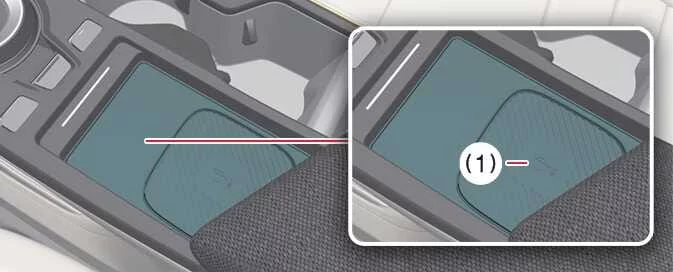
-
Wireless charging pad
-
-
Once the Digital Key 2 card key registration is completed successfully, a confirmation message will appear on the Kia EV6 infotainment screen.
TIP
-
The Kia EV6 infotainment menus and interface may change after software updates. Refer to the latest owner’s manual and quick guide for updated information.
-
If a Digital Key 2 card key is already registered in the Kia EV6, the Save function becomes inactive. Delete the previously registered card key before adding a replacement card.
-
Both registered Kia EV6 smart keys must remain inside the vehicle during the NFC card key registration process.
-
A registered Kia EV6 Digital Key 2 card key cannot be transferred for use with another vehicle.
How to use the Digital Key 2 (Card key)
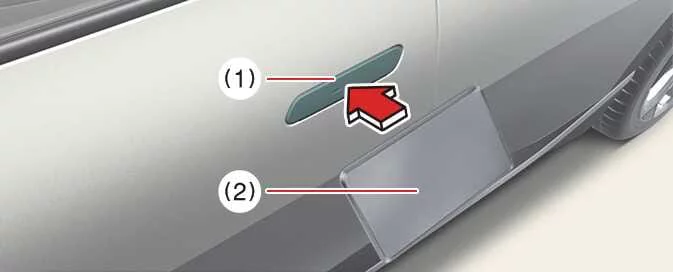
Card key touch controlThe Kia EV6 driver can lock or unlock the doors by touching the registered NFC card key to the exterior door handle authentication area. The vehicle can also be started by placing the card key on the wireless charging pad.
|
|
-
If the driver places the NFC antenna area of the registered Kia EV6 card key against the authentication pad on the exterior driver or passenger door handle for more than 2 seconds, the doors will lock or unlock.
-
After locking the vehicle, verify that the doors are securely locked. If no door is opened, the Kia EV6 will automatically relock after approximately 30 seconds.
-
The NFC authentication system functions correctly only when the center section of the card key aligns with the authentication zone on the Kia EV6 door handle.
NOTE
When using a smartphone NFC antenna or Digital Key 2 authentication, the Kia EV6 doors may not lock and emit the confirmation beep under the following conditions:
-
When the Smart Key remains inside the vehicle
-
When the EV button is set to POWER ON or DRIVE READY
-
When one or more doors, the hood, or the liftgate are open
Place the registered Kia EV6 card key on the wireless charging pad, depress the brake pedal, and then press the EV button to start the vehicle.
-
After the Kia EV6 has started successfully, the NFC card key can be removed from the charging pad.
For more information, refer to the EV button section.
WARNING
The Kia EV6 can start whenever a registered card key is placed on the charging pad. Never leave children or unauthorized individuals unattended inside the vehicle with access to the registered Digital Key 2 card key, as this may lead to serious injury, death, or vehicle theft. Always carry the registered card key with you when exiting the vehicle.
CAUTION
-
The Kia EV6 Digital Key 2 card key may not function correctly under the following circumstances:
-
When the card key is not properly aligned with the center of the door handle authentication pad or wireless charging pad.
-
If the card key overlaps NFC-enabled devices such as smartphones, payment cards, or access cards.
-
If the card key fails to respond, move it at least 4 inches (10 cm) away from the authentication pad before trying again.
-
-
The NFC card key may become damaged from physical impact. Replace damaged Kia EV6 card keys immediately and register the new card again.
-
Lost or damaged card keys are not covered under the vehicle warranty, and replacement costs are the responsibility of the owner.
-
Extended exposure to heat or direct sunlight may affect the performance of the Kia EV6 Digital Key 2 card key.
-
Do not leave the card key on the wireless charging pad while driving the Kia EV6, as this may interfere with proper operation.
-
If a smartphone is wirelessly charging while the NFC card key is positioned between the smartphone and charging pad, Digital Key 2 operation may malfunction.
How to delete Digital Key 2 (Card key)
-
Switch the Kia EV6 to POWER ON using the smart key. Keep the smart key inside the vehicle throughout the card key deletion procedure.
-
While the vehicle is powered on, select Setup > Vehicle > Digital key > NFC card key > Delete within the infotainment system.
If no card key has been saved previously, the Delete menu will remain unavailable.
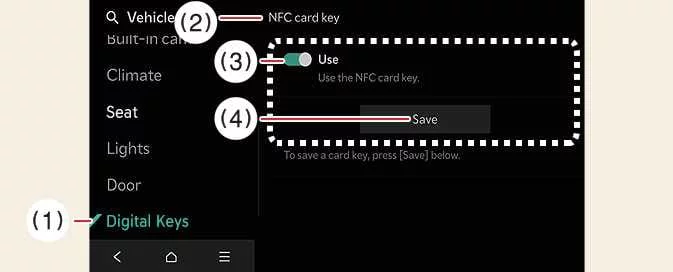
-
Digital keys
-
NFC card Key
-
Use
-
Delete
-
-
After the Digital Key 2 card key is removed successfully, a confirmation message will appear on the Kia EV6 infotainment display or instrument cluster.
TIP
The Kia EV6 infotainment interface may change depending on software updates. Always refer to the latest infotainment documentation and quick reference guide for updated menu layouts and Digital Key 2 functions.
Personalized Profile and Vehicle Settings
The Kia EV6 Digital Key 2 (smartphone) system can be synchronized with an individual user profile to deliver a more personalized driving experience. When the same smartphone account is used, the system recognizes all registered smartphone digital keys as belonging to the same [Group]. Every Kia EV6 Digital Key 2 connected within that group can automatically activate the linked profile as soon as the driver enters the vehicle. This allows the Kia EV6 to instantly restore saved preferences and convenience settings without requiring additional driver input.
The smartphone keys associated with the same [Group], excluding the My Smartphone Key profile, can be viewed in the following infotainment menu.
Select Setup > Vehicle > Digital Keys > Smartphone key > Shared Keys > [Group] on the Kia EV6 infotainment system screen.


Other information:
Towing Service Wheel dollies If the Kia EV6 requires towing, the procedure should be performed by an authorized Kia dealer or a professional towing service equipped to handle electric vehicles. Following the correct lifting and transportation procedures is essential to prevent damage to the electric powertrain, suspension, battery system, and drivetrain components.To open or close a window in the Kia EV6, gently press down or pull up the front section of the corresponding window switch to the first detent position (1). Type B - Auto up/down window: (if equipped) Pressing or pulling the Kia EV6 power window switch briefly to the second detent position (2) will completely open or close the window automatically, even after the switch is released.
Contents
Categories
- Manuals Home
- Kia EV6 Owners Manual
- Questions & Answers
- Video Guides
- Useful Resources
- New on site
- Most important about Kia EV6
- Privacy Policy
