
Kia Seltos: Rear View Monitor (RVM) / RVM operation
Contents:
Parking/View button
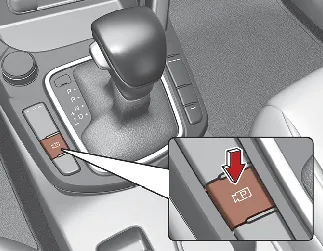
Press the Parking/View button to turn on Rear View Monitor.
Press the button again to turn off the function when the operating conditions allow it.
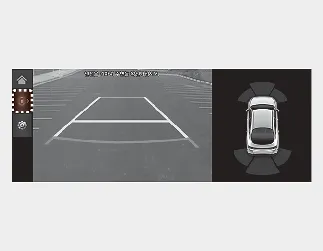
Rear view
Operating conditions
-
When the gear is shifted to R (Reverse), the rear view image appears on the screen.
-
When the Parking/View button is pressed while the gear is in P (Park), the rear view image appears on the screen.
-
When the View icon is pressed while the rear top view is displayed, the rear view may be shown on the screen.
Off conditions
-
The rear view cannot be turned off while the gear is in R (Reverse).
-
If the Parking/View button is pressed again while the gear is in P (Park) and the rear view is displayed, the rear view will turn off.
-
When the gear is shifted from R (Reverse) to P (Park), the rear view will turn off.
Rear top view
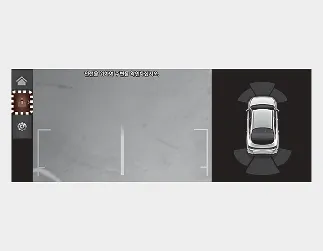
When you touch the ( ) icon, the top view appears on the screen and shows the distance from objects or vehicles behind your Kia Seltos while parking.
Extended RVM
The rear view may remain displayed on the screen to assist the driver while parking or maneuvering at low speed.
Operating conditions
-
When the gear is shifted from R (Reverse) to N (Neutral) or D (Drive), the rear view remains on the screen.
-
The vehicle speed is below approximately 6 mph (10 km/h).
Off conditions
-
When vehicle speed exceeds 6 mph (10 km/h), the rear view will turn off.
-
When the Parking/View button is pressed, the rear view will turn off.
-
When the gear is shifted to P (Park), the rear view will turn off.


Other information:
Kia Seltos SP2 (2021-2026) Owner's Manual: Vehicle load limit
The vehicle load limit for the Kia Seltos is shown on the tire and loading information label located on the driver's door area. Tire and loading information label The label on the driver's door sill shows the original tire size, the recommended cold tire pressures, the maximum number of occupants, and the vehicle capacity weight for your Kia Seltos.Kia Seltos SP2 (2021-2026) Owner's Manual: Navigation-based Smart Cruise Control (NSCC)
Navigation-based Smart Cruise Control (NSCC) in the Kia Seltos can help maintain an appropriate driving speed according to road conditions when driving on highways or motorways. While Smart Cruise Control is operating, NSCC uses road information from the navigation system to support smoother and safer highway driving. NOTICE NSCC is available only on controlled-access roads of certain highways.