
Kia Seltos: Lane Following Assist (LFA) / LFA settings
Contents:
Warning Methods
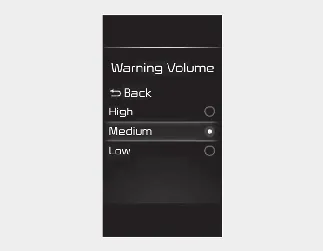
You can adjust the Warning Methods with the ignition switch or ENGINE START/STOP button in the ON position.
-
Warning Volume: Select User Settings → Driver Assistance → Warning Volume on the LCD display, or select Setup → Vehicle → Driver Assistance → Warning Methods on the infotainment system.
-
Driving Safety Priority: Select Setup → Vehicle → Driver Assistance → Warning Methods → Driving Safety Priority on the infotainment system. For safer driving, the audio volume may temporarily decrease so the driver can hear the audible warning more clearly.

NOTICE
-
The Warning Methods you select may also apply to the warning volume of other ADAS functions.
-
Warning Methods will keep the last selected setting even if the Kia Seltos is restarted.
-
The setting menu may not be available depending on vehicle features, trim level, and specifications.


Other information:
Kia Seltos SP2 (2021-2026) Owner's Manual: AWD mode
AWD mode helps improve the driving performance of the Kia Seltos by controlling power delivery to all four wheels. This system supports better traction and stability when road conditions change, especially on wet, slippery, sandy, muddy, or uneven surfaces. You can switch from AWD AUTO mode to AWD Lock mode by pressing the AWD Lock mode switch.Kia Seltos SP2 (2021-2026) Owner's Manual: Care of seat belts
Seat belt systems in the Kia Seltos should never be disassembled, modified, or repaired by the owner. Always make sure the belt webbing, buckles, latches, anchors, and related hardware are not damaged by seat hinges, doors, sharp objects, or improper use. WARNING Pinched seat belt When returning the rear seatback to its upright position, make sure the seat belt webbing and buckle do not become caught or pinched.