
Kia Seltos: Driver assistance system / Intelligent Speed Limit Assist (ISLA)
Contents:
- ISLA settings
- ISLA operation
- Auto set speed change (if Infotainment system equipped)
- ISLA malfunction and limitations
Intelligent Speed Limit Assist (ISLA) in the Kia Seltos uses information from detected road signs and, when equipped, the navigation system to inform the driver of the current road speed limit and related information. ISLA helps the driver stay aware of posted limits and maintain a speed appropriate for the road.

CAUTION
-
ISLA may not operate properly if the function is used in countries or regions where the system data, road signs, or navigation information are not supported.
-
If your Kia Seltos is equipped with a navigation system, the navigation data should be updated regularly for ISLA to operate properly. For more information, refer to the user's manual provided with the infotainment system and the quick reference guide.
Detecting sensor
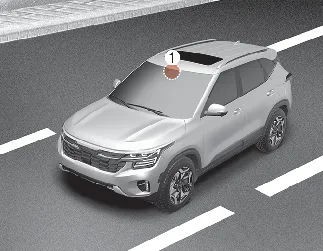
[1]: Front view camera
Refer to the image above for the detailed location of the detecting sensor. The front view camera helps the Kia Seltos recognize road signs and support Intelligent Speed Limit Assist operation.

CAUTION
For more details about front view camera precautions, refer to More Details. Keep the windshield area in front of the camera clean and free from stickers, accessories, heavy tint, frost, or objects that could block the camera view.
ISLA settings ➤
ISLA operation ➤
Auto set speed change (if Infotainment system equipped)
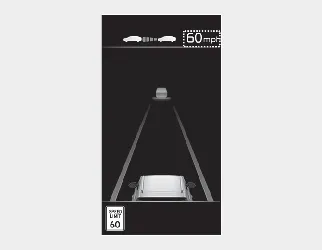
When MSLA or SCC is operating, and the speed set by the driver matches the current road speed limit, the set speed may be adjusted automatically if the speed limit changes afterward. The auto set speed change function operates on roads with a speed limit above 45 mph (70 km/h). When the function is active, the set speed on the Kia Seltos instrument cluster is displayed in green.

WARNING
-
When you want to drive at a speed lower than the posted speed limit, set the offset below '0' or push the - switch down to decrease the set speed.
-
Even after the set speed changes according to the road speed limit, the Kia Seltos may still travel above the speed limit in some situations. If necessary, press the brake pedal to reduce vehicle speed.
-
ISLA operates using the speed unit selected by the driver in the instrument cluster. If the speed unit is set differently from the unit used in the country where you are driving, ISLA may not operate properly.

NOTICE
-
For more details about Manual Speed Limit Assist operation, refer to More Details.
-
For more details about Smart Cruise Control operation, refer to More Details.
ISLA malfunction and limitations


Other information:
Kia Seltos SP2 (2021-2026) Owner's Manual: Instrument cluster
Type A Type B * The actual instrument cluster in your Kia Seltos may differ from the illustration depending on trim level, market, and vehicle specifications. Speedometer Tachometer Fuel gauge Engine coolant temperature gauge LCD display Warning and indicator lightsKia Seltos SP2 (2021-2026) Owner's Manual: Air bag - advanced Supplemental Restraint System
* The actual air bags and their locations in your Kia Seltos may differ from the illustration depending on model, trim, and equipment. Driver's front air bag Passenger's front air bag Side air bag Curtain air bag Even in vehicles equipped with air bags, the driver and all passengers must always wear the safety belts provided.