
Kia Seltos: Intelligent Speed Limit Assist (ISLA) / ISLA settings
Contents:
Speed Limit
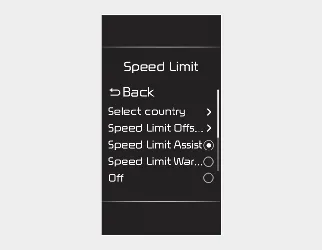
With the ignition switch or ENGINE START/STOP button in the ON position, select User Settings → Driver Assistance → Speed Limit on the LCD display, or select Setup → Vehicle → Driver Assistance → Speed Limit on the infotainment system.
-
Country Selection: If your Kia Seltos is not equipped with a navigation system, a settings menu is provided so the country can be selected manually. For ISLA to operate properly, select the country where the vehicle is currently being driven.
-
Speed Limit Offset: The tolerance for the speed limit can be adjusted. The vehicle will warn the driver or adjust the driving speed when the current speed is higher than the recognized speed limit plus the selected offset value.
-
Speed Limit Assist: ISLA informs the driver of the speed limit and additional road sign information. It can also recommend changing the set speed of Manual Speed Limit Assist (MSLA) or Smart Cruise Control (SCC) to help the Kia Seltos stay within the posted speed limit.
-
Speed Limit Warning: ISLA informs the driver of the speed limit and additional road signs. It warns the driver when the vehicle is traveling faster than the recognized speed limit. The MSLA or SCC set speed will not be adjusted automatically, so the driver must change speed manually.
-
Off: ISLA will be turned off.

WARNING
Change ISLA settings only after parking your Kia Seltos in a safe location.

NOTICE
-
The Speed Limit and Speed Warning functions operate based on the recognized speed limit plus the selected offset value. Set the offset value to '0' if you want the system to warn or adjust speed according to the recognized speed limit without additional tolerance.
-
The Speed Limit Offset setting is not reflected in Navigation-based Smart Cruise Control.


Other information:
Kia Seltos SP2 (2021-2026) Owner's Manual: Integrated Memory System
The Integrated Memory System in the Kia Seltos is designed to store and recall selected driver comfort settings with a simple button operation. This feature helps the driver quickly return the vehicle to a preferred driving position after another driver has used the vehicle. The Kia Seltos Integrated Memory System can store and recall the following settings, depending on vehicle equipment: Driver's seat position Head-Up Display (HUD): position WARNING Never attempt to operate the integrated memory system while the Kia Seltos is moving.Kia Seltos SP2 (2021-2026) Owner's Manual: Emission control system
The emission control system of your Kia Seltos is covered by a written limited warranty. For detailed coverage information, refer to the Warranty & Consumer Information manual supplied with your vehicle. Your Kia Seltos is equipped with an emission control system designed to meet all applicable emission regulations. The system helps reduce harmful emissions while supporting proper engine performance and fuel efficiency.