
Kia Seltos: Highway Driving Assist (HDA) / HDA settings
Contents:
HDA
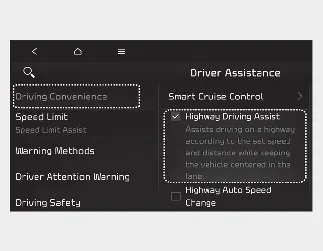
With the ignition switch or ENGINE START/STOP button in the ON position, select Setup → Vehicle → Driver Assistance → Driving Convenience → Highway Driving Assist on the infotainment system screen to choose whether this function will be used.
-
If Highway Driving Assist is selected, the system helps maintain distance from the vehicle ahead, maintain the set speed, and help center the Kia Seltos in the lane when supported operating conditions are met.

WARNING
For your safety, change HDA settings only after parking your vehicle in a safe location.

NOTICE
-
If there is a problem with the function, the settings cannot be changed. Have the Kia Seltos inspected by an authorized Kia dealer.
-
If the vehicle is restarted, the function will maintain the last selected setting.
Warning Methods
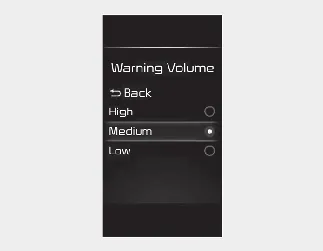
You can adjust the Warning Methods with the ignition switch or ENGINE START/STOP button in the ON position.
-
Warning Volume: Select User Settings → Driver Assistance → Warning Volume on the LCD display, or select Setup → Vehicle → Driver Assistance → Warning Methods on the infotainment system.
-
Driving Safety Priority: Select Setup → Vehicle → Driver Assistance → Warning Methods → Driving Safety Priority on the infotainment system. For safer driving, the audio volume may temporarily decrease so the driver can hear the audible warning more clearly.

NOTICE
-
The Warning Methods you select may also apply to the warning volume of other Driver Assistance systems in the Kia Seltos.
-
Warning Methods will keep the last selected setting even if the vehicle is restarted.
-
The setting menu may not be available depending on vehicle features, trim level, and specifications.

