
Kia K4: Smart Cruise Control (SCC) / Smart Cruise Control operation
Contents:
- Operating conditions
- Turning on Smart Cruise Control
- Smart Cruise Control display and control
- Limitations of Smart Cruise Control
- This device complies with Part 15 of the FCC rules.
Operating conditions
Basic function
To ensure safe and reliable performance, the Smart Cruise Control (SCC) system in your Kia K4 will only engage when specific vehicle requirements are met. The system operates under the following conditions:
-
The transmission gear selector must be in the D (Drive) position.
-
Your driving speed falls within the designated operating range for the Kia K4:
-
Without a lead vehicle: 5–110 mph (10–180 km/h).
-
With a detected lead vehicle: 0–110 mph (0–180 km/h), allowing the Kia K4 to come to a complete stop and resume movement.
-
-
The Electronic Stability Control (ESC) and Anti-lock Braking System (ABS) must be in the ON state and functioning correctly.
Conversely, the Smart Cruise Control system in the Kia K4 will not activate or will automatically deactivate if any of the following conditions occur:
-
The driver’s door is detected as open.
-
The engine RPM exceeds the safety limit.
-
The Electronic Parking Brake (EPB) is engaged.
-
The ESC or ABS is actively intervening to stabilize the vehicle.
-
The Forward Collision-Avoidance Assist (FCA) system is currently executing emergency brake control.
TIP
If your Kia K4 is brought to a complete halt behind another vehicle, you can re-engage the Smart Cruise Control system even while the brake pedal is currently pressed.
Overtaking Acceleration Assist function
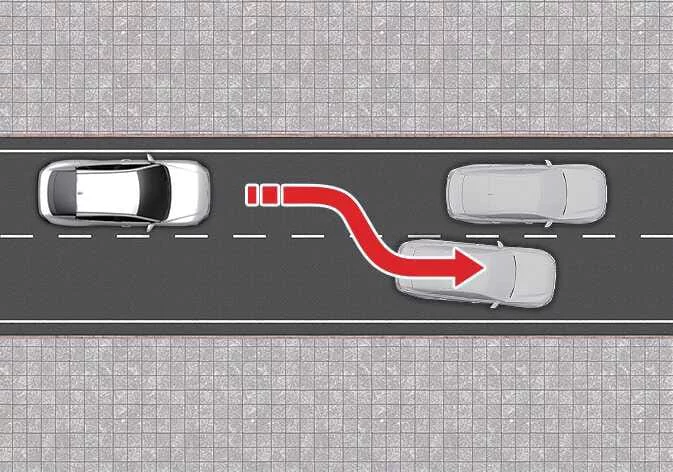
The Overtaking Acceleration Assist feature is designed to support your driving maneuvers in the Kia K4. This function activates when you engage the turn signal indicator toward the direction of the passing lane while Smart Cruise Control is active, provided the following conditions are met:
-
Your current speed is above 40 mph (60 km/h).
-
The Kia K4 sensor suite has detected a vehicle directly ahead of you.
Overtaking Acceleration Assist will remain inactive if:
-
The vehicle's hazard lights are currently switched ON.
-
You have already reduced your speed significantly to maintain the necessary following distance from the vehicle ahead.
WARNING
-
Engaging the turn signal while following a vehicle may cause your Kia K4 to accelerate temporarily. Always remain vigilant and monitor surrounding road and traffic conditions closely.
-
Overtaking Acceleration Assist is configured to trigger based on signal input regardless of your country's driving direction. When driving the Kia K4 in countries with different traffic flow rules, always exercise extreme caution and verify that road conditions are safe before relying on automated acceleration functions.
Turning on Smart Cruise Control
|
To activate the Smart Cruise Control (SCC) system in your Kia K4, simply press the Driving Assist button located on the steering wheel. Upon activation, the Kia K4 will automatically set your cruising speed to your current vehicle speed, as displayed on the instrument cluster.
-
Clear Road Ahead: If there is no vehicle detected ahead of your Kia K4, the system will maintain the set cruising speed.
-
Traffic Ahead: If a slower vehicle is detected, the Kia K4 will intelligently adjust your speed to maintain a safe, pre-selected following distance. Should the lead vehicle accelerate or change lanes, your Kia K4 will smoothly return to your previously set cruising speed.
TIP
If you engage the Driving Assist button while your Kia K4 is moving at a low speed between 0–20 mph (0–30 km/h), the system will default the Smart Cruise Control set speed to 20 mph (30 km/h).
Setting vehicle distance
|
|
You can easily customize the gap between your Kia K4 and the vehicle in front by pressing the Vehicle Distance button. Each press cycles through the available distance levels.
|
When traveling at a speed of 56 mph (90 km/h), the Kia K4 will maintain the following approximate distances based on your selection:
-
Distance 4: ~172 ft (52.5 m)
-
Distance 3: ~130 ft (40 m)
-
Distance 2: ~106 ft (32.5 m)
-
Distance 1: ~82 ft (25 m)
TIP
The Kia K4 remembers your last chosen distance setting, maintaining that preference even after restarting the vehicle or temporarily canceling the Smart Cruise Control.
Increasing set speed
|
|
-
Push the speed adjustment switch (
) upward and release immediately to increase the set speed of your Kia K4 by 1 mph (1 km/h). -
Push and hold the switch (
 ) upward to increase the set speed in 5 mph (10 km/h) increments. The Kia K4 allows you to set a maximum speed of 110 mph (180 km/h).
TIP
Always evaluate current traffic and road conditions before using the speed increase switch ( ). Note that the Kia K4 may accelerate abruptly if you hold the adjustment switch (
 ) down.
Decreasing set speed
|
|
-
To lower your speed, push the switch downward. A quick tap reduces the speed by 1 mph (1 km/h), while pushing and holding the switch will decrease the speed of your Kia K4 in 5 mph (10 km/h) increments.
-
Push the speed adjustment switch (
) downward and release it immediately. The set speed of your Kia K4 will decrease by 1 mph (1 km/h) with each operation. -
Push the speed adjustment switch (
) downward and hold it. The Kia K4 will reduce the set speed by 5 mph (10 km/h) for every increment of time you hold the switch, allowing you to quickly lower your cruising pace to a minimum of 20 mph (30 km/h).
Temporarily canceling Smart Cruise Control
|
|
To temporarily cancel the Smart Cruise Control system in your Kia K4, press the Cancel switch () or firmly apply pressure to the brake pedal. This action puts the Kia K4 into a standby mode while retaining your previously set cruising parameters.
Resuming Smart Cruise Control
|
|
To resume Smart Cruise Control after a temporary cancellation, you can utilize the following switches on your Kia K4 steering wheel:
-
Pushing the adjustment switch up (
) or down ( ) will set the cruising speed to your current real-time speed as displayed on the Kia K4 instrument cluster.
 -
Pressing the Resume (RES) switch (
 ) will cause the Kia K4 to accelerate or decelerate back to your last saved preset speed.
TIP
Always verify the surrounding traffic conditions before engaging the Resume switch ( ). Be aware that your Kia K4 may accelerate or decelerate sharply to meet the target speed when the (
 ) is activated.
Turning OFF Smart Cruise Control
|
|
To fully power OFF the Smart Cruise Control system, press the Driving Assist button located on the Kia K4 steering wheel.
NOTE
If your Kia K4 model includes the Manual Speed Limit Assist feature, a single press may not turn off the SCC entirely. In this case, press and hold the Driving Assist button to deactivate Smart Cruise Control; please note that this specific action will subsequently activate the Manual Speed Limit Assist function.
WARNING
To maintain system integrity and safe operation of your Kia K4, do not attempt to press multiple cruise control switches or buttons simultaneously, as this can confuse the control logic and cause the Smart Cruise Control to operate improperly.
Smart Cruise Control display and control ➤
Limitations of Smart Cruise Control ➤
This device complies with Part 15 of the FCC rules.
Operation of this electronic system in your Kia K4 is subject to the following two conditions:
- This device may not cause harmful interference.
- This device must accept any interference received, including interference that may cause undesired operation of the Kia K4 systems.
TIP
Any changes or modifications to the vehicle's electronic components not expressly approved by the party responsible for compliance could void your authority to operate the equipment in your Kia K4.


Other information:
Kia K4 (CL4) 2025-2026 Owner's Manual: Keys and Remote Access Fobs
The advanced Kia K4 electronic smart key fob seamlessly integrates a traditional emergency mechanical key blade with modern remote multi-channel radio functions, enabling keyless vehicle entry, push-button starting, and remote climate control pre-activation sequences. CRITICAL COGNITIVE SAFETY WARNING: UNATTENDED CHILDREN Never leave your smart key fobs inside the passenger cabin alongside unsupervised children.Kia K4 (CL4) 2025-2026 Owner's Manual: Windshield defrosting and defogging
For your safety, it is essential to clear any frost, ice, or moisture from the windshield to ensure maximum visibility while operating your Kia K4. WARNING Windshield heating Do not use the or setting while running the air conditioner (A/C) in extremely humid weather conditions. A significant temperature differential between the outside air and the glass surface can cause fog to form on the *outer* side of the windshield, which may severely obscure your vision and increase the risk of an accident.
Contents
- Operating conditions
- Turning on Smart Cruise Control
- Smart Cruise Control display and control
- Limitations of Smart Cruise Control
- This device complies with Part 15 of the FCC rules.
Categories
- Manuals Home
- Kia K4 Owners Manual
- Questions & Answers
- Video Guides
- Useful Resources
- New on site
- Most important about Kia K4
- Privacy Policy
