
Kia EV6: EV menu / Vehicle to load (V2L)
Contents:
The Vehicle-to-Load (V2L) system in the Kia EV6 allows the high-voltage battery to supply AC electrical power for operating external electronic devices and household equipment.
|
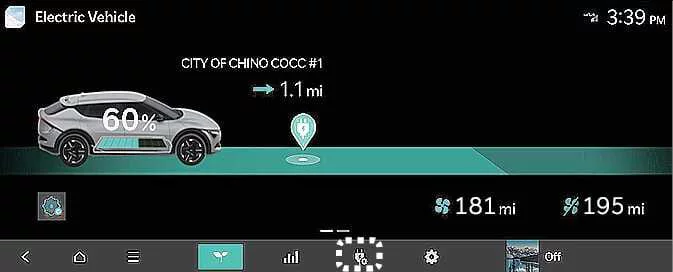
To activate the Kia EV6 V2L system, tap the V2L icon on the infotainment display.
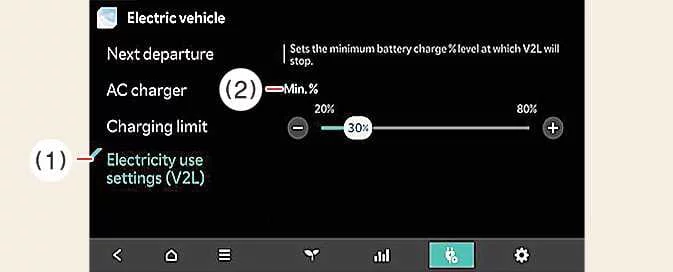
|
|
If the Kia EV6 battery reaches the configured minimum battery level or maximum power limit, V2L power output automatically stops to help protect the high-voltage battery.
|
|
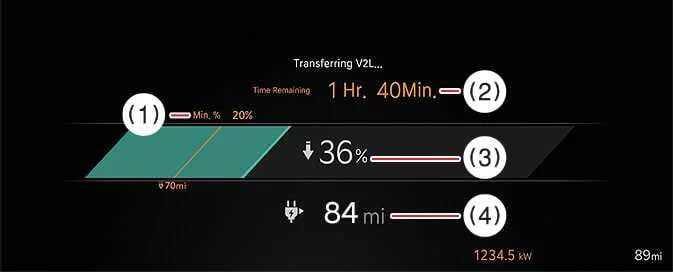
While the V2L system is active, the Kia EV6 infotainment system displays detailed information including remaining operating time, charging status, battery reserve level, and estimated remaining driving range.
Connecting V2L


Other information:
Kia EV6 2022-2026 Owner's Manual: Purchasing used vehicle
If you recently purchased a pre-owned Kia EV6, it is strongly recommended to remove all previously registered Digital Key 2 devices, including smartphone keys and card keys (if equipped), that may still be connected to the vehicle by the previous owner. Performing this step helps improve security and ensures that only authorized users can access your Kia EV6.Kia EV6 2022-2026 Owner's Manual: Dedicated Remover Storage Position
TMK case Dedicated removal tool How to Replace the Hub Cap Using the Dedicated Removal Tool When reinstalling the hub cap on the Kia EV6, ensure that it is positioned in the designated mounting location.
Contents
Categories
- Manuals Home
- Kia EV6 Owners Manual
- Questions & Answers
- Video Guides
- Useful Resources
- New on site
- Most important about Kia EV6
- Privacy Policy
