
Kia EV6: Opening and closing / Smartphone Touch Control
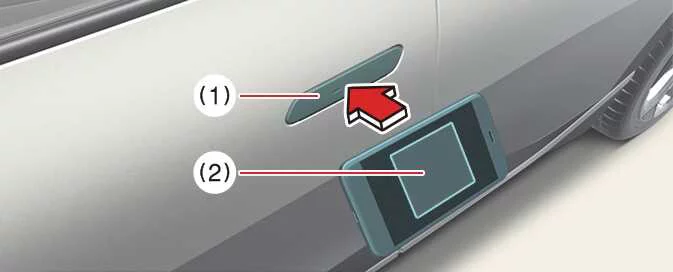
The Kia EV6 Digital Key 2 smartphone touch control system allows the driver to conveniently lock or unlock the vehicle doors simply by touching a compatible smartphone to the exterior door handle, without needing to manually open the Kia Access App.
In addition, the Kia EV6 can be started by placing the registered smartphone onto the wireless charging pad located inside the vehicle. For proper operation, ensure that the smartphone’s NFC (Near Field Communication) antenna is aligned correctly with the authentication area on the vehicle.
The advanced smartphone authentication system of the Kia EV6 combines convenience, security, and modern wireless connectivity technologies for everyday driving.
|
|
Because NFC antenna locations vary depending on smartphone manufacturer and model, users should position the correct area of the device against the Kia EV6 authentication pad for reliable operation.
On Apple iPhone ® devices, the NFC antenna is generally positioned near the upper rear section of the phone, while the Apple Watch ® places the NFC antenna near the center of the display. These are typically the same locations used for contactless payment functionality.
If you are unsure where the NFC antenna is located on your smartphone, contact the smartphone manufacturer for additional technical information.
Locking and unlocking the doors
-
If the driver touches the smartphone NFC antenna to the Kia EV6 driver-side or passenger-side exterior door handle authentication pad for more than approximately 2 seconds, the doors will either lock or unlock automatically.
-
After unlocking the Kia EV6 using the smartphone digital key, the doors automatically relock after approximately 30 seconds unless a door is opened.
-
If the smartphone digital key does not respond properly, move the smartphone at least 4 inches (0.1 m) away from the Kia EV6 door handle authentication pad and try the operation again.
To lock or unlock the Kia EV6 using a registered smartphone without UWB functionality, place the smartphone’s NFC antenna directly against the authentication pad located on the driver or passenger exterior door handle for approximately 2 seconds.
For smartphones with UWB support:-
To lock or unlock the Kia EV6 doors, carry the compatible smartphone with you and touch the exterior door handle lock/unlock sensor located in the curved sensor area of the handle.
-
If the Approach Unlock feature is enabled, the Kia EV6 automatically unlocks the front doors when the driver approaches the exterior door handle while carrying the registered smartphone.
The Kia EV6 Digital Key 2 system is designed to provide seamless and intuitive vehicle access while minimizing the need for physical keys.
WARNING
-
When carrying a UWB-compatible smartphone near the Kia EV6 for an extended period, the automatic door unlocking system may not respond immediately in certain situations.
-
If the smartphone is stored in a back pocket, handbag, backpack, or other enclosed area, the wireless signal strength may be reduced. This can affect Bluetooth communication quality and cause delayed operation when locking, unlocking, or starting the Kia EV6.
-
If metallic window tint film or metallic materials are installed near the smartphone or vehicle glass, the Kia EV6 Digital Key 2 system may not function correctly.
NOTE
The Kia EV6 doors may unlock automatically and an audible confirmation beep may sound while using Digital Key 2 under any of the following conditions:
-
When the Smart Key is already inside the Kia EV6
-
When the EV button is in the POWER ON position
-
When attempting to lock the Kia EV6 while one or more doors, the hood, or the liftgate remains open
-
If metallic window tint or metal-based film interferes with the Digital Key 2 communication signal, operation may become unreliable.
Starting the vehicle
To start the Kia EV6 using Digital Key 2 smartphone authentication, place the registered smartphone onto the wireless charging pad, press and hold the brake pedal, and then press the EV button.
-
Once the Kia EV6 has started successfully, the smartphone can be removed from the wireless charging pad.
The smartphone-based starting system of the Kia EV6 offers an additional level of convenience for drivers who prefer using digital vehicle access technology.
For additional information regarding startup procedures, refer to the EV button section of the Kia EV6 owner’s manual.
For smartphones without UWB support:-
To start the Kia EV6, position the smartphone’s NFC antenna directly over the center of the wireless charging pad, then press the brake pedal and press the EV button.
-
After the Kia EV6 enters the DRIVE READY state successfully, the smartphone may be removed from the charging pad.
-
If smartphone recognition does not occur immediately, slightly reposition the device on the charging pad and try the authentication process again.
Some smartphone models may experience inconsistent NFC communication because of their internal antenna layout or hardware structure. If authentication with the Kia EV6 wireless charging pad does not respond correctly, slightly reposition the smartphone toward the left or right side of the charging pad until proper communication is established.
On Apple iPhone ® devices, the NFC antenna is generally located near the upper rear section of the phone, while the Apple Watch ® places the NFC antenna near the center area of the display. These are the same areas commonly used for contactless payment authentication. If you are unsure about the exact NFC antenna location on your smartphone or wearable device, contact the smartphone manufacturer for detailed technical information.
-
Carry the registered smartphone inside the Kia EV6 cabin, press the brake pedal, and then press the EV button to start the vehicle without using the physical smart key.
-
To remotely start the Kia EV6, use the smartphone manufacturer’s compatible digital wallet or vehicle control application to lock the vehicle first using the door lock command, then press the remote start button within 4 seconds. Once activated successfully, the Kia EV6 will start and the hazard warning lights will flash for confirmation.
-
To switch the Kia EV6 off after remote start operation, press the remote start button again through the compatible smartphone application or device interface.
Operating the liftgate
For smartphones with UWB support:-
When the Kia EV6 is locked, press the liftgate open button while carrying a registered Digital Key 2 smartphone to automatically unlock and open the liftgate.
-
If the Smart Liftgate function is enabled, the Kia EV6 liftgate opens automatically when the driver stands within the detection zone behind the vehicle for more than approximately 3 seconds while carrying a registered Digital Key 2 smartphone.
The Smart Liftgate system of the Kia EV6 improves convenience during loading and unloading by allowing hands-free liftgate operation.
CAUTION
-
Before closing the Kia EV6 liftgate, confirm that the registered smartphone is not left inside the vehicle. If the smartphone remains inside the vehicle while the doors are locked, the vehicle may not unlock properly after the liftgate is closed using the exterior liftgate controls.
-
The Kia EV6 can be started whenever a registered Digital Key 2 smartphone remains inside the vehicle. Never leave children, passengers unfamiliar with the system, or unattended individuals inside the vehicle with the registered smartphone present, as unintended vehicle operation could lead to serious injury or death. Always carry the registered smartphone with you when leaving the vehicle to reduce theft risk.
For smartphones with UWB support, Kia EV6 Digital Key 2 functionality is only available while the smartphone and vehicle maintain an active Bluetooth connection.
-
The operating range of the Kia EV6 Bluetooth connection may vary depending on nearby electronic devices, obstacles, wireless interference, and surrounding environmental conditions.
-
Bluetooth signal quality may decrease depending on the type of window tint film installed on the Kia EV6.
-
If the smartphone is stored inside a back pocket, handbag, backpack, or other enclosed location, the wireless signal may become partially blocked. This can reduce Bluetooth performance and cause delayed door locking, unlocking, or vehicle starting responses.
For smartphones equipped with UWB support, Kia EV6 Digital Key 2 operation may remain active for a limited time period in order to help optimize battery consumption for both the smartphone and the vehicle.
You can verify the connection status between the Kia EV6 and the registered smartphone through the smartphone settings menu or by using the application supplied by the smartphone manufacturer.
WARNING
The Kia EV6 can be started whenever a registered smartphone is positioned on the in-vehicle authentication pad (wireless charging pad). Never leave children or individuals unfamiliar with the Digital Key 2 system unattended inside the vehicle, as unintended vehicle operation may result in severe injury or death. Always carry the registered smartphone with you when exiting the Kia EV6 to help prevent unauthorized vehicle access or theft.
NOTE
When using a shared-user Kia EV6 Digital Key 2 for the first time, operation response times may initially be slightly longer during the first authentication process.
Move the Digital Key 2 smartphone close to the authentication pad integrated into the Kia EV6 exterior door handle until the door locking or unlocking function activates normally.
If the interior authentication pad is being used for the first time, the initial Kia EV6 vehicle start function may not operate immediately. Repeat the authentication process if necessary.
How to delete Digital Key (Smartphone)
Before deleting a Kia EV6 Digital Key 2 linked to a smartphone, switch the vehicle on using the smart key and keep the smart key inside the Kia EV6 throughout the entire deletion process to ensure proper authentication and system access.
-
To Delete All Digital Keys
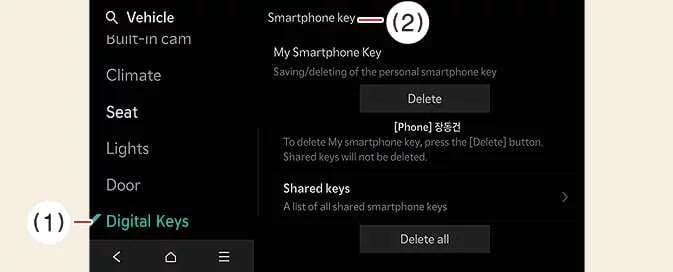
-
Digital Keys
-
Smartphone key
With the Kia EV6 powered on, open the infotainment menu and select Setup > Vehicle > Digital Keys > Smartphone key > Shared keys > Delete all.
-
This procedure removes both the owner’s smartphone digital key and all shared Kia EV6 Digital Key 2 users connected to the vehicle.
-
If no digital smartphone key has been registered, the Delete All option will remain unavailable.
-
-
To Delete the Owner’s Digital Key
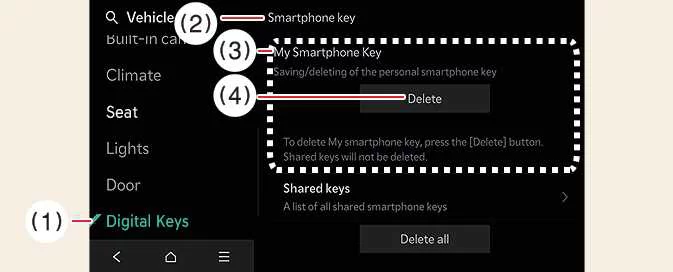
-
Digital Keys
-
Smartphone key
-
My Smartphone Key
-
Delete
If you only want to replace the owner’s smartphone while keeping shared Digital Key 2 users active in the Kia EV6, select My Smartphone Key and delete only that entry instead of using Delete All. Afterward, you can register a new owner device.
With the vehicle switched on, select Setup > Vehicle > Digital Keys > Smartphone Key > My Smartphone key > Delete through the Kia EV6 infotainment system.
-
Once the My Smartphone Key profile is removed, another smartphone can be paired and registered as the new Kia EV6 Digital Key 2 owner device.
-


Other information:
Kia EV6 2022-2026 Owner's Manual: 1. Setting
To enable the Kia EV6 Smart Liftgate with Auto Open feature, navigate to Setup > Vehicle > Door > Smart Liftgate with Auto Open within the infotainment system settings menu. 2. Detect and Alert If you stand within the detection zone located approximately 20–40 inches (50–100 cm) behind the Kia EV6 while carrying the smart key, the hazard warning lights will flash and a warning chime will sound.Kia EV6 2022-2026 Owner's Manual: Limitations of Blind-Spot Collision-Avoidance Assist
The Kia EV6 Blind-Spot Collision-Avoidance Assist system may operate unexpectedly, become temporarily limited, or fail to detect surrounding vehicles properly under certain road, weather, traffic, or environmental conditions. Because the Kia EV6 Blind-Spot Collision-Avoidance Assist system relies on radar sensors and electronic detection technology, detection performance can vary depending on surrounding obstacles, road geometry, weather, and driving behavior.
Categories
- Manuals Home
- Kia EV6 Owners Manual
- Questions & Answers
- Video Guides
- Useful Resources
- New on site
- Most important about Kia EV6
- Privacy Policy
