
Owner's library Kia Seltos Manuals Owner's manual pages, service notes, maintenance references and practical Kia Seltos help in one clean library.

Kia Seltos reference pages

Manuals, maintenance notes and quick owner help.

Find Kia Seltos operating instructions, warning light explanations, service information and owner guidance without digging through a full PDF.

Kia Seltos: What to do in an emergency / Road warning

Contents:

When an emergency occurs while driving, or when the Kia Seltos is parked near the edge of the roadway, you must warn approaching and passing vehicles to use caution. Use the hazard warning flasher to make the vehicle more visible.

Hazard warning flasher

The hazard warning flasher warns other drivers to use extreme caution when approaching, overtaking, or passing your Kia Seltos.
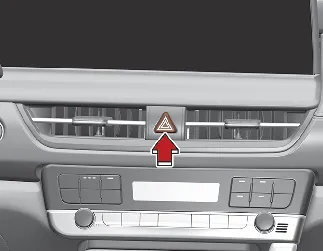
Kia Seltos hazard warning flasher switch on center dashboard panel

Use the hazard warning flasher whenever emergency repairs are being made or when the vehicle is stopped near the edge of a roadway.

Press the flasher switch with the ENGINE START/STOP button in any position. The flasher switch is located on the center dashboard panel. All turn signal lights will flash at the same time.

  • The hazard warning flasher operates whether the vehicle is running or not.

  • The turn signals do not operate while the hazard warning flasher is on.

  • Use care when operating the hazard warning flasher while the Kia Seltos is being towed.

Other information:

Kia Seltos SP2 (2021-2026) Owner's Manual: Selecting a CRS

When selecting a Child Restraint System for your child, always choose a restraint that fits the child, fits the Kia Seltos seating position, and can be installed according to the manufacturer's instructions. Make sure the CRS has a label certifying that it meets FMVSS 213. Select a child restraint based on your child's height and weight.

Kia Seltos SP2 (2021-2026) Owner's Manual: AWD mode

AWD mode helps improve the driving performance of the Kia Seltos by controlling power delivery to all four wheels. This system supports better traction and stability when road conditions change, especially on wet, slippery, sandy, muddy, or uneven surfaces. You can switch from AWD AUTO mode to AWD Lock mode by pressing the AWD Lock mode switch.