
Kia Seltos SP2 (2021-2026) Owner's Manual / Driver assistance system / Navigation-based Smart Cruise Control (NSCC) / NSCC settings
Kia Seltos: Navigation-based Smart Cruise Control (NSCC) / NSCC settings
Contents:
Highway Auto Speed Change
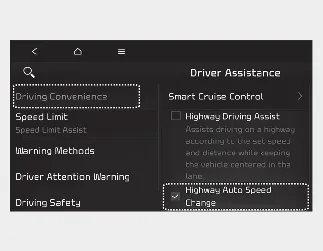
With the ignition switch or ENGINE START/STOP button in the ON position, select ‘Setup → Vehicle → Driver Assistance → Driving Convenience → Highway Auto Speed Change’ on the infotainment system screen to choose whether this function will be used.

NOTICE
When there is a problem with NSCC, the function cannot be selected or changed from the Settings menu. If the issue continues, have the Kia Seltos checked by an authorized Kia dealer.


Other information:
Kia Seltos SP2 (2021-2026) Owner's Manual: Navigation-based Smart Cruise Control (NSCC)
Navigation-based Smart Cruise Control (NSCC) in the Kia Seltos can help maintain an appropriate driving speed according to road conditions when driving on highways or motorways. While Smart Cruise Control is operating, NSCC uses road information from the navigation system to support smoother and safer highway driving. NOTICE NSCC is available only on controlled-access roads of certain highways.Kia Seltos SP2 (2021-2026) Owner's Manual: Conditions and operation of the front passenger ODS
Condition detected by the occupant detection system Indicator/Warning light Devices "PASSENGER AIR BAG OFF" indicator light SRS warning light Front passenger air bag 1.