
Kia Seltos: Navigation-based Smart Cruise Control (NSCC) / Limitations of NSCC
Navigation-based Smart Cruise Control (NSCC) in the Kia Seltos may not operate properly under certain road, navigation, weather, or system conditions. The driver must always monitor the road and remain ready to control speed manually.
-
The navigation system is not operating properly.
-
Map information is not transmitted because of abnormal infotainment system operation.
-
The map information and the actual road do not match because of real-time GPS data errors or map information errors.
-
The navigation system is searching for a route while driving.
-
GPS signals are blocked, such as when driving through a tunnel.
-
The vehicle enters a service area or rest area.
-
Android Auto or Apple CarPlay is operating.
-
The navigation system cannot detect the current Kia Seltos position, for example when elevated roads, overpasses, general roads, or nearby parallel roads are close together.
-
The navigation system is being updated while driving.
-
The navigation system is restarting while driving.
-
The speed limit changes in certain sections depending on road conditions.
-
The vehicle is being driven on a road under construction.
-
The vehicle is being driven on a controlled or restricted road section.
-
There is bad weather, such as heavy rain, heavy snow, fog, or other conditions that reduce visibility and road recognition.
-
The vehicle is being driven on a sharply curved road.
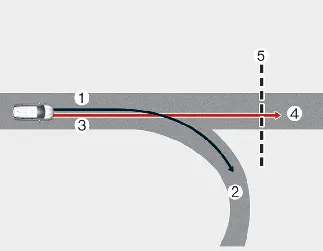
[1]: Set route, [2]: Branch line, [3]: Driving route, [4]: Main road, [5]: Curved road section
-
When there is a difference between the navigation set route, such as a branch line, and the actual driving route, such as the main road, Highway Curve Zone Auto Slowdown may not operate until the driving route is recognized as the main road.
-
When the Kia Seltos driving route is recognized as the main road by continuing on the main road instead of following the navigation set route, Highway Curve Zone Auto Slowdown may operate. Depending on the distance to the curve and the current vehicle speed, deceleration may not be sufficient or may feel sudden.
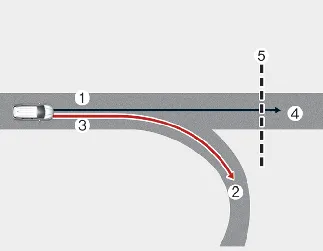
[1]: Main road, [2]: Branch line, [3]: Driving route, [4]: Set route, [5]: Curved road section
-
When there is a difference between the navigation route on the main road and the actual driving route on a branch line, Highway Curve Zone Auto Slowdown may operate based on curve information for the main road.
-
When the system determines that the vehicle is leaving the route by entering a highway interchange, junction, service area, or similar section, Highway Curve Zone Auto Slowdown will not operate.
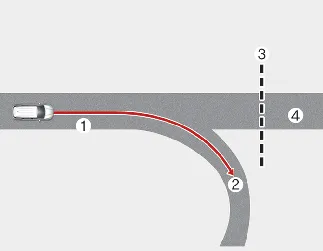
[1]: Driving route, [2]: Branch line, [3]: Curved road section, [4]: Main road
-
If the Kia Seltos is traveling on a branch line or a road section that the navigation system does not recognize accurately, NSCC may not slow the vehicle at the expected time for a curve.
-
Always reduce speed manually when approaching curves, interchanges, ramps, or unfamiliar road layouts. NSCC is a driver assistance feature and cannot replace attentive driving or correct speed judgment.
If no destination is set in the navigation system, the Highway Curve Zone Auto Slowdown function may operate based on curve information for the main road.
Even if the Kia Seltos leaves the main road, Highway Curve Zone Auto Slowdown may continue operating temporarily because of stored navigation information for the highway curve section.

WARNING
-
NSCC is not a replacement for safe driving practices. It is a convenience feature only. Always keep your eyes on the road and remember that you are responsible for obeying traffic laws.
-
The speed limit information provided by navigation may differ from the actual speed limit on the road. It is the driver's responsibility to check and follow the speed limit on the actual road or lane being driven.
-
NSCC will be canceled automatically when the Kia Seltos leaves the main highway road. Always pay attention to road layout, traffic flow, and driving conditions.
-
NSCC may not operate depending on the presence of vehicles ahead and the current driving conditions of the vehicle. Always monitor the road and be ready to brake or steer manually.
-
When towing a trailer or another vehicle, turn off NSCC.
-
After passing through a highway tollgate, NSCC may operate based on the first lane. If you enter another lane, the system may not operate correctly.
-
If you press the accelerator pedal while NSCC is operating, the Kia Seltos will accelerate and the function will not decelerate the vehicle during that time. If the accelerator pedal is not pressed enough, the vehicle may decelerate.
-
If you accelerate and then release the accelerator pedal while NSCC is operating, the vehicle may not decelerate enough, or it may decelerate rapidly to a safer speed.
-
If a curve is too large, too small, or not recognized accurately by the navigation data, NSCC may not operate as expected.

NOTICE
-
A time gap may occur between the navigation guidance and the moment NSCC operation starts or ends.
-
The speed information shown on the instrument cluster and the navigation system may differ.
-
Even when the Kia Seltos is traveling below the SCC set speed, acceleration may be limited if a curve section is ahead.
-
If NSCC is operating while the vehicle leaves the main road to enter an interchange, junction, service area, or similar area, the function may continue operating for a short period.
-
NSCC deceleration may feel insufficient because of road conditions such as uneven surfaces, narrow lanes, sharp curves, or changing traffic conditions.


Other information:
Kia Seltos SP2 (2021-2026) Owner's Manual: Head-Up Display (HUD)
The Kia Seltos Head-Up Display is a transparent display system that projects selected information from the instrument cluster and navigation system onto the HUD screen. This allows the driver to view key information while keeping attention closer to the road ahead. Combiner Shutter The hidden HUD screen rises when you press the screen operation switch located on the left side of the lower crash pad.Kia Seltos SP2 (2021-2026) Owner's Manual: Care of seat belts
Seat belt systems in the Kia Seltos should never be disassembled, modified, or repaired by the owner. Always make sure the belt webbing, buckles, latches, anchors, and related hardware are not damaged by seat hinges, doors, sharp objects, or improper use. WARNING Pinched seat belt When returning the rear seatback to its upright position, make sure the seat belt webbing and buckle do not become caught or pinched.