
Kia Seltos: Lighting / Lighting control
Contents:
The Kia Seltos light switch includes positions for headlights, position lamps, AUTO lighting, and OFF or DRL OFF operation.
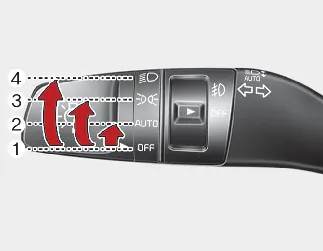
To operate the lights, turn the knob at the end of the control lever to one of the following positions:
-
OFF position / DRL off position
-
Auto light position
-
Position & Tail lamp
-
Headlight position
Position & Tail lamp
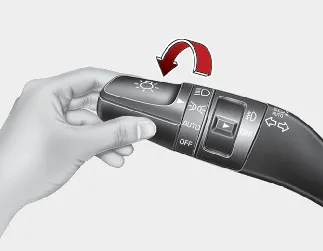
When the light switch is in the position lamp setting, the tail lamps, license plate lamp, and instrument panel lights turn ON.
Head light (Low Beam)
Auto light
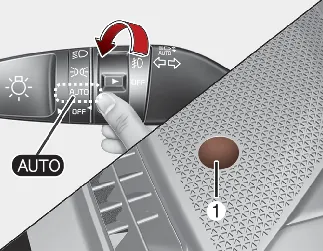
When the Kia Seltos light switch is set to the AUTO light position, the taillights and headlights turn ON or OFF automatically according to the amount of outside light around the vehicle. This function helps improve convenience when driving through changing light conditions, such as tunnels, shaded roads, or evening traffic.

CAUTION
-
Never place anything over the sensor (1) located on the instrument panel. Keeping this sensor clear helps the Kia Seltos auto-light system operate correctly.
-
Do not clean the sensor with window cleaner. The cleaner may leave a light film that can interfere with sensor operation.
-
If the front windshield has window tint or another metallic coating, the Auto light system may not work properly.
One-touch lane change function
To activate the one-touch lane change function, move the turn signal lever slightly and then release it. The lane change signals will blink 3, 5, or 7 times, depending on the selected Kia Seltos setting.
You can activate or deactivate the One Touch Turn Signal function, or select the number of blinks, by choosing Lights → One Touch Turn Signal. This setting is available through User Settings → Lights → One Touch Turn Signal on the LCD display, or through Setup → Vehicle → Lights → One Touch Turn Signal on the infotainment system.
NOTICE
The infotainment system may change after software updates. For more information, refer to the user's manual provided in the Kia Seltos infotainment system and the quick reference guide.
NOTICE
If the turn signal indicator stays on without flashing, flashes abnormally fast, or does not appear, a bulb may be burned out or there may be a poor electrical connection in the circuit. The bulb or related component may require inspection or replacement.


Other information:
Kia Seltos SP2 (2021-2026) Owner's Manual: Trip information (trip computer)
The Kia Seltos trip computer is a microcomputer-controlled driver information system that displays useful driving data. It helps the driver monitor trip distance, driving time, fuel economy, and other important travel information directly through the instrument cluster. NOTICE Some driving information stored in the Kia Seltos trip computer may be reset if the battery is disconnected.Forward Collision-Avoidance Assist (FCA) in the Kia Seltos is designed to help detect and monitor a vehicle ahead, or help detect a pedestrian or cyclist in the roadway. When the system determines that a collision risk is increasing, it may warn the driver with a warning message and audible alert, and may assist with emergency braking. Detecting sensor [1]: Front view camera Refer to the image above for the detailed location of the detecting sensor.