
Kia Seltos: Digital Key 2 Touch / Digital Key 2 Touch (Card Key)
Contents:
- How to register Digital Key 2 Touch (Card Key)
- How to use the Digital Key 2 Touch (Card key)
- How to delete Digital Key 2 Touch (Card key)
How to register Digital Key 2 Touch (Card Key)
To use the card key as a Kia Seltos Digital Key 2 Touch device, follow the registration procedure below. The card key can provide convenient access when it is properly saved to the vehicle.
-
Get into the Kia Seltos with two smart keys.
-
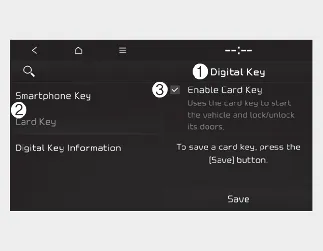
Check that the 'Enable Card Key' menu is activated.
With the vehicle on, select 'Setup → Vehicle → Digital Key → Card Key → Enable Card Key' on the infotainment system.
-
Digital Key
-
Card Key
-
Enable Card Key
-
-
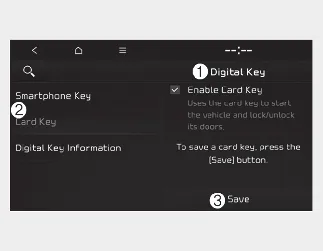
With your Kia Seltos turned on, place the card key on the in-vehicle authentication pad. The saving process will begin automatically.
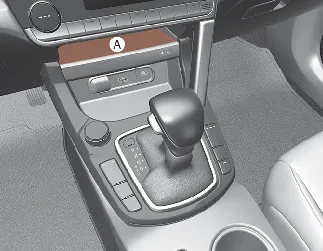
[A]: Charging pad
-
Digital Key
-
Card Key
-
Save
-
-
When the digital card key is saved successfully, a confirmation message will appear on the infotainment system screen.

NOTICE
-
The infotainment system may change after software updates. For current menu information and detailed operation, refer to the user's manual provided in the Kia Seltos infotainment system and the quick reference guide.
-
When a digital card key is already saved in the vehicle, the 'Save' menu is disabled. To save a digital key again, delete the existing card key first, and then repeat the registration procedure.
-
To register the Kia Seltos digital card key, both smart keys must be inside the vehicle.
-
The registered digital card key cannot be used with another vehicle.
How to use the Digital Key 2 Touch (Card key)
Card key touch control
The driver can lock and unlock the Kia Seltos doors by touching the registered card key to the door handle authentication pad. The vehicle can also be started by placing the card key on the in-vehicle authentication pad, also known as the wireless charging pad.
This Kia Seltos Digital Key 2 Touch card key function provides a convenient alternative to carrying a traditional smart key, as long as the card key has been registered correctly.
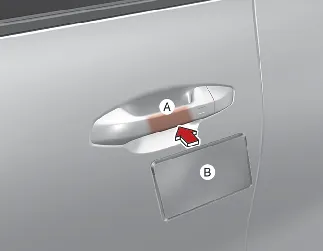
[A]: Door handle authentication pad
[B]: Card key NFC antenna
Locking/Unlocking the doors
-
If you touch the card key to the driver's or passenger's door handle authentication pad for more than 2 seconds, the door will lock or unlock.
-
If the 2 Press Unlock function is set, only the driver's door will unlock when the card key is touched to the driver's door handle. Touch the card key once more within 4 seconds to unlock all doors.
-
After the doors are unlocked, they will automatically re-lock after 30 seconds unless a door is opened.

NOTICE
When the card key is touched to the outside door handle authentication pad, the Kia Seltos doors will not lock and an audible warning may sound in the following conditions:
-
The smart key is inside the vehicle.
-
The ENGINE START/STOP button is in the ACC or ON position.
-
Any door is open, or the hood or liftgate is not properly closed.
Starting your vehicle
To start the Kia Seltos with the Digital Key 2 Touch card key, place the registered card key on the in-vehicle authentication pad or wireless charging pad. Then depress the brake pedal and press the ENGINE START/STOP button.
-
Once the vehicle has started, you can remove the card key from the pad.
For more details, refer to the related Kia Seltos Digital Key and vehicle start-up instructions.

WARNING
Your Kia Seltos can be started when the registered card key is placed on the in-vehicle authentication pad or wireless charging pad. Do not leave unsupervised children or people who do not understand the system inside the vehicle, as this could result in serious injury or death. Always keep the registered card key with you when leaving the vehicle to help prevent unauthorized use or theft.

CAUTION
-
The Kia Seltos digital card key may not work properly under the following conditions:
-
The digital card key is not touching the center of the door handle authentication pad or the in-vehicle authentication pad correctly.
-
The digital card key is used while overlapped with NFC-enabled items such as a credit card, access card, or smart phone.
-
If the digital card key does not operate, move it approximately 4 in (10 cm) away from the authentication pad, then touch it to the pad again.
-
-
The digital card key can be damaged by impact. If it is damaged, replace it with a new card key and register it again before use.
-
Long exposure to high temperature may cause the card key to malfunction. Do not leave the Kia Seltos card key in direct sunlight or near high-heat areas for an extended period.
How to delete Digital Key 2 Touch (Card key)
-
Turn the Kia Seltos on with the smart key and make sure the smart key remains inside the vehicle during the digital card key deleting process.
-
With the vehicle on, place the card key on the in-vehicle authentication pad. Then select 'Setup → Vehicle → Digital Key → Card Key → Delete' on the infotainment system.
The 'Delete' menu will be disabled if no digital card key is saved in the vehicle.
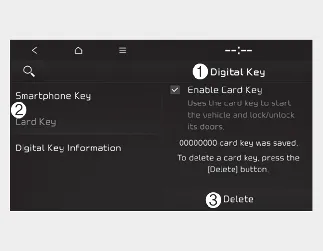
-
Digital Key
-
Card Key
-
Delete
-
-
When the digital card key is deleted, a confirmation message will appear on the infotainment system screen or instrument cluster.

NOTICE
The infotainment system may change after software updates. For the latest menu layout, screen names, and detailed operating information, refer to the user's manual provided in the Kia Seltos infotainment system and the quick reference guide.


Other information:
Kia Seltos SP2 (2021-2026) Owner's Manual: Remote keyless entry
The remote keyless entry system allows you to lock and unlock the Kia Seltos doors from a distance for convenience and security. Remote keyless entry system operations Folding key Smart key - Type A Smart key - Type B Lock (1) All doors are locked when the lock button is pressed. If all doors are closed, the hazard warning lights will blink, and the chime will sound once for the smart key to confirm that all doors are locked.Kia Seltos SP2 (2021-2026) Owner's Manual: Instrument cluster
Type A Type B * The actual instrument cluster in your Kia Seltos may differ from the illustration depending on trim level, market, and vehicle specifications. Speedometer Tachometer Fuel gauge Engine coolant temperature gauge LCD display Warning and indicator lights