
Kia Seltos: All Wheel Drive (AWD) system / AWD mode
Contents:
AWD mode helps improve the driving performance of the Kia Seltos by controlling power delivery to all four wheels. This system supports better traction and stability when road conditions change, especially on wet, slippery, sandy, muddy, or uneven surfaces.
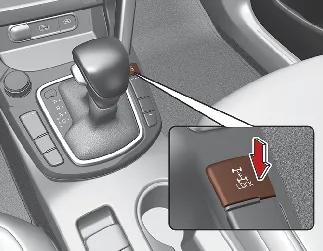
You can switch from AWD AUTO mode to AWD Lock mode by pressing the AWD Lock mode switch. The selected mode should always match the current road surface and driving conditions.
AWD transfer mode selection
|
Transfer mode |
Selection button |
Indicator light |
Description |
|---|---|---|---|
|
AWD AUTO |
- |

|
|
|
AWD LOCK |

|

|
|

NOTICE
Normal road conditions
-
Keep the Kia Seltos in AWD AUTO mode when driving on normal paved roads.
-
When driving under normal road conditions, especially while cornering, AWD Lock mode may cause slight mechanical vibration or noise. This is a normal characteristic of the system and does not indicate a malfunction. Once AWD Lock mode is released, the noise or vibration should disappear.

NOTICE
AWD vehicles must be towed with all wheels off the ground, either on a flatbed tow truck or by using proper wheel dollies. This prevents unnecessary stress on the Kia Seltos AWD drivetrain.

CAUTION
The Kia Seltos AWD model should never be towed with the wheels directly on the ground. Improper towing can cause serious damage to the transmission, driveline components, or AWD system.


Other information:
Kia Seltos SP2 (2021-2026) Owner's Manual: Recommended lubricants and capacities
To help achieve proper engine performance, powertrain durability, and long-term reliability in the Kia Seltos, use only lubricants and fluids of the recommended quality and specification. Using the correct lubricants helps reduce engine friction, supports fuel efficiency, and protects important mechanical components from premature wear. The following lubricants and fluids are recommended for use in your Kia Seltos.If a professional towing service is not available during an emergency, your Kia Seltos may be temporarily towed using a suitable cable, chain, or towing strap attached only to the emergency towing hook located under the front or rear of the vehicle. Front Rear If towing is necessary, it is always best to have the Kia Seltos handled by an authorized Kia dealer or a professional commercial tow-truck service.