Kia K4: Interior features / Wireless smartphone charging system
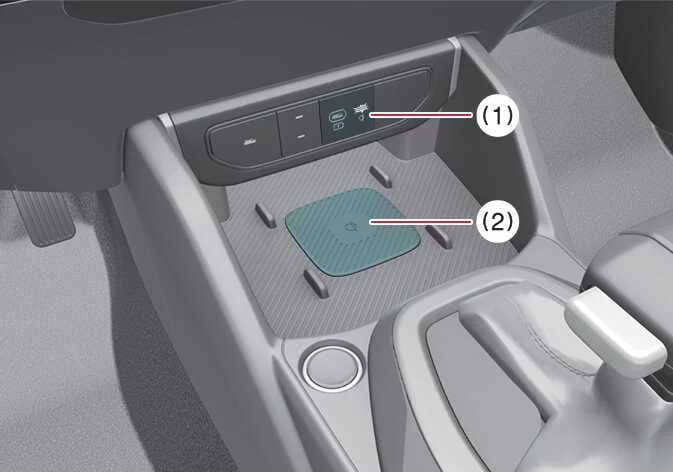
The Kia K4 features an advanced wireless smartphone charging system conveniently located at the front of the center console, allowing you to power your mobile devices without the clutter of cables.
|
|
To ensure proper operation, firmly close all vehicle doors and start the Kia K4 engine or set the ignition to the ON position. To initiate wireless charging, simply place your Qi®-compatible smartphone flat onto the center of the wireless charging pad. Achieving optimal alignment is key to the most efficient energy transfer.
Please note that the Kia K4 wireless charging system is designed to accommodate one Qi®-certified smartphone at a time. To verify if your device supports this standard, please consult your smartphone’s accessory packaging or the official manufacturer’s website.
NOTE
Always ensure that no metallic objects—such as coins, keys, or credit cards with magnetic strips—are placed between the Kia K4 charging pad and your smartphone, as these items can disrupt the electromagnetic field, prevent charging, or become dangerously hot.
Wireless smartphone charging procedure
-
Ensure the Kia K4 charging pad is clear of all foreign objects, including your smart key or metal items, which can interfere with or disable the system.
-
Position your smartphone directly in the center of the wireless charging pad.
-
The indicator light will illuminate in amber once the Kia K4 system detects your device and begins the charging process. Depending on your smartphone’s software and battery health, the indicator may transition to green once charging is complete.
-
You can manage the wireless charging functionality via the vehicle's infotainment system settings menu.
If charging does not begin immediately, gently shift the smartphone's position on the pad until the amber light activates. Please be aware that some smartphone models may not trigger the green status light even after a full charge has been reached.
Should an error occur, the orange indicator light will flash for 10 seconds before extinguishing. In this case, lift the device from the pad, verify that no debris is present, and place it back onto the center of the pad.
For your convenience, if you leave your smartphone on the Kia K4 charging pad while the vehicle is turned OFF and you open the front door, the instrument cluster will provide a warning message and an audible alert (on equipped models) to remind you to collect your device.
While the Kia K4 is highly intelligent, note that some specific smartphone models may not trigger this reminder due to their internal power management characteristics; this is a standard behavior of the device and not an issue with your Kia K4.
WARNING
Distracted driving
Driving while distracted is a significant safety hazard that can lead to a total loss of vehicle control, potentially resulting in an accident, severe bodily injury, or even fatality. Your primary responsibility as a driver of the Kia K4 is the safe, attentive, and legal operation of the vehicle at all times.
The use of handheld mobile devices, infotainment distractions, or other vehicle systems that divert your eyes, attention, and focus away from the road is strongly discouraged and may be prohibited by law. Always prioritize your attention on the road and use Kia K4 hands-free features if interaction with a device is absolutely necessary.
CAUTION
Liquid in the wireless charging system
To prevent short circuits or permanent damage to the Kia K4 interior electronics, ensure that no liquids are spilled over or near the wireless smartphone charging system.
NOTE
Metal objects and wireless charging
If any metallic objects, such as coins, keys, or metallic phone cases, are positioned between the Kia K4 wireless charging pad and your smartphone, the charging process will be disrupted. These metallic items can heat up rapidly due to electromagnetic induction, posing a fire risk and potentially damaging the Kia K4 charging system. If you detect metal between your device and the pad, immediately remove the smartphone, and only retrieve the metallic object after it has sufficiently cooled.
NOTE
-
Thermal Protection: If the internal temperature of the Kia K4 wireless charging system exceeds the safe operating threshold, charging will automatically cease. Functionality will resume once the interior temperature drops to an acceptable level.
-
Smartphone Covers: Wireless charging performance in your Kia K4 may be degraded or fail entirely if your smartphone is equipped with an overly thick, heavy, or metallic accessory cover.
-
Electronic Interference: To avoid radio wave disruption, the wireless charging feature will temporarily disable if you utilize the Kia K4 smart key search function.
-
Smart Key Proximity: Charging will stop if the smart key is moved outside the Kia K4 while the ignition is in the ON position.
-
Door Status: The charging process will be interrupted if any of the vehicle doors are opened (on models equipped with smart key proximity features).
-
Vehicle Power: Wireless charging will immediately stop when the Kia K4 engine is turned off.
-
Device Alignment: Charging will cease if the smartphone is not placed in complete, direct contact with the center of the wireless charging pad.
-
Magnetic Sensitive Items: Objects containing magnetic components, such as credit cards, transit passes, or security key cards, may be permanently damaged or wiped if left on the charging pad during operation.
-
Placement Tips: For the most reliable charging in your Kia K4, always center your smartphone on the pad. Positioning the device near the outer rim may lead to inconsistent charging or excessive heat buildup during the cycle.
-
External Adapters: For smartphones that do not feature built-in wireless charging, you must utilize an appropriate, manufacturer-approved wireless charging adapter accessory.
-
Charging Notifications: Certain smartphones may display "weak current" or "slow charging" messages; this is typically related to the device's own power management software and does not indicate a malfunction of the Kia K4 charging system.
-
Indicator Logic: On some smartphone models, the indicator light may remain orange even after the battery is fully charged; this is a characteristic of the smartphone's battery communication and is not a sign of an issue with your Kia K4 vehicle.
-
Operational Noise: If you place a non-compatible device or a metallic object on the Kia K4 charging pad, you may hear a subtle operational noise. This sound is simply the Kia K4 system detecting the compatibility of the item placed on the pad. Please be assured that this noise does not indicate any fault and will not affect the vehicle or your smartphone in any way.
-
Compatibility Requirements: The wireless smartphone charging system in your Kia K4 may not support certain mobile devices that have not been officially verified for the Qi® specification
 .
. -
Optimal Alignment: When positioning your smartphone on the charging pad, ensure it is placed directly in the middle. Proper centering is essential for maximum energy transfer efficiency. If the device is misaligned or off to the side, charging speeds may decrease significantly, and your smartphone may generate excess heat.
-
Self-Protection Mechanisms: When charging smartphones equipped with internal battery protection features, the wireless charging system may automatically reduce its output speed or pause entirely to preserve battery health.
-
Charging Prerequisites: Only smartphones that natively support wireless charging protocols can be powered by this system.
-
Internal Cooling System: The Kia K4 wireless charging pad features an integrated cooling system designed to maintain optimal temperatures. You may occasionally notice the faint sound of a fan; this is a normal part of the system's operation to keep your device cool during the charging process.
-
Simultaneous App Usage: It is normal for your smartphone to warm up while charging. However, running high-demand applications like Android Auto or Apple CarPlay simultaneously can cause your device to heat up much faster. In such cases, the system may delay or stop charging to prevent overheating. This is not a malfunction of the Kia K4 wireless charging system; if this occurs, simply remove your smartphone from the pad for a short period to allow it to return to a safe operating temperature.
-
Cooling Fan Operation: To prevent overheating of both the device and the charging components, the internal fan will activate automatically during wireless charging, which may produce a noticeable but normal sound.
TIP
Wireless charging speeds can vary significantly based on the specific power policies and hardware limitations set by each manufacturer. We recommend checking your smartphone’s user manual to understand its maximum supported wireless charging speed and any specific requirements for optimal performance within your Kia K4.
This device complies with Part 15 of the FCC rules.
Operation of the Kia K4 wireless charging system is subject to the following two conditions:
-
This device may not cause harmful interference, and
-
this device must accept any interference received, including interference that may cause undesired operation.
TIP
Any changes or modifications to the Kia K4 wireless charging system not expressly approved by the party responsible for compliance could void your authority to operate the equipment.