Kia K4: Surround View Monitor (SVM): / Surround View Monitor operation
Contents:
Parking/View button
|
|
To activate the Surround View Monitor in your Kia K4 manually, simply press the Parking/View button (1). To deactivate the system, press the same button again.
Front-view
|
|
The front-view function of the Surround View Monitor (SVM) assists you with safe parking by displaying a real-time feed of the activity ahead of your Kia K4 directly on the infotainment system, according to your personalized display settings.
Parking
The Kia K4 Surround View Monitor's front-view function automatically activates during parking maneuvers under the following conditions:
-
Your vehicle's gear is set to P (Park), N (Neutral), or D (Drive) at a speed below 6 mph (10 km/h), and you manually press the Parking/View button (1).
-
You shift the transmission from R (Reverse) to N (Neutral) or D (Drive) while maintaining a speed below 6 mph (10 km/h).
-
The Forward Parking Distance Warning system alerts you while the gear is set to D (Drive).
*(This requires the "Surround View Monitor Auto On" setting to be enabled via: Setup > Vehicle > Driver Assistance > Parking Safety > Surround View Monitor Auto On on your infotainment screen).
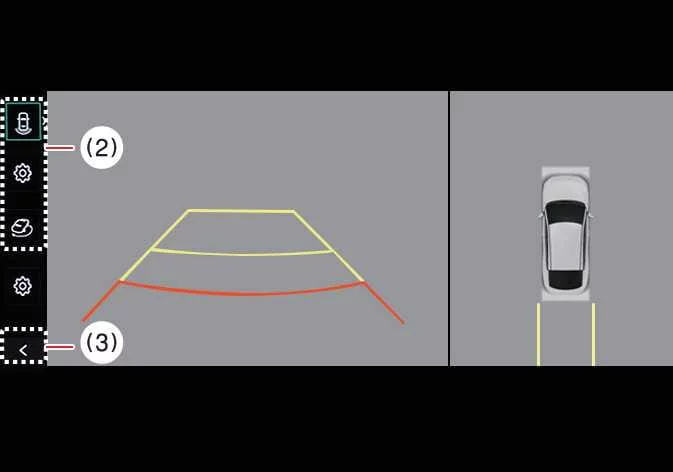
Once active, press the view switching button (2) on the screen to toggle between Top View, Front View, Side View, or Wide View.
The front-view function of your Kia K4 Surround View Monitor will automatically turn OFF during parking maneuvers if:
-
You shift the gear selector to P (Park) or R (Reverse).
-
You press the Parking/View button (1).
-
You press the back button (3) on the monitor screen.
-
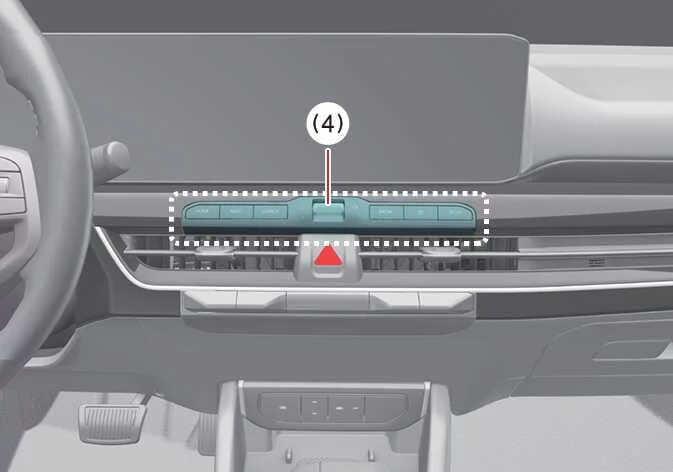
You press the infotainment system power/operation button (4).
-
The vehicle speed exceeds 6 mph (10 km/h).
TIP
When you activate the Surround View Monitor front-view, the system conveniently displays the last view mode you utilized.
Rear-view
|
|
|
The Kia K4 Surround View Monitor's rear-view function enhances parking safety by displaying activity directly behind your vehicle on the navigation screen, configured to your personal preferences.
Parking
The rear-view function activates under these conditions:
-
You press the Parking/View button (1), then select "Rear View" using the view switching button (2) while the gear is in P (Park), N (Neutral), or D (Drive) and speed is under 6 mph (10 km/h).
-
You shift the gear into R (Reverse).
You can cycle through various perspectives, including Top View, Front View, Side View, or Wide View, by pressing the view switching button (2).
The Surround View Monitor's rear-view function in your Kia K4 turns OFF when the gear is in P (Park), N (Neutral), or D (Drive) if:
-
You shift from N (Neutral) or D (Drive) into P (Park).
-
You press the Parking/View button (1).
-
You press the back button (3) on the display.
-
You press the infotainment system power button (4).
-
The vehicle speed increases above 6 mph (10 km/h).
Please note that the function also turns OFF if you shift from R (Reverse) directly to P (Park).
TIP
-
The rear-view monitor always prioritizes the rear display whenever you shift into R (Reverse).
-
When the gear is in R (Reverse), the video feed remains active even if you accidentally press the infotainment system power button (4).
3D View function
|
|
|
Additional interface controls include: (2) View switching button, (3) back button, and (4) infotainment system operation button.
The 3D View function within the Surround View Monitor system of your Kia K4 offers an immersive visual experience, displaying your vehicle from various dynamic angles. This allows you to better perceive the vehicle's position relative to its surroundings. To select a specific viewing angle, simply press the 3D View icon on your Kia K4 touchscreen. To reset the perspective to the default angle, press the 3D View icon once more.
The Surround View Monitor’s 3D View function automatically activates under the following conditions:
-
When you shift the gear to P (Park), N (Neutral), or D (Drive) while the Kia K4 is traveling at a speed below 6 mph (10 km/h).
-
When you press the view switching button (2) to select 3D view while the gear is in R (Reverse) and the Surround View Monitor is currently active.
The 3D View function in your Kia K4 will automatically turn OFF during parking maneuvers if:
-
You shift the transmission gear from N (Neutral) or D (Drive) to P (Park).
-
You press the Parking/View button (1).
-
You press the back button (3) on the infotainment screen.
-
You press the infotainment system power button (4).
-
Your Kia K4 exceeds a speed of 6 mph (10 km/h).
-
You shift the gear from R (Reverse) to P (Park).
When your Kia K4 is in R (Reverse), the 3D View function will also turn off if you shift into P (Park).
TIP
-
Please note that the 3D View mode does not display parking guidelines.
-
The Top View screen, which integrates Front View, Rear View, and 3D View, utilizes advanced processing of footage from your Kia K4's four wide-view cameras to synthesize a seamless 360-degree overhead image.
-
The Top View display is unavailable when Front or Rear Wide View modes are selected.
-
You can intuitively zoom in or out on the Top View area by using a pinch gesture on the touchscreen.


Other information:
Kia K4 (CL4) 2025-2026 Owner's Manual: Indicator lights
Electronic Stability Control (ESC) indicator light The ESC system is a critical safety feature of your Kia K4. This indicator light operates as follows: It illuminates for approximately 3 seconds as a system self-diagnostic check whenever you turn the ENGINE START/STOP button to the ON position. If the light remains illuminated, it indicates a malfunction in the ESC system.Kia K4 (CL4) 2025-2026 Owner's Manual: Tire terminology and definitions
To help you better understand the specifications and maintenance requirements for your Kia K4, please refer to the following list for detailed definitions of technical terms commonly found in tire descriptions: Air Pressure The amount of pressurized air inside the tire pressing outward against the casing. For your Kia K4, proper air pressure is critical and is expressed in pounds per square inch (psi) or kilopascals (kPa).