Kia K4: Parking Distance Warning (PDW): / Parking Distance Warning operation
Contents:
- Parking Safety button
- Forward Parking Distance Warning
- Side Parking Distance Warning:
- Reverse Parking Distance Warning
Parking Safety button
|
Press the physical Parking Safety button ( ) to manually turn the Forward/Side/Reverse Parking Distance Warning system ON. Press the button again to deactivate the function.
When you shift the gear selector of your Kia K4 into R (Reverse), the Parking Distance Warning system will automatically activate, and the Parking Safety button indicator will illuminate to confirm that the system is ready to assist you.
Forward Parking Distance Warning
The Forward Parking Distance Warning system in your Kia K4 is designed to assist you during low-speed maneuvers. It activates automatically when any of the following conditions are met:
-
You shift the transmission gear from R (Reverse) to D (Drive) while the Reverse Parking Distance Warning system is already active.
-
The gear is in D (Drive) and the Parking Safety button indicator (
 ) is illuminated.
 -
The Kia K4 is in D (Drive) and you have enabled the "Parking Distance Warning Auto On" feature via the infotainment system menu: Setup > Vehicle > Driver Assistance > Parking Safety > Parking Distance Warning Auto On.
NOTE
-
The Forward Parking Distance Warning system for the Kia K4 is designed to operate specifically when your driving speed is below 6 mph (10 km/h).
-
When the Kia K4 is in R (Reverse), the forward sensors do not provide alerts for standard obstacles. However, they will trigger an alert if an object is detected within a close range of 24 inches (60 cm) directly in front of the vehicle.
-
If "Parking Distance Warning Auto On" is not enabled, the system (including the indicator light) will automatically deactivate once your speed exceeds 18 mph (30 km/h). The system will not reactivate automatically, even if your speed subsequently drops below 6 mph (10 km/h).
Warning indicator and warning sound
Distance from object |
Warning indicator |
Warning sound |
|
|---|---|---|---|
Instrument cluster |
Infotainment screen |
||
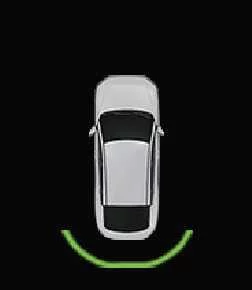
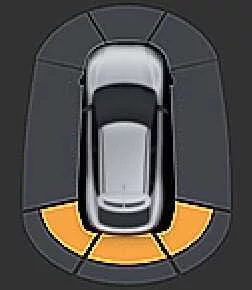
24–48 in (60–120 cm) |
 |
 |
Buzzer beeps intermittently |
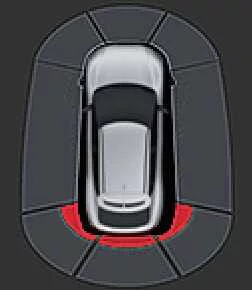
12–24 in (30–60 cm) |
 |
 |
Buzzer beeps more frequently |
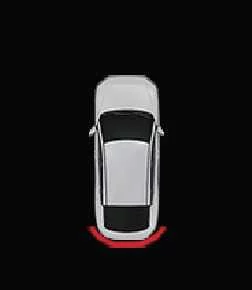
Within 12 in (30 cm) |
 |
 |
Buzzer beeps continuously |
-
A visual indicator will appear on your Kia K4 displays and an audible chime will sound whenever any of the ultrasonic sensors detect a person, animal, or object within the defined sensing range.
-
In scenarios where multiple objects are detected, the Kia K4 will prioritize the audible warning for the object closest to the vehicle.
-
When the distance to an obstacle is greater than 24 inches (60 cm), the instrument cluster will not display a specific proximity warning indicator.
-
Please note that the graphical representation of the warning indicator may vary based on your specific Kia K4 software version or cluster theme.
Side Parking Distance Warning:
The Side Parking Distance Warning system for the Kia K4 is designed to enhance your situational awareness during low-speed maneuvers. This feature activates automatically when any of the following conditions are met:
-
You shift the transmission gear into R (Reverse).
-
The transmission is in D (Drive) and the Parking Safety button indicator (
) is illuminated. -
You are driving in D (Drive) and have configured the "Parking Distance Warning Auto On" feature via the infotainment system by navigating to: Setup > Vehicle > Driver Assistance > Parking Safety > Parking Distance Warning Auto On.
-
Your Kia K4 is traveling at a speed below 6 mph (10 km/h).
TIP
-
For optimal performance, please note that the Side Parking Distance Warning system exclusively functions when your vehicle speed is below 6 mph (10 km/h).
-
The side sensors will only operate when the primary Forward/Reverse Parking Distance Warning system is currently set to ON.
Warning indicator and warning sound
Distance from object |
Warning indicator |
Warning sound |
|
|---|---|---|---|
Instrument cluster |
Infotainment screen |
||
24–48 in (60–120 cm) |
|
|
- |
12–24 in (30–60 cm) |
|
|
- |
Within 12 in (30 cm) |
|
|
Buzzer beeps continuously |
-
When the ultrasonic sensors on the side of your Kia K4 detect a person, animal, or object, the instrument cluster and infotainment screen will display corresponding indicators to represent the proximity.
-
An audible warning chime will sound only when an object is detected within 12 inches (30 cm) of the side, specifically if it is within the vehicle's projected exit path.
-
If an object is detected to the side but outside of the immediate exit path, the system will provide a visual indicator without the audible alarm.
-
When driving in D (Drive), the side-way proximity warning will only display on the instrument cluster if the object is within 12 inches (30 cm).
-
Please be aware that the indicator icons illustrated here may vary slightly from those displayed on your specific Kia K4 model.
Reverse Parking Distance Warning
The Reverse Parking Distance Warning system in your Kia K4 activates automatically whenever the gear selector is shifted into R (Reverse), helping you navigate tight parking spaces safely.
Warning indicator and warning sound
Distance from object |
Warning indicator |
Warning sound |
|
|---|---|---|---|
Instrument cluster |
Infotainment screen |
||
24–48 in (60–120 cm) |
|
|
Buzzer beeps intermittently |
12–24 in (30–60 cm) |
|
|
Buzzer beeps more frequently |
Within 12 in (30 cm) |
|
|
Buzzer beeps continuously |
-
The Kia K4 system provides a corresponding visual indicator and an audible warning sound as soon as any ultrasonic sensor detects a person, animal, or object within the defined detection range.
-
Should the system detect more than two objects simultaneously, the audible warning will prioritize the object closest to the Kia K4 to assist in collision avoidance.
-
The appearance of the warning indicators in your vehicle may differ from those shown in these illustrations.


Other information:
Kia K4 (CL4) 2025-2026 Owner's Manual: Occupant Detection System (ODS)
Your new Kia K4 is equipped with an advanced Occupant Detection System (ODS) integrated directly into the front passenger’s seat to enhance safety during potential collision events. The ODS in the Kia K4 continuously monitors the presence of a properly seated front passenger and calculates whether the passenger’s front airbag should be activated or deactivated.Kia K4 (CL4) 2025-2026 Owner's Manual: Tilt and telescopic steering wheel
The Kia K4 features a highly adjustable tilt and telescopic steering wheel, allowing you to fine-tune the driving position to your exact preferences before setting off. This versatile system also enables you to raise the wheel to its highest position, providing additional legroom for effortless entry and exit from the Kia K4. For the safest and most comfortable driving experience, the steering wheel should be positioned so that it feels natural during operation while ensuring you have a clear, unobstructed view of all instrument panel gauges and warning lights.