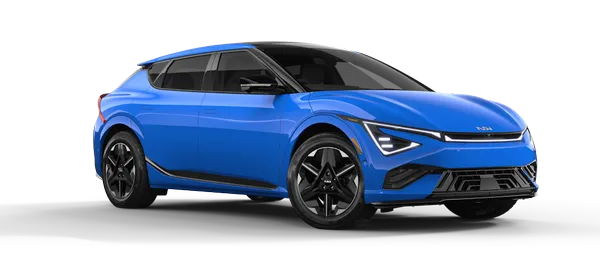
Kia K4: Lighting / High Beam Assist (HBA)
Contents:
- High Beam Assist (HBA) setting
- High Beam Assist (HBA) operation
- High Beam Assist malfunction and limitations
|
The High Beam Assist (HBA) feature in your Kia K4 provides automated convenience by switching between high and low beams based on the detection of oncoming vehicles, preceding taillights, and ambient road brightness. This helps maximize your vision without blinding other road users.
Detection sensor
The system relies on a high-resolution forward-facing camera. Please refer to the "Detecting sensor(s)" section in your owner's manual for specific details regarding the location and maintenance of these sensors.
TIP
-
To ensure the HBA in your Kia K4 operates with maximum accuracy, keep the windshield area in front of the camera clean and free of obstructions, such as stickers or debris.
-
For more comprehensive information on camera capabilities, refer to the "Forward Collision-Avoidance Assist (FCA) (Sensor Fusion)" section of the manual.
High Beam Assist (HBA) setting
|
|
With the Kia K4 ENGINE START/STOP button in the ON position, you can enable HBA by navigating to Setup > Vehicle > Lights > High Beam Assist on your infotainment screen.
WARNING
To prevent driver distraction and ensure safety, always adjust vehicle settings, including HBA configuration, only after the Kia K4 is safely parked.
High Beam Assist (HBA) operation
Once you have configured the High Beam Assist system via the infotainment settings, the feature enhances your night driving experience in the Kia K4 by automating beam selection based on real-time traffic and road conditions.
-
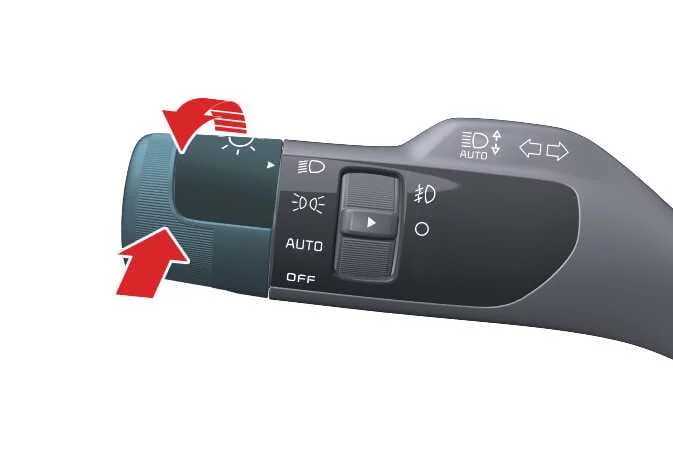
To engage the HBA system, rotate your headlight switch to the AUTO position and push the headlamp control lever toward the instrument cluster. The HBA indicator light (
) will illuminate on the Kia K4 instrument cluster to confirm the system is in standby mode. -
Once enabled, the Kia K4 will automatically activate high beams when your driving speed exceeds 20 mph (30 km/h). Conversely, the system will revert to low beams automatically if your speed drops below 12 mph (20 km/h).
-
The high beam indicator light (
 ) will display on the cluster whenever the high beams are actively projecting.
If you prefer to manually override the system while HBA is active, observe the following behaviors:
-
To force high beams on momentarily without disabling the HBA system, pull the headlight lever toward you. Upon releasing the lever, it returns to the center position, and the high beams will extinguish.
-
To turn the high beams on and permanently cancel the HBA function, push the light lever toward the instrument cluster as you would in a standard vehicle.
-
Switching the headlight knob from the AUTO setting to any other manual position will immediately deactivate HBA and activate the selected lighting mode.
The Kia K4 intelligent HBA system will proactively switch from high to low beam in the following common scenarios:
Detection of an oncoming vehicle's headlights.
Detection of the taillights of a vehicle traveling ahead.
Identification of the lights from a motorcycle or bicycle.
Ambient light levels are sufficient to safely illuminate the road without high beams.
Detection of persistent street lighting or other urban light sources.
High Beam Assist malfunction and limitations
High Beam Assist (HBA) malfunction
|
|
|
If the HBA system detects a fault, the Master warning light () will appear alongside a diagnostic message on the Kia K4 instrument display. If this occurs, please contact your authorized Kia dealer for a professional system inspection.
High Beam Assist (HBA) limitations
Please note that the Kia K4 HBA system may face performance limitations in the following conditions:
Oncoming or preceding lights are not detected due to adverse weather or sensor obstruction.
Headlight lenses are obscured by dust, mud, road salt, or heavy ice/snow.
You are navigating narrow, steep, or severely winding roads where the sensor's line of sight is limited.
Reflective signage, traffic signals, or mirror-like surfaces cause false sensor triggers.
The Kia K4 is following a vehicle that is partially obscured or tilted (e.g., towing or a flat tire).
Ambient visibility is degraded by heavy fog, exhaust smoke, or localized spray.
TIP
HBA is a driver convenience feature, not a replacement for attentive driving. It remains your responsibility to monitor road safety in your Kia K4.
The HBA system typically requires a 15-second initialization period after the vehicle is started or the front view camera is reset.
If you suspect the system is not responding correctly to traffic, revert to manual headlight control immediately.


Other information:
Kia K4 (CL4) 2025-2026 Owner's Manual: Seat belt restraint system
To ensure maximum protection, occupants must wear their seat belts whenever the Kia K4 is in motion: The shoulder belt should be adjusted to rest midway over the shoulder and across the collarbone, never against the neck. For safety reasons, never allow children to ride in the front passenger seat. Please refer to the "Child Restraint System (CRS)" section of your Kia K4 owner's manual for detailed guidance on appropriate child seating.Kia K4 (CL4) 2025-2026 Owner's Manual: Forward Attention Warning malfunction and limitations
NOTE In the event of a system error, the following alerts will be displayed on your Kia K4 LCD screen. For comprehensive troubleshooting, please refer to the "malfunction and limitations" documentation for the affected system: "Check forward attention warning system" (Indicates a potential sensor or software issue) "Forward attention warning disabled.