
Kia EV6: Controls and features / Interior lights
Contents:
- Ambient light: (if equipped)
- Automatic turn off function: (if equipped)
- Interior Lights Always On
- Room lamp
- Map light
- Liftgate room lamp
- Vanity mirror lamp
- Glove box lamp
- Charging inlet lamp
The Kia EV6 is equipped with multiple interior lighting elements designed to improve cabin visibility, convenience, and premium atmosphere throughout the vehicle interior.
Avoid using the Kia EV6 interior lights for extended periods while the vehicle is switched OFF.
Extended operation of interior lighting may discharge the 12V auxiliary battery.
WARNING
Interior Lights
Do not operate the interior lights excessively while driving at night. Bright interior illumination may reduce visibility outside the vehicle and increase the risk of accidents.
Ambient light: (if equipped)
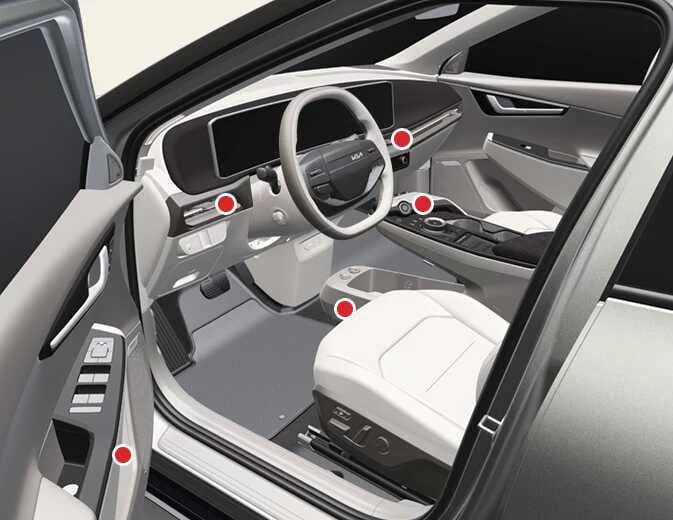
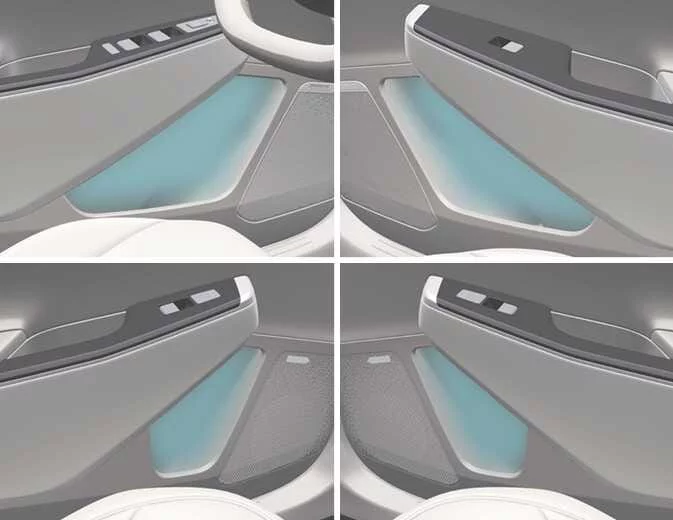
The Kia EV6 ambient lighting system is integrated into the front instrument panel, front doors, and the upper and lower sections of the center console.
|
|
When the headlamps are switched ON, the Kia EV6 ambient lighting system activates automatically and can be customized through the infotainment system settings.
Refer to the Kia EV6 infotainment manual for detailed ambient light customization options.
Automatic turn off function: (if equipped)
The Kia EV6 interior lights automatically switch OFF approximately 20 minutes after the EV button is turned OFF if the interior lights remain in the ON position.
If the Kia EV6 is equipped with the theft alarm system, the interior lights automatically turn OFF approximately 5 seconds after the security system is armed.
Interior Lights Always On
The Kia EV6 Interior Lights Always On function keeps the interior button illumination active during both daytime and nighttime driving, making vehicle controls easier to locate in low-light conditions.
To activate the Interior Lights Always On feature, select Setup > Vehicle > Lights > Interior Lights Always On within the Kia EV6 infotainment system.
The interior button lights operate according to the following conditions:
-
When all doors are closed and locked, unlocking and opening a door keeps the interior button lights illuminated for approximately 5 minutes.
-
After the Kia EV6 is switched OFF, the interior button lights remain illuminated for approximately 5 minutes.
-
If you open and close a door or lock the vehicle during this time, the lights switch OFF immediately.
Room lamp

|
-
 :
The
Kia EV6 room lamp remains illuminated continuously.
:
The
Kia EV6 room lamp remains illuminated continuously.
Map light
|
-
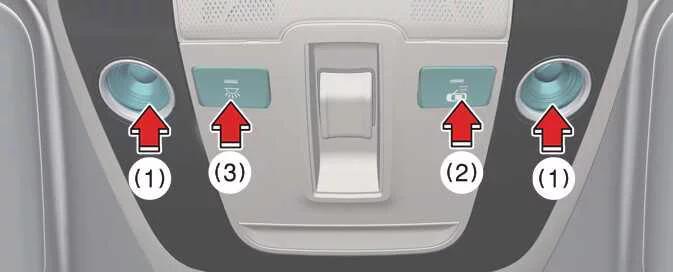
Press the lens (1) to switch the Kia EV6 map lamp ON.
To switch the map lamp OFF, press the lens (1) once again.
-
 (2): DOOR mode
-
The Kia EV6 map lamp and room lamp automatically illuminate whenever a door is opened. The lamps turn OFF automatically after approximately 30 seconds.
-
The map lamp and room lamp illuminate for approximately 30 seconds when the Kia EV6 doors are unlocked using the smart key or transmitter, provided the doors are not opened.
-
The Kia EV6 map lamp and room lamp remain illuminated for approximately 20 minutes if a door is opened while the EV button is in the POWER ON or OFF position.
-
The map lamp and room lamp stay continuously illuminated if a door is opened while the interior light switch is in the ON position.
-
The Kia EV6 map lamp and room lamp turn OFF immediately if the vehicle is switched to the OFF position or when all doors are locked.
-
To deactivate DOOR mode, press the DOOR button (2) again until the mode is no longer selected.
-
-
 (3): Press this switch to turn the Kia EV6 front and
rear
interior lights ON or OFF.
(3): Press this switch to turn the Kia EV6 front and
rear
interior lights ON or OFF.
NOTE
The DOOR mode and ROOM mode cannot be activated simultaneously in the Kia EV6 interior lighting system.
Liftgate room lamp
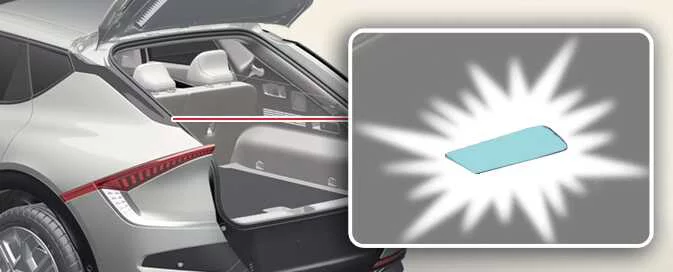
The Kia EV6 liftgate room lamp automatically illuminates whenever the liftgate is opened.
|
NOTE
The Kia EV6 liftgate lamp remains illuminated as long as the liftgate is open. To help prevent unnecessary battery discharge, close the liftgate securely after loading or unloading cargo.
Vanity mirror lamp

|
-
Push the switch to turn the Kia EV6 vanity mirror lamp ON or OFF.
-
 : Press this button to switch the vanity mirror
lamp
ON.
: Press this button to switch the vanity mirror
lamp
ON. -
 : Press this button to switch the vanity mirror
lamp
OFF.
: Press this button to switch the vanity mirror
lamp
OFF.
-
CAUTION
Vanity Mirror Lamp
Always keep the Kia EV6 vanity mirror lamp switched OFF when it is not being used. Closing the sun visor while the lamp remains ON may discharge the battery or damage the visor assembly because of excessive heat buildup.
Glove box lamp
|
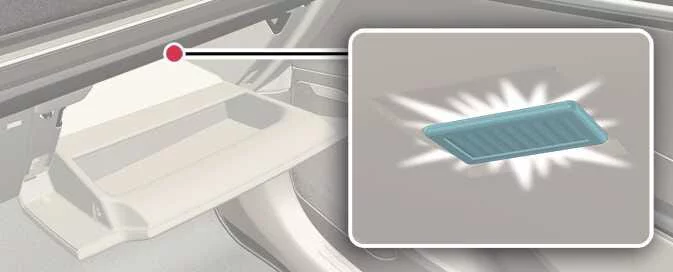
The Kia EV6 glove box lamp automatically illuminates when the glove box compartment is opened.
CAUTION
To prevent unnecessary electrical system drain and auxiliary battery discharge, close the Kia EV6 glove box securely after use.
Charging inlet lamp
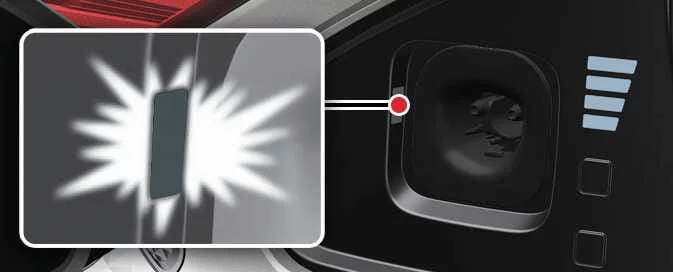
The Kia EV6 charging inlet lamp automatically turns ON whenever the charging door is opened, improving visibility during nighttime charging.
|
NOTE
The Kia EV6 charging inlet lamp remains illuminated while the charging door stays open. To help prevent unnecessary battery drain, close the charging door securely after charging is completed.


Other information:
Kia EV6 2022-2026 Owner's Manual: Child restraint system (CRS)
Infants and younger children must always be secured in an appropriate rear-facing or forward-facing CRS that has first been properly installed in the rear seat of the Kia EV6. Carefully read and follow all installation instructions and usage guidelines supplied by the manufacturer of the child restraint system to ensure proper protection. WARNING Child Restraint System (CRS) Installation An improperly installed child restraint system may greatly increase the risk of severe injury or death during a collision.Kia EV6 2022-2026 Owner's Manual: Lane Following Assist (LFA)
The Kia EV6 Lane Following Assist (LFA) system is designed to help keep the vehicle centered within its lane while driving. The Kia EV6 Lane Following Assist system detects visible lane markings and/or vehicles ahead using the front view camera and assists with steering control to help maintain stable lane positioning. This Kia EV6 driver assistance technology is especially helpful during highway driving, long-distance travel, and moderate traffic conditions.
Contents
- Ambient light: (if equipped)
- Automatic turn off function: (if equipped)
- Interior Lights Always On
- Room lamp
- Map light
- Liftgate room lamp
- Vanity mirror lamp
- Glove box lamp
- Charging inlet lamp
Categories
- Manuals Home
- Kia EV6 Owners Manual
- Questions & Answers
- Video Guides
- Useful Resources
- New on site
- Most important about Kia EV6
- Privacy Policy
