
Kia EV6: Controls and features / Charging wireless smart phone
Contents:
-
Remove all objects from the Kia EV6 wireless charging pad, including the smart key and metallic accessories. Foreign objects may interfere with charging operation or cause overheating.
-
Position the smartphone in the center of the Kia EV6 charging pad.
When charging begins, the Kia EV6 charging indicator changes to orange. After charging is completed, the indicator changes to green.
You can enable or disable the Kia EV6 wireless charging function through the infotainment system settings menu.
If wireless charging does not begin immediately, gently reposition the smartphone until the Kia EV6 charging indicator turns orange.
Depending on the smartphone model, the indicator light may remain orange even after charging is fully completed.
If the Kia EV6 wireless charging system does not operate correctly, the orange indicator flashes for approximately ten seconds before switching OFF. In this case, remove the smartphone and place it back on the charging pad again.
If a smartphone remains on the Kia EV6 charging pad after the vehicle is switched OFF, the system may display a warning message and generate an audible notification after the Goodbye screen disappears from the instrument cluster.
WARNING
Distracted driving
Driving while distracted may result in loss of vehicle control, severe injury, or death. The driver’s primary responsibility is the safe and legal operation of the Kia EV6. Handheld devices, electronic equipment, or infotainment features that divert attention away from driving should never be used while the vehicle is in motion.
CAUTION
Liquid in Wireless Smart Phone Charger
To help prevent damage to the Kia EV6 wireless charging system, avoid spilling water, beverages, or other liquids onto the charging pad area.
CAUTION
Metal in wireless charging system
If metallic objects such as coins, keys, clips, or cards are placed between the smartphone and the Kia EV6 charging pad, charging may be interrupted and the metal object may become extremely hot.
If a metallic object is detected, immediately remove the smartphone and allow the object to cool before touching it.
NOTE
-
If the internal temperature of the Kia EV6 wireless charging system rises above the normal operating range, wireless charging temporarily stops until the system cools down.
-
The Kia EV6 wireless charger may not function correctly when thick smartphone cases or accessory covers are installed.
-
The Kia EV6 wireless charging system temporarily stops while the wireless smart key search function is operating to reduce radio interference.
-
Wireless charging stops if the smart key leaves the Kia EV6 while the vehicle remains in the POWER ON position.
-
The Kia EV6 wireless charging system may stop operating when a door is opened on vehicles equipped with a smart key system.
-
Wireless charging automatically stops when the Kia EV6 is switched OFF.
-
The Kia EV6 wireless charging system operates correctly only when the smartphone maintains complete contact with the charging surface.
-
Items containing magnetic strips or sensitive electronic components, including credit cards, transportation cards, and bankbooks, may become damaged during wireless charging.
-
For the best Kia EV6 charging performance, place the smartphone in the center of the charging pad. Charging performance may decrease if the phone is positioned near the edge of the pad, and device temperature may increase.
-
Smartphones without integrated wireless charging capability require an approved wireless charging accessory to operate with the Kia EV6 charging system.
-
Some smartphone manufacturers may display weak current messages during Kia EV6 wireless charging. This is related to smartphone design characteristics and does not indicate a charging system malfunction.
-
On certain smartphone models, the Kia EV6 charging indicator may remain orange even after the battery is fully charged. This is a normal device-specific behavior.
-
If a non-compatible smartphone or metallic object is placed on the Kia EV6 charging pad, a faint operational sound may occur while the system checks compatibility. This does not damage the vehicle or device.
-
The Kia EV6 wireless charging system may not support certain smartphones that are not officially certified under the Qi specification (
 ).
). -
Position the smartphone carefully in the middle of the Kia EV6 charging pad to achieve optimal charging speed and reduce heat buildup.
-
Some smartphones equipped with advanced thermal protection systems may reduce wireless charging speed or temporarily stop charging to control device temperature.
-
When smartphone applications such as Android Auto are operating during Kia EV6 wireless charging, charging performance may slow or stop because of smartphone overheating. Remove the device from the charging pad if overheating occurs.
-
During Kia EV6 wireless charging operation, an internal cooling fan may activate to reduce charging system temperature. Fan noise during operation is normal.
This device complies with Part 15 of the FCC rules.
Operation is subject to the following two conditions:
-
This device may not cause harmful interference, and
-
this device must accept any interference received, including interference that may cause undesired operation.
TIP
Changes or modifications not expressly approved by the party responsible for compliance may void the user’s authority to operate the Kia EV6 wireless charging equipment.
Coat hook
The Kia EV6 coat hook is conveniently positioned next to the rear passenger grab handle for hanging lightweight clothing items.

|
The actual Kia EV6 coat hook design and appearance may differ slightly depending on trim level and equipment specifications.
CAUTION
Hanging clothing
Do not hang excessively heavy clothing or large objects on the Kia EV6 coat hook, as excessive weight may damage the hook or surrounding trim components.
WARNING
Do not hang hard objects, sharp items, bags with metal components, or clothes containing heavy objects inside the pockets on the Kia EV6 coat hook. In the event of sudden braking, a collision, or curtain airbag deployment, these objects may become dangerous projectiles and cause vehicle damage or serious personal injury.
Floor mat anchor(s)
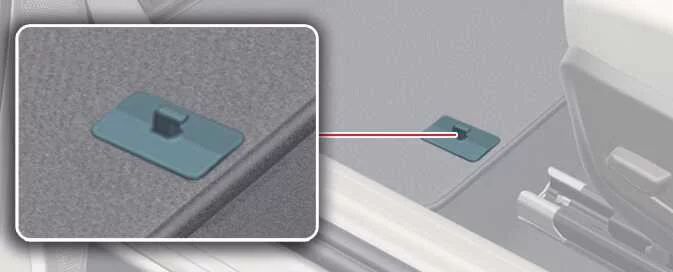
|
When installing floor mats inside the Kia EV6, always ensure the mats are securely attached to the factory floor mat anchors. Proper attachment helps prevent the mats from sliding forward and interfering with pedal operation.
WARNING
-
Aftermarket Floor Mat
-
Do not install aftermarket floor mats in the Kia EV6 unless they can be securely fastened to the original floor mat anchor system.
Loose or unsecured floor mats may interfere with accelerator, brake, or regenerative braking pedal operation.
-
-
Use only Kia EV6 floor mats with an appropriate thickness and secure fitment to avoid interference with the pedals. Installing floor mats over protective plastic films may damage or break the retaining rings, causing the mats to become unsecured.
Particularly in the driver’s footwell area, unsecured Kia EV6 floor mats may contribute to unintended acceleration or delayed braking response. Always remove all protective plastic coverings before installing floor mats.
Observe the following Kia EV6 floor mat installation guidelines:
-
Ensure all floor mats are securely attached to the Kia EV6 floor mat anchors before driving.
-
Do not use any floor mat that cannot be firmly secured to the Kia EV6 anchor system.
-
Do not stack multiple floor mats on top of one another, such as placing an all-weather rubber mat over a carpeted mat. Only one properly fitted floor mat should be installed in each seating position.
NOTE
Your Kia EV6 is equipped with factory-designed floor mat anchors intended to hold the driver’s floor mat securely in position. To help prevent interference with pedal operation, Kia recommends using only genuine Kia EV6 floor mats specifically designed for your vehicle.
Luggage net holder
The Kia EV6 luggage net holders help secure cargo inside the luggage compartment and reduce movement of stored items during driving.: (if equipped)
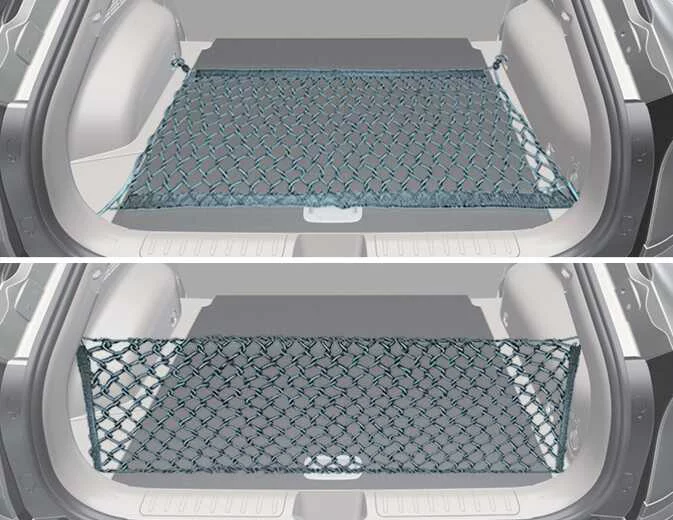
|
You can attach a compatible Kia EV6 luggage net to the cargo area holders to help keep items stable while driving.
If additional accessories or replacement components are required, contact an authorized Kia dealer.
CAUTION
To help prevent damage to the Kia EV6 luggage compartment and trim panels, exercise caution when carrying fragile, oversized, or heavy cargo items.
WARNING
Luggage net
Keep your face and body away from the Kia EV6 luggage net recoil path at all times. Do not use the luggage net if the straps show visible wear, stretching, or damage, as the net could snap and cause injury.
Cargo security screen: (if equipped)
The Kia EV6 cargo security screen helps conceal luggage and personal belongings stored inside the rear cargo area.
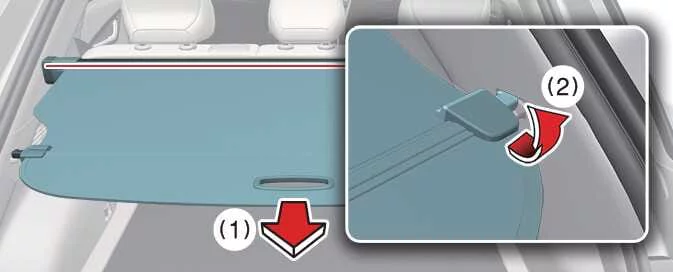
|
-
To operate the Kia EV6 cargo security screen, pull the handle rearward (1) and insert both ends into the retaining slots (2).
WARNING
Cargo security screen
Do not place objects on top of the Kia EV6 cargo security screen. During sudden braking or an accident, unsecured objects may be thrown inside the cabin and could injure occupants.
CAUTION
Do not load luggage directly on the Kia EV6 cargo security screen. Excessive weight may damage, deform, or permanently affect the operation of the screen assembly.


Other information:
The Next Departure feature in the Kia EV6 allows drivers to schedule charging sessions and pre-set cabin climate temperatures before departure.The Kia EV6 Junction Crossing, Lane-Change Oncoming, Lane-Change Side, and Evasive Steering Assist systems may experience reduced performance when the temperature around the front or rear side radar sensors becomes excessively high or low. Installing a trailer, bicycle carrier, cargo carrier, or other accessory near the Kia EV6 rear corner radar may interfere with sensor operation and limit driver assistance performance.
Contents
Categories
- Manuals Home
- Kia EV6 Owners Manual
- Questions & Answers
- Video Guides
- Useful Resources
- New on site
- Most important about Kia EV6
- Privacy Policy
