
Kia Seltos: LCD display modes / User Settings mode
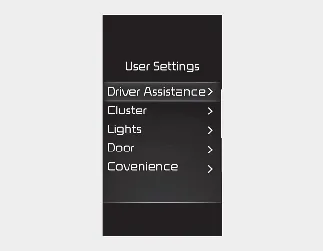
In the Kia Seltos User Settings mode, you can customize several vehicle functions directly through the instrument cluster. This menu allows the driver to adjust cluster preferences, lighting behavior, door functions, convenience features, units, language, and reset options.
-
Driver Assistance
-
Cluster
-
Lights
-
Door
-
Convenience
-
Units
-
Language
-
Reset
The available information and settings may differ depending on the systems and equipment installed in your Kia Seltos.
1. Driver Assistance
|
Items |
Explanation |
|---|---|
|
Driving Convenience |
These functions help support more convenient driving in the Kia Seltos when the applicable systems are equipped and active. |
|
Speed Limit |
Use this menu to select the desired speed limit assistance function and related display or warning behavior. |
|
Warning Methods |
This setting allows you to choose the warning volume level used by supported Kia Seltos driver assistance systems. |
|
Driver Attention Warning |
This function can notify the driver when the vehicle ahead begins moving, depending on equipment and operating conditions. |
|
Driving Safety |
These settings allow the driver to adjust selected safety assistance features in the Kia Seltos, including forward, lane, blind-spot, and exit-related alerts where available. |
|
Parking Safety |
Use these settings to configure parking-related assistance features that help alert the driver to nearby obstacles or crossing traffic when applicable. |
* The information provided may differ depending on which systems are applicable to your Kia Seltos.
2. Cluster
|
Items |
Explanation |
|---|---|
|
Cluster Theme |
This setting allows you to select the preferred visual theme for the Kia Seltos instrument cluster. |
|
Wiper/Lights Display |
Use this option to activate or deactivate the wiper and lights display in the cluster. |
|
Icy Road Warning |
Use this option to activate or deactivate the icy road warning, which can help alert the driver when outside conditions may be slippery. |
|
Welcome Sound |
This setting activates or deactivates the welcome sound played by the Kia Seltos when the feature is available. |
* The information provided may differ depending on which systems are applicable to your vehicle.
3. Lights
|
Items |
Explanation |
|---|---|
|
Illumination |
This setting adjusts the brightness level of the Kia Seltos instrument panel illumination. |
|
One Touch Turn Signal |
This feature is useful for quick lane changes or short signaling without holding the lever. |
|
Headlight Delay |
If this item is checked, the headlight escort function will be activated, keeping the headlights on briefly after the Kia Seltos is turned off. |
|
High Beam Assist |
If this item is checked, High Beam Assist will be activated when the system conditions are met. |
* The information provided may differ depending on which functions are applicable to your Kia Seltos.
4. Door
|
Items |
Explanation |
|---|---|
|
Auto Lock |
|
Enable on Shift: All doors of the Kia Seltos will automatically lock when the vehicle is shifted from P (Park) to R (Reverse), N (Neutral), or D (Drive), while the engine is ON.
Enable on Speed: All doors will automatically lock when the Kia Seltos speed exceeds 9.3 mph (15 km/h).
Auto Unlock
-
On Shift to P: All doors will automatically unlock when the gear selector is shifted to P (Park), while the engine is ON.
-
On Key Out/Vehicle Off: All doors will automatically unlock when the ENGINE START/STOP button is set to the OFF position or when the ignition key is removed from the ignition switch.
-
Off: The automatic door unlock function will be canceled.
2 Press Unlock
This setting activates or deactivates the 2 Press Unlock function. Press the door unlock button once to unlock only the driver's door, then press it again within 4 seconds to unlock the remaining doors of the Kia Seltos.
Horn Feedback
This setting activates or deactivates horn feedback when the door is locked with the folding key.
Power Liftgate
This setting activates or deactivates the Kia Seltos power liftgate, if the vehicle is equipped with this feature.
Power Liftgate Opening Speed
-
Fast/Normal
This setting adjusts the opening speed of the power liftgate for easier access to the cargo area.
Power Liftgate Opening Height
-
Full Open/Level 3, 2, 1/User Height Setting
This setting adjusts how high the power liftgate opens. It can be useful when parking the Kia Seltos in garages or areas with limited overhead clearance.
Smart Liftgate
This setting activates or deactivates the Smart Liftgate function, allowing convenient cargo access when the system conditions are met.
Remote Window Control
This setting activates or deactivates remote window control for the Kia Seltos, allowing supported window operation from outside the vehicle.
* The information provided may differ depending on which systems are applicable to your Kia Seltos.
5. Convenience
|
Items |
Explanation |
|---|---|
|
Rear Occupant Alert |
If this item is checked, the Rear Occupant Alert (ROA) display will be activated. This feature helps remind the driver to check the rear seats before leaving the Kia Seltos. |
|
Service Interval |
This menu allows service interval reminders to be enabled, adjusted, or reset according to the maintenance schedule. |
|
Oil Change Reminder |
If this item is checked, the oil change reminder will be activated to help track regular engine oil maintenance. |
|
Auto Rear Wiper (in R) |
If this item is checked, the rear wiper will operate automatically when reverse gear is selected, helping improve rear visibility in wet conditions. |
|
Vehicle Auto-Shut Off |
This setting can help prevent unnecessary engine operation when the vehicle is left running for an extended period. |
* The information provided may differ depending on which functions are applicable to your Kia Seltos.
6. Units
|
Items |
Explanation |
|---|---|
|
Speed Unit |
Selects the speedometer unit displayed in the Kia Seltos instrument cluster. |
|
Temperature Unit |
Selects the outside temperature unit shown on the vehicle display. |
|
Fuel Economy Unit |
Selects the fuel economy unit used in the Kia Seltos trip and efficiency displays. |
|
Tire Pressure Unit |
Selects the tire pressure unit shown in the tire pressure information display. |
* The information provided may differ depending on which functions are applicable to your Kia Seltos.
7. Language
|
Items |
Explanation |
|---|---|
|
Language |
This menu allows you to select the display language used in the Kia Seltos cluster and related menus. |
8. Reset
|
Items |
Explanation |
|---|---|
|
Reset |
You can reset the menus in User Settings mode. All User Settings menus will return to factory defaults, except for language and service interval settings. |


Other information:
Kia Seltos SP2 (2021-2026) Owner's Manual: Intelligent Speed Limit Assist (ISLA)
Intelligent Speed Limit Assist (ISLA) in the Kia Seltos uses information from detected road signs and, when equipped, the navigation system to inform the driver of the current road speed limit and related information. ISLA helps the driver stay aware of posted limits and maintain a speed appropriate for the road. CAUTION ISLA may not operate properly if the function is used in countries or regions where the system data, road signs, or navigation information are not supported.Kia Seltos SP2 (2021-2026) Owner's Manual: Intelligent variable transmission (IVT)
The Intelligent Variable Transmission (IVT) in the Kia Seltos adjusts automatically according to vehicle speed, accelerator pedal input, engine load, and the selected shift lever position. Instead of requiring the driver to choose individual gears manually during normal driving, the IVT is designed to provide smooth acceleration, efficient power delivery, and comfortable everyday operation.