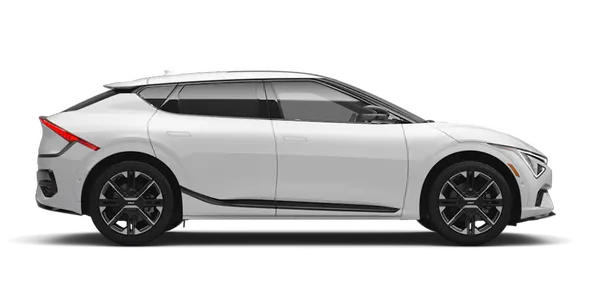
Kia K4: Infotainment system / Over-The-Air (OTA) software update
The Over-The-Air (OTA) software update feature provides a seamless way to keep your Kia K4 performing at its peak. By wirelessly downloading the latest firmware and system improvements, this feature ensures that your Kia K4 always benefits from the most recent technological enhancements without requiring a visit to a service center. To utilize these convenient remote updates, you must maintain an active Kia Connect subscription.
Downloading software
Your Kia K4 is designed to download the latest software updates automatically while you are driving, ensuring that the process does not disrupt your daily routine. Once the download is complete, a notification will be sent to your smartphone via the Kia Access app, and a similar alert will appear on the Kia K4 infotainment screen, indicating that the update is ready for installation. You can then choose to initiate the update process the next time you power off your Kia K4.
Approving software update
|
|
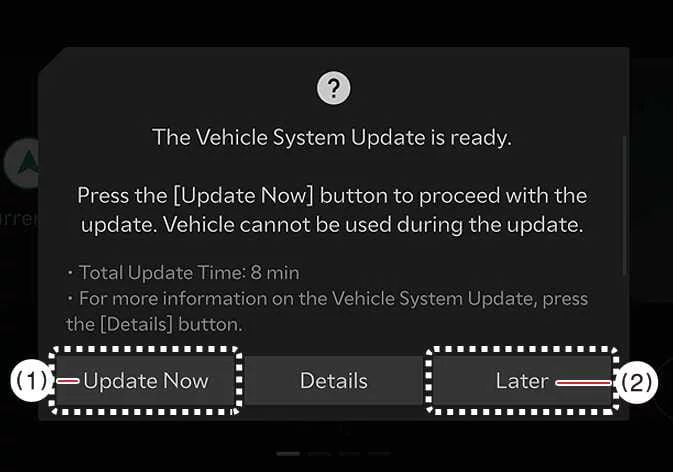
After you turn off your Kia K4, the vehicle's system will prompt you to begin the installation.
-
To proceed with the installation immediately, select Update Now (1).
-
If you are not ready at that moment, select Later (2) to postpone the installation until a more convenient time.
Preparing software update
|
|
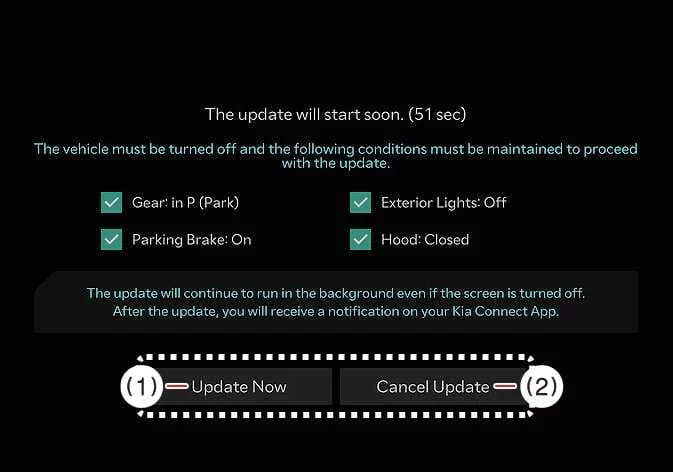
Once you select Update Now, the Kia K4 will begin the automated installation. For the process to initiate successfully, the following safety and operational conditions must be met:
-
The vehicle power must be in the OFF position.
-
The transmission must be shifted into P (Park).
-
The electronic parking brake must be securely applied.
-
All exterior lighting must be turned off.
-
The hood must be completely closed and latched.
-
The Kia K4 12V battery must maintain a sufficient charge level.
-
The specific systems targeted for the update must not be in active use.
-
Select Update Now to begin the installation immediately.
-
Select Cancel Update if you need to abort the process.
TIP
To ensure a successful installation, your Kia K4 automatically performs a diagnostic check of the battery health and system readiness before starting the update.
Updating software
|
|
You can monitor the real-time progress of the installation directly on the infotainment screen. Please be aware that the screen may cycle off and back on during the update; this is a normal part of the process and indicates that the Kia K4 systems are successfully applying the new software.
Once the software update for your Kia K4 is successfully installed, you will receive a confirmation notification directly on your smartphone via the Kia Access app, as well as a visual confirmation displayed on the Kia K4 vehicle screen.
TIP
-
To preserve battery health during the update, the Kia K4 infotainment screen will automatically turn off after 3 minutes of inactivity. You can monitor the progress of the update at any time by briefly pressing the ENGINE START/STOP button.
-
Once the update process has officially commenced, you are free to exit and lock your Kia K4; the system will continue the installation independently.
-
The Over-The-Air (OTA) software update feature is an exclusive benefit reserved for active Kia Connect service subscribers.
-
Please note that the specific features or improvements included in the update may vary based on your Kia K4 current installed software version and trim level.
-
In the unlikely event that an update fails, the Kia K4 system will automatically trigger a recovery mode. If this happens, you can manually retry the installation by pressing the "Start" button on the screen; the vehicle will then resume the process automatically. If both the initial update and the recovery sequence fail, please schedule a visit to your nearest authorized Kia dealer for expert technical support.
-
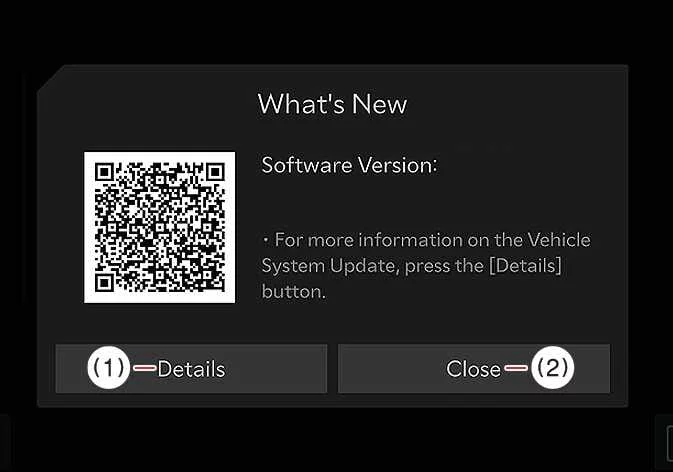
Upon the successful completion of the installation, a summary message will appear on your display. You may press "Details" or scan the provided QR Code to review a comprehensive list of the software changes and enhancements applied to your Kia K4.
TIP
-
Important operational restrictions to observe during your Kia K4 software update:
-
The vehicle cannot be operated while an update is in progress. Please ensure you have allocated sufficient time for the process and have parked your Kia K4 in a safe, secure location before beginning.
-
Remote vehicle control features, such as Remote Start or climate control scheduling, will be temporarily unavailable.
-
Do not attempt to charge your vehicle during an update; ensure all charging activities are completed before starting or resume them only after the update is finalized.
-
The Rear Occupant Alert system may be temporarily disabled. Please perform a manual, visual inspection of the rear seats to ensure no passengers or pets remain in the Kia K4 before finalizing your exit.
-
If the update history includes modifications to the digital key feature, please be aware that smartphone-based door locking/unlocking or fingerprint authentication may be temporarily unavailable. Always keep your physical smart key with you to lock or unlock the Kia K4 during this period.
-
-
The update sequence will be automatically aborted if any required vehicle conditions (such as the hood being opened) are violated before the installation starts.
-
Once the installation has officially started, it cannot be canceled.
-
The OTA update feature will be disabled if the original vehicle software has been unauthorizedly modified or replaced.
-
Do not open the hood or disconnect/replace the Kia K4 12V battery while the update is running, as this will lead to a system failure.
-
Note that the high-voltage power management module may cycle on during the update to maintain a sufficient charge for the 12V battery.
-
Ensure no diagnostic tools or third-party dongles are connected to the On-board Diagnostic (OBD) terminal. If a device is connected, remove it and restart the Kia K4 to enable the update feature.
-
To ensure a safe and successful installation, the vehicle must maintain a strong cellular signal (greater than -82 dBm) throughout the entire process.


Other information:
Condition detected by the occupant detection system Indicator/Warning light Devices Devices PASSENGER AIR BAG OFF SRS warning light Front passenger air bag 1.Kia K4 (CL4) 2025-2026 Owner's Manual: Tire Pressure Monitoring System (TPMS)
The Kia K4 is equipped with a sophisticated Tire Pressure Monitoring System (TPMS) that continuously monitors the inflation pressure of each tire and transmits this data to the instrument cluster for your convenience. Low tire pressure or TPMS malfunction indicator light.