Kia K4: Navigation-based Smart Cruise Control (NSCC): / Navigation-based Smart Cruise Control limitations
The Navigation-based Smart Cruise Control (NSCC) system is a highly advanced convenience feature; however, its performance relies heavily on accurate real-time data. The system may exhibit abnormal or unexpected behavior under the following circumstances:
- The navigation system is experiencing a technical malfunction.
- Map data fails to transmit correctly due to glitches in the infotainment system screen.
- Discrepancies exist between the digital map and the actual road infrastructure due to GPS data drift or outdated information.
- The navigation system is actively calculating a new route while you are currently driving.
- GPS satellite signal reception is obstructed, such as when driving through long tunnels or deep urban canyons.
- The vehicle transitions into a service station, rest area, or off-highway facility.
- Third-party projection services like Android Auto™ or Apple CarPlay® are currently active, which may interfere with system integration.
- The navigation software cannot accurately triangulate the vehicle’s position—a common issue when driving on complex multi-level roads, such as overpasses adjacent to standard surface streets.
- The navigation system initiates an automated firmware update while the vehicle is in motion.
- The navigation system performs an unexpected restart during transit.
- Speed limit signage or road regulations change abruptly for certain segments.
- The vehicle is navigating through active road construction zones where lane markings may be ambiguous.
- You are driving on roads with specific access control restrictions.
- Environmental conditions, such as extreme heavy rain or dense snow, impact the sensors.
- You are negotiating extremely tight or sharply curved road segments that exceed standard parameters.
|
|
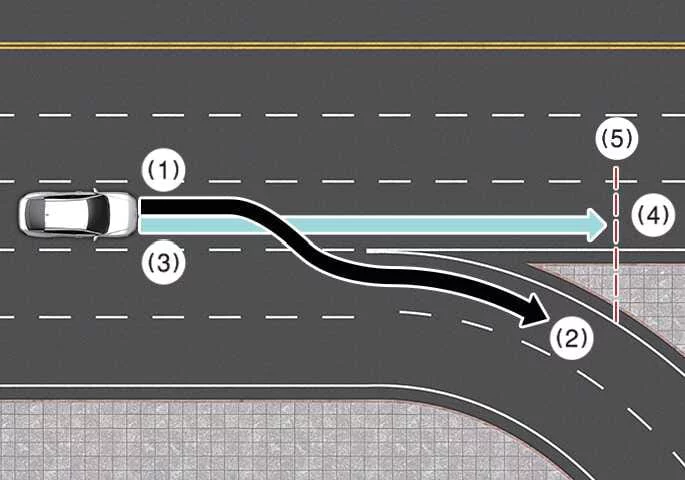
- When there is a disparity between the navigation's pre-calculated "set route" (branch line) and your actual path on the main highway, the Highway Curve Zone Auto Slowdown feature may remain inactive until the system successfully re-synchronizes and recognizes your path as the primary road.
- The Highway Curve Zone Auto Slowdown function successfully identifies the vehicle's trajectory as the main road once the driver continues along the highway instead of following the navigation's specific branching instructions. Depending on the distance from the upcoming curve and your current velocity, the Kia K4 may perform an automatic deceleration that is either more rapid than expected or, conversely, insufficient for the curve's severity. Always maintain readiness to apply manual braking if the system’s automated deceleration does not match the severity of the road ahead.
|
|
|
|
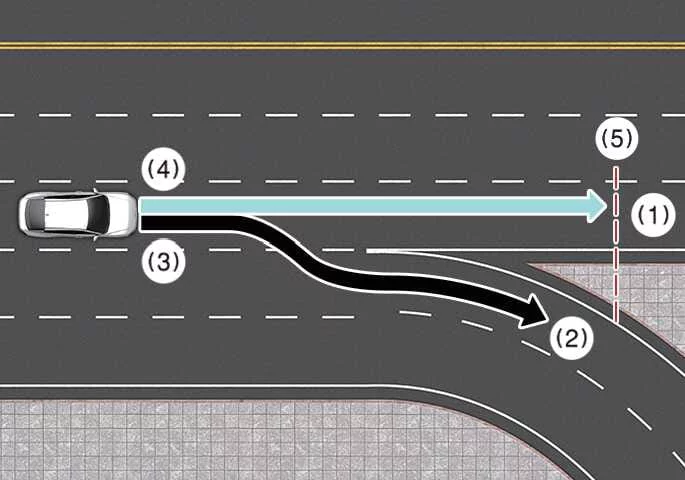
-
When the navigation system's set route (main road) and your actual driving path (branch line) differ, the Highway Curve Zone Auto Slowdown feature in your Kia K4 will temporarily operate based on the curve information of the main highway road.
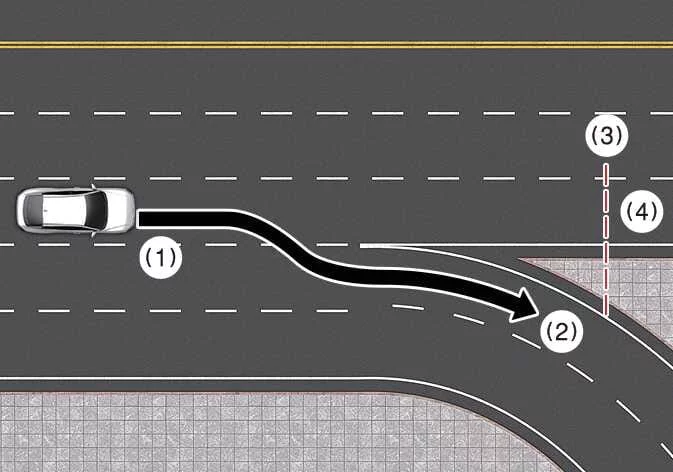
-
If the navigation system determines that you have exited the primary route by entering a highway off-ramp or junction, the Highway Curve Zone Auto Slowdown function will cease operation to ensure the driver maintains full manual control of the Kia K4.

|
|
-
If you have not specified a navigation destination, the Highway Curve Zone Auto Slowdown feature operates proactively based on the curvature data identified on the main road currently being traveled by your Kia K4.
-
Even if you depart from the designated main road, the Highway Curve Zone Auto Slowdown system may still temporarily engage based on cached navigation information regarding upcoming curved sections of the highway, providing an extra layer of assistance.
WARNING
-
Navigation-based Smart Cruise Control is intended strictly as a convenience feature and is not a substitute for active, safe driving practices. Always maintain full visual attention on the road. It remains the driver's legal responsibility to adhere to all traffic laws and regulations while operating the Kia K4.
-
Navigation-provided speed limit data may occasionally differ from posted physical speed limit signs. Always verify the current speed limit with physical road signs wherever you are driving your Kia K4.
-
The Navigation-based Smart Cruise Control system cancels automatically when the vehicle exits the highway or main road. Always remain vigilant and monitor changing road conditions closely.
-
Navigation-based Smart Cruise Control may be restricted or fail to operate based on the behavior of vehicles ahead and their specific driving conditions. Always prioritize your own assessment of the road environment over automated system responses.
-
Always keep your hands on the steering wheel and be prepared to take immediate manual control of the Kia K4 should the cruise system performance become inadequate for the traffic situation.
-
When towing a trailer, boat, or any similar heavy load, your Kia K4 will naturally have increased momentum. Consequently, the automatic deceleration provided by the cruise system may be insufficient to maintain safe spacing. Always drive with extra caution and be prepared to brake manually when towing with your Kia K4.
-
After navigating through a highway tollgate, the Navigation-based Smart Cruise Control (NSCC) operates primarily based on the first lane detected. If you choose to enter a different lane, the system may not detect the new lane’s path correctly, which might lead to improper operation of the Kia K4.
-
If you engage the accelerator pedal while the cruise system is active, your Kia K4 will accelerate, effectively overriding the automatic speed management. Note that the function will not provide automatic deceleration while you are actively pressing the pedal. Additionally, if the accelerator pedal is engaged only very lightly, the system may interpret this as a request for speed management and could unexpectedly trigger a deceleration event.
-
If you press and then quickly release the accelerator pedal while the system is operating, the Kia K4 may not decelerate sufficiently to resume the previous following distance, or conversely, it may trigger a rapid deceleration to quickly reach a safe cruising speed. Always stay alert to these transitions.
-
If a highway curve is extremely sharp or, conversely, too subtle, the NSCC system may fail to recognize the section, and the feature may not operate or initiate the expected slowdown.
-
The Navigation-based Smart Cruise Control is strictly a supplemental convenience feature and is not a replacement for active, attentive driving. It is your responsibility as the operator of the Kia K4 to constantly verify your vehicle speed and the distance from the vehicle ahead. Always drive safely and maintain a cautious mindset.
WARNING
-
There may be a slight temporal discrepancy between the navigation system's turn-by-turn guidance and the moment the Navigation-based Smart Cruise Control system initiates or concludes its speed adjustment in your Kia K4.
-
Occasionally, the speed limit information displayed on the Kia K4 instrument cluster may differ slightly from the data projected in the navigation map view; always prioritize physical signage.
-
Even if your current velocity is lower than the set cruising speed, your Kia K4 may limit further acceleration if the navigation data detects an upcoming curved road section that requires speed management.
-
If the Navigation-based Smart Cruise Control is actively operating as you exit the main highway to enter an interchange, junction, or rest area, the function may continue to operate for a short period before disengaging. Be prepared to take full manual control.
-
Automatic deceleration performed by the system may feel insufficient or delayed depending on road conditions, such as highly uneven asphalt, potholes, or narrow lane geometry. If you feel the Kia K4 is not slowing down effectively for the road environment, immediately engage the brake pedal to maintain safety.


Other information:
Kia K4 (CL4) 2025-2026 Owner's Manual: Fuel Requirements
To ensure optimal performance and longevity, your new Kia K4 is engineered to operate exclusively on high-quality unleaded fuel. It is highly recommended to use gasoline with a pump octane rating of (R+M)/2 of 87 (which corresponds to a Research Octane Number of 91) or higher. Utilizing the correct fuel grade prevents engine knocking and maintains internal components in peak condition.Kia K4 (CL4) 2025-2026 Owner's Manual: How to register Digital Key 2 (Smartphone)
The advanced Kia Digital Key 2 framework is exclusively compatible with specific, modern smartphones that feature hardware-level support for native secure element wireless protocols. This specialized digital key feature is provisioned directly through your smartphone manufacturer's proprietary native wallet infrastructure (such as Apple Wallet, Google Wallet, or Samsung Wallet).